
Nissan Murano: Action Test / I-Li
Description
-
Perform action test to verify the customer's concern.
-
Perform action test and check the system operation after system diagnosis.
WARNING:
Be careful of traffic conditions and safety around the vehicle when performing road test.
CAUTION:
-
Fully understand the following items well before the road test:
-
Precautions: Refer to Precaution for Intelligent Lane Intervention System Service
-
System description for I-LI: Refer to System Description.
-
Handling precaution: Refer to Precaution for Lane Departure Warning.
-
CHECK I-LI SYSTEM SETTING
-
Start the engine.
-
Check that the I-LI system setting can be enabled/disabled in the Nissan Murano vehicle information display.
-
Turn OFF the ignition switch and wait for 30 seconds or more.
-
Check that the previous setting is saved when the engine starts again.
>>
GO TO 2.
ACTION TEST FOR I-LI
-
Enable the setting of the I-LI system in the Nissan Murano vehicle information display.
-
Check the I-LI operation according to the following table.
Nissan Murano Vehicle condition/ Driver's operation Action Indication on the combination meter Buzzer Less than Approx. 50 km/h (30 MPH) Close to lane marker No action 
— Approx. 60 km/h (37 MPH) or more Close to lane marker Warning and yawing
-
Buzzer sounds
-
Warning lamp blinks
-
Brake control

Short continuous beeps -
Close to lane marker
-
Turn signal ON (Deviate side)
No action — Close to lane marker with soft braking Warning
-
Buzzer sounds
-
Warning lamp blinks
Short continuous beeps -
VDC OFF Switch
OFF ⇒ ON
(VDC system ON ⇒ OFF)
-
Road condition is wet
-
Lane camera temperature is high
Cancellation
-
Buzzer sounds
-
Each message is displayed
Each message is displayed Beep -
 NOTE:
NOTE:
After the operating conditions are satisfied, the control continues until the Nissan Murano vehicle speed reaches approximately 50 km/h (30 MPH).
>>
Inspection End.
 I-Da
I-Da
Description
Always perform the Intelligent Drive Alertness (I-DA) system action test to check that the system operates normally after replacing the around view monitor control unit and any Intelligent Drive Alertness (I-DA) system malfunction...

Other information:
Nissan Murano (Z52) 2015-2024 Service Manual: Select Learning
Work Procedure NOTE: If Clutch Point Learning is also required, always perform Clutch Point Learning before Select Learning. Perform Select Learning with CVT fluid temperature below 50°C (122°F) and again with fluid temperature above 50°C (122°F)...
Nissan Murano (Z52) 2015-2024 Service Manual: Component Parts. Hydraulic Pump Electric Power Steering System
Component Parts Location A. Engine room right side B. Engine room left side C. Instrument panel (view with combination meter removed) D. View with heated steering wheel removed No. Component Function 1...
Categories
- Manuals Home
- Nissan Murano Owners Manual
- Nissan Murano Service Manual
- Power Steering Fluid (PSF)
- Settings
- Intelligent Forward Collision Warning (I-FCW)
- New on site
- Most important about car
Autolight system
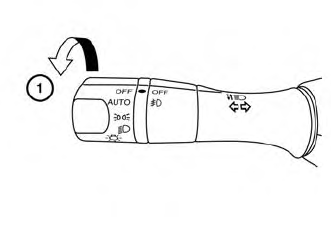
The autolight system allows the headlights to turn on and off automatically. The autolight system can:
Turn on the headlights, front parking, tail, license plate and instrument panel lights automatically when it is dark. Turn off all the lights (except daylight running lights) when it is light. Keep all the lights on for a period of time after you place the ignition switch in the OFF position and all doors are closed.