
Nissan Murano: Hood Lock / Hood Lock Release Cable
REMOVAL
Remove fender protector (LH). Refer to Removal and Installation.
Remove front grille. Refer to Removal and Installation.
Disconnect hood lock release cable from hood lock release handle and hood lock.
Release hood lock release cable clips using a suitable tool.
Remove grommet on lower dash and carefully pull hood lock release cable into passenger compartment.
CAUTION:
While pulling, be careful not to damage (peel) outside of hood lock release cable.
INSTALLATION
Installation is in the reverse order of removal.
CAUTION:
-
Be careful not to bend cable too much, keep radius 100 mm (3.94 in) or more.
-
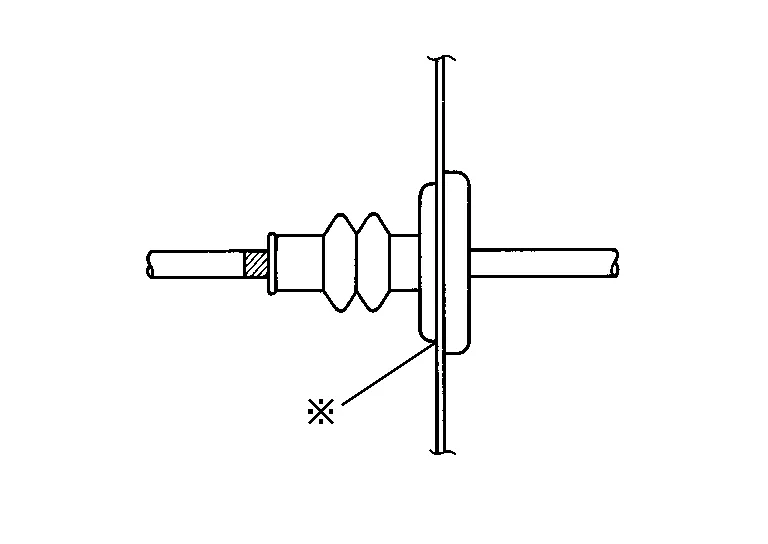
Check that cable is not offset from positioning grommet, and apply sealant to grommet (at * mark) properly.
-
Check that hood lock release cable is properly engaged with hood lock assembly.
-
After installation, perform hood assembly adjustment procedure. Refer to Adjustment.
-
After adjusting, perform hood lock inspection. Refer to Inspection.
 Secondary Latch
Removal and Installation
REMOVALRemove front grille. Refer to Removal and Installation.
Disconnect secondary latch cable from hood lock assembly.
Remove bolts and secondary latch...
 Hood Lock Release Handle
Removal and Installation
REMOVALRemove fuel filler lid/hood lock release handle bolts (A).
Disconnect fuel filler lid release cable (2) from fuel filler lid release handle (1)...
Other information:
Nissan Murano (Z52) 2015-2024 Service Manual: Body Sealing
Description The following figure shows the areas which are sealed at the factory. Sealant which has been applied to these areas should be smooth and free from cuts or gaps. Care should be taken not to apply an excess amount of sealant and not to allow other unaffected parts to come into contact with the sealant...
Nissan Murano (Z52) 2015-2024 Owners Manual: Jump starting
To start your engine with a booster battery, the instructions and precautions below must be followed. WARNING If done incorrectly, jump starting can lead to a battery explosion, resulting in severe injury or death. It could also damage your vehicle...
Categories
- Manuals Home
- Nissan Murano Owners Manual
- Nissan Murano Service Manual
- GAS STATION INFORMATION
- Turning the AEB system on/off
- Power Steering Fluid (PSF)
- New on site
- Most important about car
Autolight system

The autolight system allows the headlights to turn on and off automatically. The autolight system can:
Turn on the headlights, front parking, tail, license plate and instrument panel lights automatically when it is dark. Turn off all the lights (except daylight running lights) when it is light. Keep all the lights on for a period of time after you place the ignition switch in the OFF position and all doors are closed.