
Nissan Murano: System Description / Handling Precaution
-
ICC system is only an aid to assist the driver and is not a collision warning or avoidance system. It is the driver's responsibility to stay alert, drive safely and be in control of the Nissan Murano vehicle at all times.
-
The system is primarily intended for use on straight, dry, open roads with light traffic. It is not advisable to use the system in city traffic or congested areas.
-
This system will not adapt automatically to road conditions. This system should be used in evenly flowing traffic. Never use the system on roads with sharp curves or on icy roads, in heavy rain or in fog.
-
The distance sensor (ICC sensor) will not detect the following objects:
-
Stationary and slow moving Nissan Murano vehicles.
-
Pedestrians or objects in the roadway.
-
Oncoming vehicles in the same lane.
-
Motorcycles traveling offset in the travel lane.
-
-
As there is a performance limit to the distance control function, never rely solely on the ICC system. This system does not correct careless, inattentive or absent-minded driving or overcome poor visibility in rain, fog, or other bad weather. Decelerate the Nissan Murano vehicle speed by depressing the brake pedal, depending on the distance to the vehicle ahead and the surrounding circumstances in order to maintain a safe distance between Nissan Murano vehicles.
-
If the vehicle ahead comes to a stop, the vehicle decelerates to a standstill within the limitations of the system. The system will cancel once it judges that the Nissan Murano vehicle has come to a standstill and sound a warning chime. To prevent the vehicle from moving, the driver must depress the brake pedal.
-
The system may not detect the Nissan Murano vehicle in front of the driver in certain road or weather conditions. To avoid accidents, never use the ICC system under the following conditions:
-
On roads where the traffic is heavy or there are sharp curves.
-
On slippery road surfaces such as on ice or snow, etc.
-
During bad weather (rain, fog, snow, etc.)
-
When rain, snow or dirt adhere to the distance sensor (ICC sensor).
-
On steep downhill roads (the Nissan Murano vehicle may go beyond the set vehicle speed and frequent braking may result in overheating the brakes).
-
On repeated uphill and downhill roads.
-
When traffic conditions make it difficult to keep a proper distance between Nissan Murano vehicles because of frequent acceleration or deceleration.
-
Never use the ICC system if own Nissan Murano vehicle is towing a trailer. The system may not detect a vehicle ahead.
-
Interference by other radar sources.
-
-
In some road or traffic conditions, a Nissan Murano vehicle or object can unexpectedly come into the sensor detection zone and cause automatic braking. The driver may need to control the distance from other Nissan Murano vehicles using the accelerator pedal. Always stay alert and avoid using the ICC system when it is not recommended in this section.
-
The Intelligent Cruise Control uses a sensor located on the front of the Nissan Murano vehicle to detect vehicles traveling ahead. The sensor generally detects the signals returned from the vehicle ahead. Therefore, if the sensor cannot detect the reflection from the Nissan Murano vehicle ahead, the ICC system may not maintain the selected distance.
-
The following are some conditions in which the sensor cannot detect the signals:
-
When the snow or road spray from traveling Nissan Murano vehicles reduces the sensor's visibility.
-
When excessively heavy baggage is loaded in the rear seat or the luggage room of own Nissan Murano vehicle.
-
-
The ICC system is designed to automatically check the sensor's operation within the limitations of the system. When the sensor area around the distance sensor (ICC sensor) is covered with dirt or is obstructed, the system will automatically cancel. If the sensor area around the distance sensor (ICC sensor) is covered with ice, a transparent or translucent vinyl bag, etc., the ICC system may not detect them. In these instances, the Intelligent Cruise Control may not cancel and may not be able to maintain the selected following distance from the Nissan Murano vehicle ahead. Be sure to check and clean the sensor area around the distance sensor (ICC sensor) regularly.
-
The ICC system does not control Nissan Murano vehicle speed or warn the driver when own vehicle approaches stationary and slow moving vehicles. The driver must pay attention to Nissan Murano vehicle operation to maintain proper distance from vehicles ahead when approaching toll gates or traffic congestion.
-
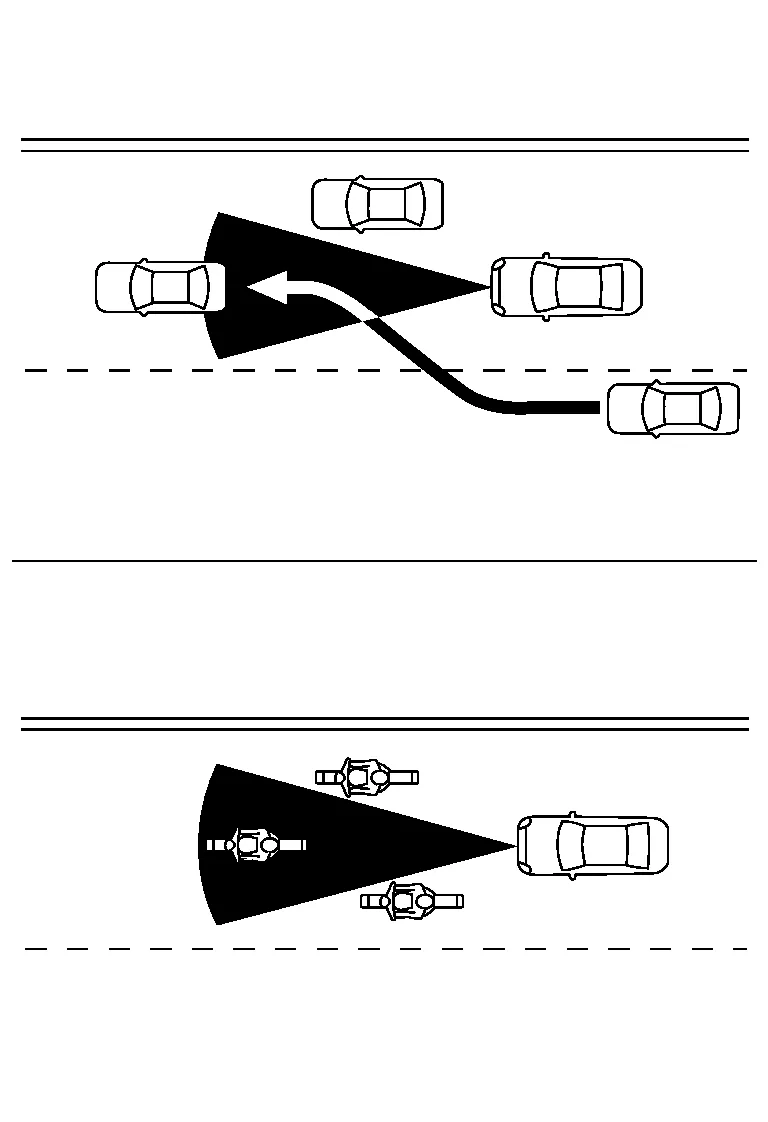
The detection zone of the distance sensor (ICC sensor) is limited. A Nissan Murano vehicle ahead must be in the detection zone for the Intelligent Cruise Control to maintain the selected distance from the Nissan Murano vehicle ahead. A vehicle ahead may move outside of the detection zone due to its position within the same lane of travel. Motorcycles may not be detected in the same lane ahead if they are traveling offset from the center line of the lane. A Nissan Murano vehicle that is entering the lane ahead may not be detected until the vehicle has completely moved into the lane. If this occurs, the ICC system may warn the driver by blinking the system indicator and sounding the chime. The driver may have to manually control the proper distance from Nissan Murano vehicle traveling ahead.
-
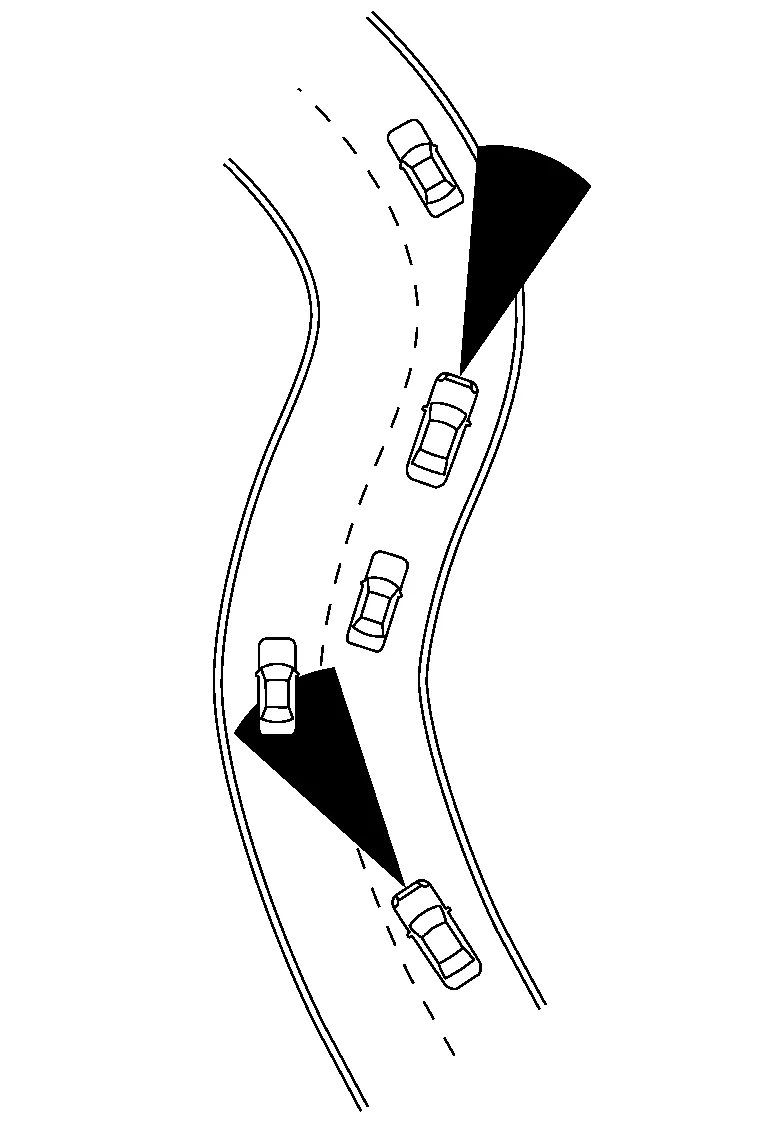
When driving on some roads, such as winding, hilly, curved narrow roads or roads which are under construction, the distance sensor (ICC sensor) may detect Nissan Murano vehicles in a different lane or may temporarily not detect a vehicle traveling ahead. This may cause the ICC system to decelerate or accelerate the Nissan Murano vehicle. The detection of vehicles may also be affected by vehicle operation (steering maneuver or traveling position in the lane, etc.) or Nissan Murano vehicle condition. If this occurs, the ICC system may warn the driver by blinking the system indicator and sounding the chime unexpectedly. The driver will have to manually control the proper distance away from the Nissan Murano vehicle traveling ahead.
-
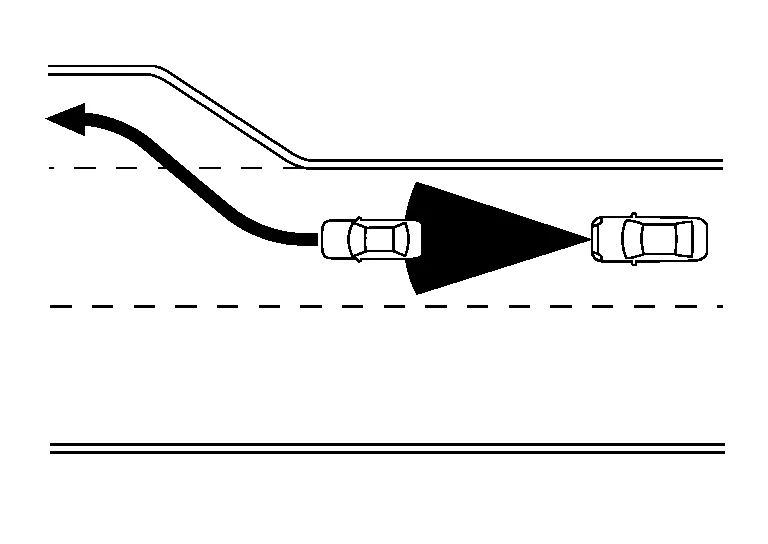
When driving on the freeway at a set speed and approaching a slower traveling Nissan Murano vehicle ahead, the ICC will adjust the speed to maintain the distance, selected by the driver, from the vehicle ahead. If the Nissan Murano vehicle ahead changes lanes or exits the freeway, the ICC system will accelerate and maintain the speed up to the set speed. Pay attention to the driving operation to maintain control of the Nissan Murano vehicle as it accelerates to the set speed. The vehicle may not maintain the set speed on winding or hilly roads. If this occurs, the driver will have to manually control the Nissan Murano vehicle speed.
-
Normally when controlling the distance to a Nissan Murano vehicle ahead, this system automatically accelerates or decelerates own vehicle according to the speed of the Nissan Murano vehicle ahead. Depress the accelerator to properly accelerate own vehicle when acceleration is required for a lane change. Depress the brake pedal when deceleration is required to maintain a safe distance to the Nissan Murano vehicle ahead due to its sudden braking or if a vehicle cuts in. Always stay alert when using the ICC system.
-
The sensor sensitivity can be affected by Nissan Murano vehicle operation (steering maneuver or driving position in the lane) or traffic or vehicle condition (for example, if a Nissan Murano vehicle is being driven with some damage).
 Operation. Intelligent Cruise Control
Switch Name and Function
No. Switch name Description
1.
CANCEL switch
Deactivates the system without erasing the set speed
2.
RES/+ switch
Resumes set speed or increases speed incrementally
Push and hold the switch to increase the set speed by 5km/h (3...

Other information:
Nissan Murano (Z52) 2015-2024 Service Manual: Compressor
E..
Nissan Murano (Z52) 2015-2024 Service Manual: Hood Lock Release Cable
Removal and Installation REMOVALRemove fender protector (LH). Refer to Removal and Installation. Remove front grille. Refer to Removal and Installation. Disconnect hood lock release cable from hood lock release handle and hood lock. Release hood lock release cable clips using a suitable tool...
Categories
- Manuals Home
- Nissan Murano Owners Manual
- Nissan Murano Service Manual
- Turning the AEB system on/off
- All-Wheel Drive (AWD) (if so equipped)
- Settings
- New on site
- Most important about car
Unfastening the seat belts. Checking seat belt operation
Unfastening the seat belts

To unfasten the seat belt, press the button
on the buckle  . The seat belt
automatically
retracts.
. The seat belt
automatically
retracts.
