
Nissan Murano: Door & Lock :: Removal and Installation / Front Fender
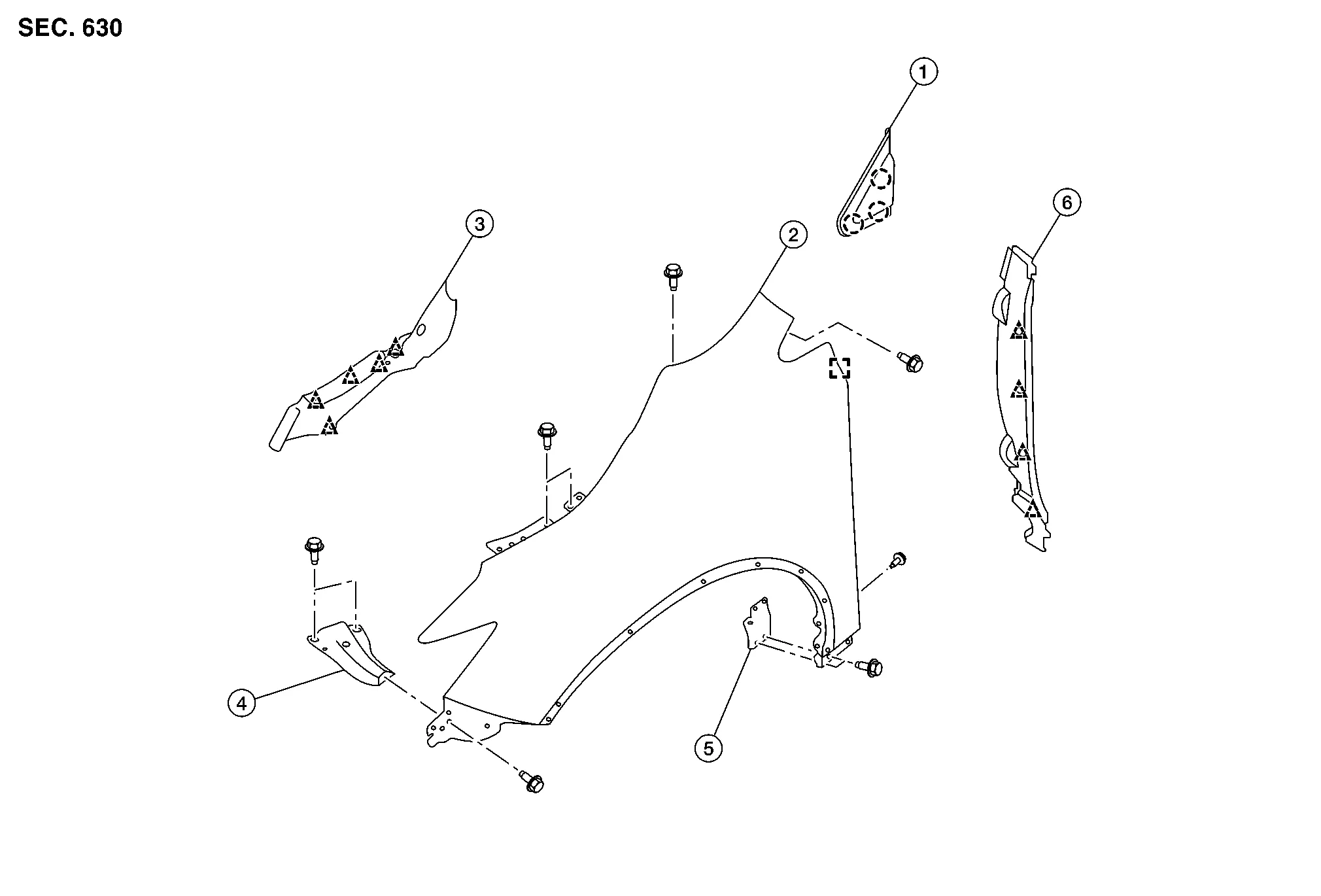
| 1. | Front fender corner finisher | 2. | Front fender | 3. | Hoodledge cover |
| 4. | Front fender front bracket | 5. | Front fender rear bracket | 6. | Front fender baffle |
 |
Pawl |  |
Clip |
CAUTION:
Use shop cloth to protect body from being damaged during removal and installation.
REMOVAL
Remove front combination lamp. Refer to Removal and Installation.
Remove hoodledge cover. Refer to Exploded View.
Remove fender corner finisher. Refer to Exploded View.
Remove front fender baffle. Refer to Exploded View.
Remove bolts and front fender.
CAUTION:
Use care when removing front fender. The front fender baffle adheres front fender to body side outer. Carefully release baffle foam or damage to front fender may occur.
Remove front fender front bracket (if necessary).
Remove front fender rear bracket (if necessary).
INSTALLATION
Installation is in the reverse order of removal.
CAUTION:
-
After installation, apply touch up paint (body color) to heads of front fender bolts.
-
After installation, adjust following components as necessary:
-
Hood assembly: Refer to Adjustment.
-
Front door: Refer to Adjustment.
-
-
Tighten bolts to specification. Refer to Exploded View.
 Radiator Core Support
Exploded View
1.
Secondary latch bracket
2.
Radiator core support
A.
Refer to Removal and Installation.
Removal and Installation
CAUTION:
When removing radiator core support upper, be careful not to damage painted surface...
 Front Door
..
Other information:
Nissan Murano (Z52) 2015-2024 Service Manual: Repairing Material
Foam Repair During factory body assembly, foam insulators are installed in certain body panels and locations around the Nissan Murano vehicle. Use the following procedure(s) to replace any factory-installed foam insulators.URETHANE FOAM APPLICATIONSUse commercially available urethane foam for sealant (foam material) repair of material used on vehicle...
Nissan Murano (Z52) 2015-2024 Service Manual: Brake Pedal
Inspection Check the brake pedal height with the floor trim removed. Check the brake pedal height (H) between the dash lower panel (2) and the brake pedal upper surface. Brake pedal height (H) from dash lower panel (2) Refer to Brake Pedal. Clearance (A) between brake pedal bracket (1), stop lamp switch (3) and brake pedal position switch (4) contact ends Refer to Brake Pedal...
Categories
- Manuals Home
- Nissan Murano Owners Manual
- Nissan Murano Service Manual
- Checking engine oil level
- Jacking up vehicle and removing the damaged tire
- Power Steering Fluid (PSF)
- New on site
- Most important about car
Seatback pockets

Theremaybe one or two seatback pockets located on the back of the driver and passenger seats. The pockets can be used to store maps.
WARNING
