
Nissan Murano: Door & Lock :: Dtc/circuit Diagnosis / B2409 Half Latch Sw
DTC DETECTION LOGIC
| DTC No. |
CONSULT screen items (Trouble diagnosis content) | DTC detecting condition | |
|---|---|---|---|
| B2409–71 |
HALF LATCH SW (Half latch switch) |
Diagnosis condition | All times |
| Signal (terminal) | Half latch switch signal (automatic back door control module connector terminal: 7) | ||
| Threshold |
When all of the following conditions are satisfied
|
||
| Diagnosis delay time | – | ||
POSSIBLE CAUSE
-
Entry of foreign materials to back door lock assembly
-
Back door mechanism
-
Half latch switch
-
Harness or connectors (half latch switch circuit is open or shorted)
-
Automatic back door control module
FAIL-SAFE
Inhibit automatic back door system auto open/close function
PERFORM DTC CONFIRMATION PROCEDURE
 CONSULT
-
Ignition switch ON.
-
Open the back door.
-
Select “Self Diagnostic Result” mode of “AUTO BACK DOOR”.
Is DTC detected?
YES>>Refer to DTC Diagnosis Procedure.
NO>>To check malfunction symptom before repair: Refer to Intermittent Incident.
NO>>Confirmation after repair: Inspection End.
CHECK FOR FOREIGN MATERIALS IN BACK DOOR LOCK ASSEMBLY
Check for entry of foreign materials in back door lock assembly.
Is the inspection result normal?
YES>>GO TO 3.
NO>>GO TO 2.
REMOVE FOREIGN MATERIALS AND ERASE DTC
CONSULT
-
Remove foreign materials.
-
Ignition switch ON.
-
Select “Self Diagnostic Result” mode of “AUTO BACK DOOR”.
-
Erase DTC, and then repeat “DTC CONFIRMATION PROCEDURE”. Refer to DTC Confirmation Procedure.
Is DTC “B2409-71” detected?
YES>>GO TO 3.
NO>>Inspection End.
CHECK BACK DOOR LOCK OPEN/CLOSE OPERATION
Manually check open and close operation of back door lock.
Is the inspection result normal?
YES>>GO TO 7.
NO>>GO TO 4.
CHECK INSTALLATION OF BACK DOOR LOCK ASSEMBLY
Check that back door lock assembly is installed normally. Refer to Removal and Installation.
Is the inspection result normal?
YES>>GO TO 6.
NO>>GO TO 5.
ADJUST OF BACK DOOR LOCK ASSEMBLY INSTALLATION AND ERASE DTC
CONSULT
-
Ignition switch OFF.
-
Adjust of back door lock assembly installation.
-
Ignition switch ON.
-
Select “Self Diagnostic Result” mode of “AUTO BACK DOOR”.
-
Erase DTC, and then repeat “DTC CONFIRMATION PROCEDURE”. Refer to DTC Confirmation Procedure.
Is DTC “B2409-71” detected?
YES>>GO TO 6.
NO>>Inspection End.
REPLACE BACK DOOR LOCK ASSEMBLY AND ERASE DTC
CONSULT
-
Ignition switch OFF.
-
Replace back door lock assembly. Refer to Removal and Installation.
-
Ignition switch ON.
-
Select “Self Diagnostic Result” mode of “AUTO BACK DOOR”.
-
Erase DTC, and then repeat “DTC CONFIRMATION PROCEDURE”. Refer to DTC Confirmation Procedure.
Is DTC “B2409-71” detected?
YES>>Replace automatic back door control module. Refer to Removal and Installation.
NO>>Inspection End.
CHECK HALF LATCH SWITCH MONITOR ITEM
CONSULT
-
Select “HALF LATCH SW” in “Data Monitor” mode of “AUTO BACK DOOR”.
-
Check that the function operates normally according to the following conditions:
| Monitor item | Condition | Status | |
|---|---|---|---|
| HALF LATCH SW | Back door | Open/fully closed | OFF |
| Half latch | ON | ||
Is the inspection result normal?
YES>>GO TO 12.
NO>>GO TO 8.
CHECK HALF LATCH SWITCH INPUT SIGNAL
-
Ignition switch OFF.
-
Disconnect back door lock assembly connector.
-
Check voltage between back door lock assembly harness connector and ground.
(+) (–) Voltage
(Approx.)Back door lock assembly Connector Terminal D557 6 Ground Battery voltage
Is the inspection result normal?
YES>>GO TO 10.
NO>>GO TO 9.
CHECK HALF LATCH SWITCH CIRCUIT
-
Disconnect automatic back door control module connector.
-
Check continuity between automatic back door control module harness connector and back door lock assembly harness connector.
Automatic back door control module Back door lock assembly Continuity Connector Terminal Connector Terminal B55 3 D557 6 Yes -
Check continuity between automatic back door control module harness connector and ground.
Automatic back door control module Ground Continuity Connector Terminal B55 3 No
Is the inspection result normal?
YES>>Replace automatic back door control module. Refer to Removal and Installation.
NO>>Repair or replace harness.
CHECK HALF LATCH SWITCH GROUND CIRCUIT
-
Disconnect back door lock assembly connector.
-
Check continuity between back door lock assembly harness connector and ground.
Back door lock assembly Ground Continuity Connector Terminal D557 8 Yes
Is the inspection result normal?
YES>>GO TO 11.
NO>>Repair or replace harness.
REPLACE BACK DOOR LOCK ASSEMBLY AND ERASE DTC
CONSULT
-
Replace back door lock assembly. Refer to Removal and Installation.
-
Ignition switch ON.
-
Select “Self Diagnostic Result” mode of “AUTO BACK DOOR”.
-
Erase DTC, and then repeat “DTC CONFIRMATION PROCEDURE”. Refer to DTC Confirmation Procedure.
Is DTC “B2409-71” detected?
YES>>Replace automatic back door control module. Refer to Removal and Installation.
NO>>Inspection End.
ERASE DTC
CONSULT
-
Select “Self Diagnostic Result” mode of “AUTO BACK DOOR”.
-
Erase DTC, and then repeat “DTC CONFIRMATION PROCEDURE”. Refer to DTC Confirmation Procedure.
Is DTC “B2409-71” detected?
YES>>GO TO 13.
NO>>Check intermittent incident. Refer to Intermittent Incident.
REPLACE BACK DOOR LOCK ASSEMBLY AND ERASE DTC
CONSULT
-
Ignition switch OFF.
-
Replace back door lock assembly. Refer to Removal and Installation.
-
Ignition switch ON.
-
Select “Self Diagnostic Result” mode of “AUTO BACK DOOR”.
-
Erase DTC, and then repeat “DTC CONFIRMATION PROCEDURE”. Refer to DTC Confirmation Procedure.
Is DTC “B2409-71” detected?
YES>>Replace automatic back door control module. Refer to Removal and Installation.
NO>>Inspection End.
 B2401 Ign Open
DTC Description
DTC DETECTION LOGIC DTC No.
CONSULT screen items
(Trouble diagnosis content) DTC detecting condition
B2401–86
IGN OPEN
(Ignition open)
Diagnosis condition
All times
Signal (terminal)
Ignition switch ON signal (CAN communication)
Threshold
When all of the following conditions are satisfied
CAN communication is normal
Automatic back door control module receives wake up signal via CAN communication with BCM
Automatic back door control module cannot detect ignition switch ON signal via CAN communication with IPDM E/R
Diagnosis delay time
–
B2401–87
IGN OPEN
(Ignition open)
Diagnosis condition
All times
Signal (terminal)
CAN communication
Threshold
When automatic back door control module can not communicate CAN communication signal
Diagnosis delay time
2 seconds
POSSIBLE CAUSE
CAN communication system
BCM
IPDM E/R
Automatic back door control module
FAIL-SAFEInhibit automatic back door system auto open/close function
DTC Confirmation Procedure
PERFORM DTC CONFIRMATION PROCEDURE
CONSULT
Ignition switch ON...
 B2416 Touch Sen R Open
DTC Description
DTC DETECTION LOGIC DTC No.
CONSULT screen items
(Trouble diagnosis content) DTC detecting condition
B2416–1B
TOUCH SEN R OPEN
(Touch sensor right open)
Diagnosis condition
All times
Signal (terminal)
Touch sensor RH signal (automatic back door control module connector terminal: 4)
Threshold
When one of the following conditions is satisfied
Touch sensor RH circuit is open
Disconnect touch sensor RH connector
Diagnosis delay time
–
B2416–1E
TOUCH SEN R OPEN
(Touch sensor right open)
Diagnosis condition
All times
Signal (terminal)
Touch sensor RH signal (automatic back door control module connector terminal: 4)
Threshold
When one of the following conditions is satisfied
Touch sensor RH circuit is open
Disconnect touch sensor RH connector
Diagnosis delay time
–
POSSIBLE CAUSE
Improper installation of touch sensor
Touch sensor RH
Harness or connectors (touch sensor circuit is open)
Automatic back door control module
FAIL-SAFEInhibit automatic back door system auto open/close function
DTC Confirmation Procedure
PERFORM DTC CONFIRMATION PROCEDURE
CONSULT
Ignition switch ON...
Other information:
Nissan Murano (Z52) 2015-2024 Owners Manual: Engine block heater (if so equipped)
Engine block heaters are used to assist with cold temperature starting. The engine block heater should be used when the outside temperature is 20°F (-7°C) or lower. WARNING Do not use your engine block heater with an ungrounded electrical system or a 2-pronged adapter...
Nissan Murano (Z52) 2015-2024 Service Manual: B1309 System on
DTC Description DTC DETECTION LOGIC DTC No. CONSULT screen terms (Trouble diagnosis content) DTC detection condition B1309–11 System ON (Amplifier ON circuit) [GND–SHOR] Diagnosis condition When ignition switch is ON. Signal (terminal) AMP ON (terminal 1) Threshold – Diagnosis delay time 30 seconds or more B1309–12 [VB–SHOR] Diagnosis condition When ignition switch is ON...
Categories
- Manuals Home
- Nissan Murano Owners Manual
- Nissan Murano Service Manual
- Warning lights
- Passenger compartment
- Intelligent Forward Collision Warning (I-FCW)
- New on site
- Most important about car
Fuel gauge
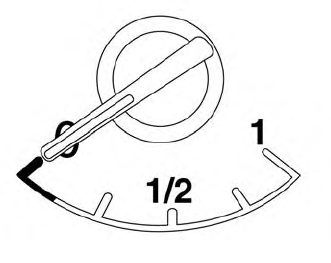
The gauge indicates the approximate fuel level in the tank.
The gauge may move slightly during braking, turning, acceleration, or going up or down hills.
The gauge needle returns to 0 (Empty) after the ignition switch is placed in the OFF position.
