
Nissan Murano: Removal and Installation / Front Camera Unit
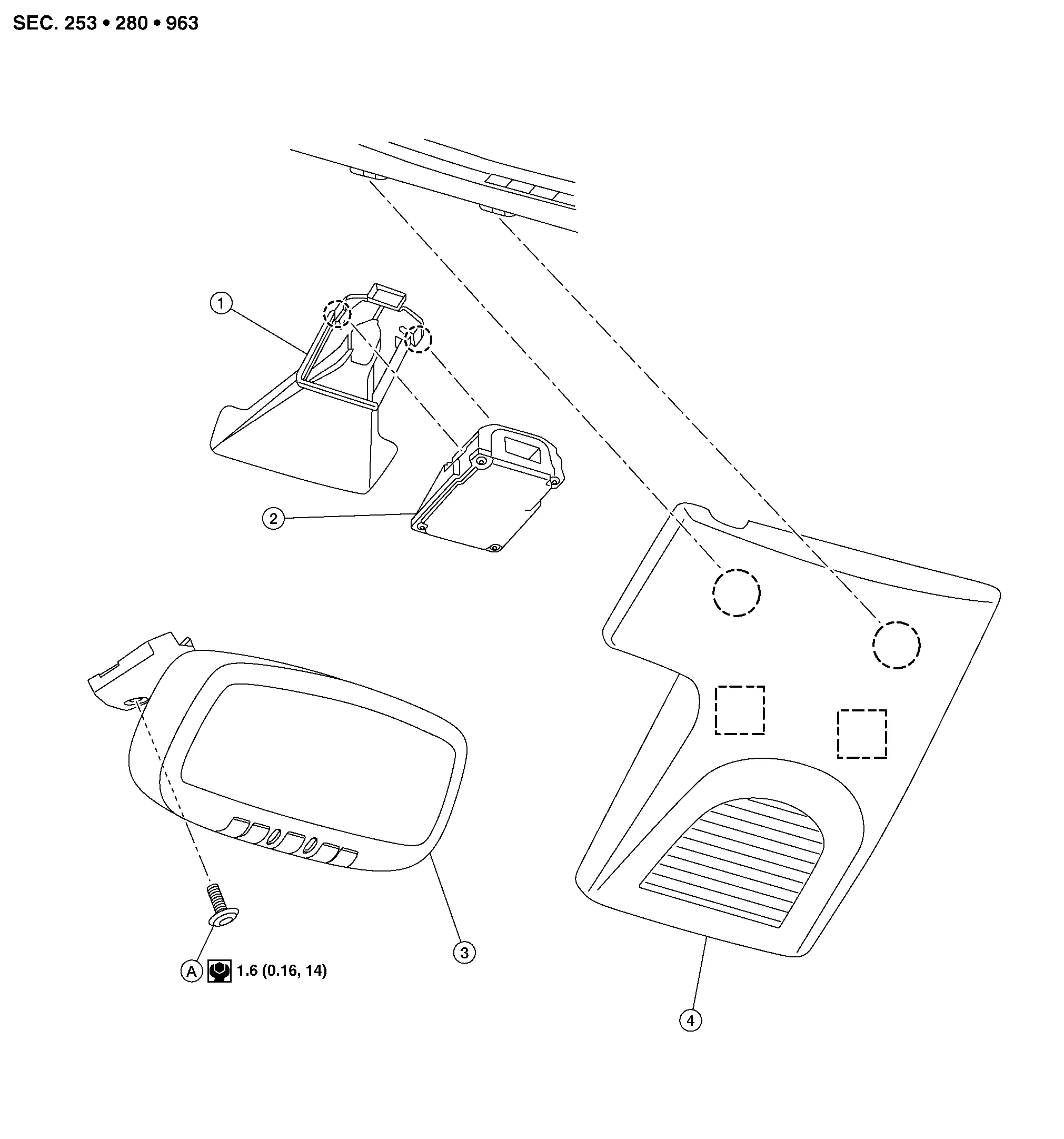
| 1. | Lane camera bracket | 2. | Lane camera unit | 3. | Inside mirror |
| 4. | Inside mirror finisher | A. | Screw |  |
Metal clip |
 |
Pawl |
REMOVAL
Release pawls and metal clips using a suitable tool and remove the inside mirror finisher.
Release pawls using a suitable tool and remove the lane camera unit from the lane camera bracket.
Disconnect the harness connector from the lane camera unit and remove the lane camera unit.
INSTALLATION
Installation is in the reverse order of removal.
CAUTION:
-
Do not touch or shock the lane camera lens area or drop the lane camera unit.
-
Make sure that the lane camera harness is not twisted after installation.
-
Align the inside mirror finisher clips with the cover bracket holes and install by hand. Do not use excessive force.
-
Perform "ADDITIONAL SERVICE WHEN REPLACING LANE CAMERA UNIT" when removing or replacing the lane camera unit. Refer to Work Procedure.
 Warning Buzzer
Removal and Installation
REMOVALRemove the glove box assembly and housing. Refer to Removal and Installation.
Disconnect harness connector (B) from the warning buzzer...
 Lane Intervention Switch
Exploded View
1.
Upper switch carrier
2.
Middle switch carrier
3.
Heated steering wheel switch (if equipped)
4.
VDC OFF switch
5.
Automatic back door switch (if equipped)
6...
Other information:
Nissan Murano (Z52) 2015-2024 Service Manual: Component Parts. Wiper and Washer System
Component Parts Location A. Cowl top (LH side) B. Behind front bumper fascia (RH) C. Back door lower finisher inside No. Component Function 1. Combination meter Transmits the Nissan Murano vehicle speed signal to BCM via CAN communication...
Nissan Murano (Z52) 2015-2024 Service Manual: Ecu Diagnosis Information. Av Control Unit
Values on the Diagnosis Tool NOTE: The following table includes information (items) inapplicable to this Nissan Murano vehicle. For information (items) applicable to this vehicle, refer to CONSULT display items. Monitor Item Condition Value/Status Sunload sensor — Off — On Parking brake Parking brake not applied...
Categories
- Manuals Home
- Nissan Murano Owners Manual
- Nissan Murano Service Manual
- Tire rotation
- System malfunction
- Rear bench seat adjustment
- New on site
- Most important about car
