
Nissan Murano: Instruments and controls / Extended storage switch
Nissan Murano (Z52) 2015-2024 Owners Manual / Instruments and controls / Extended storage switch

.gif)
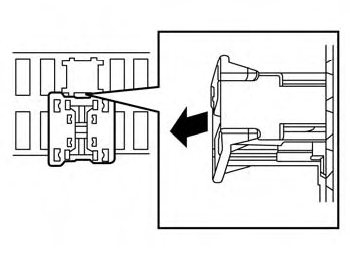
Pulled position
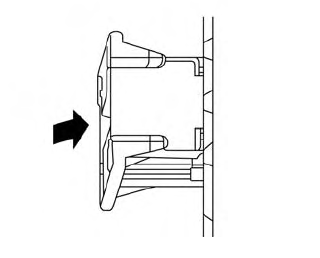
Pushed position
The extended storage switch is used when shipping the vehicle. It is located in the fuse panel to the left of the steering wheel on the instrument panel. If any electrical equipment does not operate, ensure the extended storage switch is pushed fully in place, as shown.
 Power outlets
Instrument Panel
12V OUTLETS
The power outlets are for powering electrical
accessories such as cellular telephones.
They are rated at 12 volt, 120W (10A)
maximum...
 Storage
..
Other information:
Nissan Murano (Z52) 2015-2024 Service Manual: Door Lock
Exploded View 1. Back door stay [(LH/RH) (without automatic back door)] 2. Spindle unit [(LH/RH) (with automatic back door)] 3. Back door touch sensor [(LH) (with automatic back door)] 4. Back door lock 5. Back door lock assembly (with automatic back door) 6...
Nissan Murano (Z52) 2015-2024 Service Manual: Heater & Air Conditioning System :: Service Data and Specifications (sds). Service Data and Specifications (sds)
Compressor Type Variable displacement swash plate Displacement 175 cm3 (10.7 cu in)/rev Number of cylinders 10 Cylinder bore diameter × stroke 30.5 x 24 mm (1.2 x 0.9 in) Direction of rotation Clockwise (viewed from clutch) Drive belt Poly V 7 grooves Disc to pulley clearance Standard 0...
Categories
- Manuals Home
- Nissan Murano Owners Manual
- Nissan Murano Service Manual
- Checking engine oil level
- High Beam Assist (if so equipped)
- Jacking up vehicle and removing the damaged tire
- New on site
- Most important about car
Unfastening the seat belts. Checking seat belt operation
Unfastening the seat belts
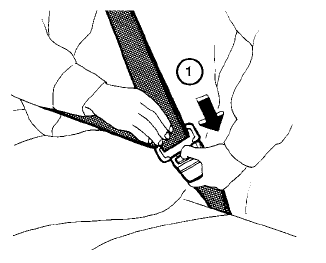
To unfasten the seat belt, press the button
on the buckle  . The seat belt
automatically
retracts.
. The seat belt
automatically
retracts.

Copyright © 2026 www.nimurano.com