
Nissan Murano: Instruments and controls / Power outlets
Nissan Murano (Z52) 2015-2024 Owners Manual / Instruments and controls / Power outlets
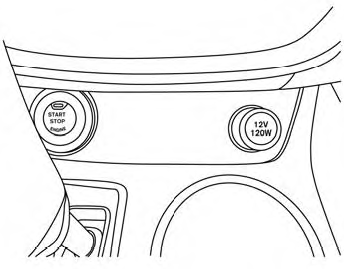
Instrument Panel
12V OUTLETS
The power outlets are for powering electrical accessories such as cellular telephones. They are rated at 12 volt, 120W (10A) maximum.
The vehicle’s power outlets are powered only when the ignition switch is in the ACC (if so equipped) or ON position.
Open the cap to use a power outlet.
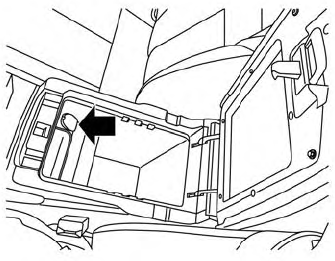
Center Console
CAUTION
- The outlet and plugmaybe hot during or immediately after use.
- Only certain power outlets are designed for use with a cigarette lighter unit. Do not use any other power outlet for an accessory lighter. It is recommended that you visit a NISSAN dealer for additional information.
- Do not use with accessories that exceed a 12 volt, 120W (10A) power draw.
Cargo Area
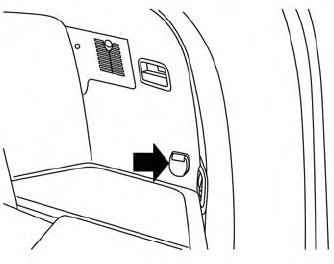
- Do not use double adapters or more than one electrical accessory.
- Use power outlets with the engine running to avoid discharging the vehicle battery.
- Avoid using power outlets when the air conditioner,headlights or rear window defroster is on.
- Before inserting or disconnecting a plug, be sure the electrical accessory being used is turned off.
- Push the plug in as far as it will go. If good contact is not made, the plug may overheat or the internal temperature fuse may open.
- When not in use, be sure to close the cap. Do not allow water or any other liquid to contact the outlet.
 Rear Door Alert
The Rear Door Alert system functions under
certain conditions to indicate there
may be an object or passenger in the rear
seat(s). Check the seat(s) before exiting the
vehicle...
 Extended storage switch
Pulled position
Pushed position
The extended storage switch is used when
shipping the vehicle. It is located in the fuse
panel to the left of the steering wheel on
the instrument panel...
Other information:
Nissan Murano (Z52) 2015-2024 Owners Manual: System malfunction
If the AEB with Pedestrian Detection system malfunctions, it will be turned off automatically, a chime will sound, the AEB with Pedestrian Detection system warning light (orange) will illuminate and the warning message [Malfunction] will appear in the vehicle information display...
Nissan Murano (Z52) 2015-2024 Service Manual: Seat Belt Warning
Seat Belt Warning Chime SYSTEM DIAGRAMWARNING OPERATION CONDITIONSFront Seat BeltsIf all of the following conditions are fulfilled: Operation conditions Ignition switch ON Nissan Murano Vehicle speed Approximately 9.3 mph (15 km/h) or more. Front seat belt buckle switch LH Unfastened (front seat belt buckle switch LH ON) Front seat belt buckle switch RH Front passenger seat is occupied, seat belt unfastened (front seat belt buckle switch RH ON)...
Categories
- Manuals Home
- Nissan Murano Owners Manual
- Nissan Murano Service Manual
- Intelligent Forward Collision Warning (I-FCW)
- Passenger compartment
- Power Steering Fluid (PSF)
- New on site
- Most important about car
Seatback pockets

Theremaybe one or two seatback pockets located on the back of the driver and passenger seats. The pockets can be used to store maps.
WARNING

Copyright © 2026 www.nimurano.com