Nissan Murano: Automatic drive positioner (if so equipped) / Entry/exit function
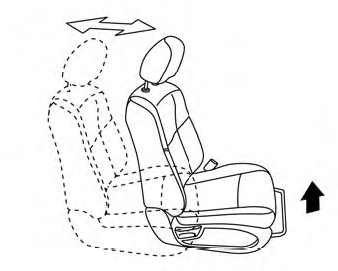
This system is designed so that the driver’s seat and steering column will automatically move when the shift lever is in the P (Park) position. This allows the driver to easily get in and out of the driver’s seat.
The driver’s seat will slide backward and the steering wheel will move up:
- When the driver’s door is opened and the ignition switch is in the OFF position.
- When the ignition switch is turned from ACC to OFF with the driver’s door open.
The driver’s seat and steering wheel will return to the previous position:
- When the ignition switch is turned to ACC or ON while the shift lever is in the P (Park) position.
The entry/exit function can be adjusted or canceled through the “Vehicle Settings” in the vehicle information display by performing the following:
- Switch the Exit Seat Slide from ON to OFF.
- Switch the Exit Steering Up from ON to OFF.
Restarting the entry/exit function
If the battery cable is disconnected or if the fuse opens, the stored memory positions may be lost and some of the functions will be restricted.
- Drive the vehicle over 25mph(40 km/h). OR
- Open and close the driver’s door more than two times with the ignition switch in the OFF position.
The entry/exit function should now work properly.
 Memory storage function (switch)
Use the following process to manually store
the two memory positions in the switch:
The vehicle should be stopped while
setting the memory.
Adjust the driver’s seat, steering columnand
outside mirrors to the desired
positions by manually operating each
adjusting switch...
 System operation
The automatic drive positioner system will
not work or will stop operating under the
following conditions:
When the vehicle speed is above 4 mph
(7 km/h)...
Other information:
Nissan Murano (Z52) 2015-2024 Service Manual: Fluid Cooler Hose
Exploded View 1. Transaxle assembly 2. Hose clamp 3. CVT fluid cooler hose A 4. Hose clip 5. CVT fluid cooler hose B 6. Connector tube 7. CVT fluid cooler hose C 8 Oil warmer A. To radiator. Refer to Exploded View...
Nissan Murano (Z52) 2015-2024 Service Manual: The System Does Not Detect the Vehicle Ahead at All
Diagnosis Procedure When ICC system is active, the ICC system does not perform any control even though there is a vehicle ahead.CHECK ICC SYSTEM DISPLAY ON INFORMATION DISPLAY Start the self-diagnosis mode of combination meter. Refer to On Board Diagnosis Function...
Categories
- Manuals Home
- Nissan Murano Owners Manual
- Nissan Murano Service Manual
- Jacking up vehicle and removing the damaged tire
- All-Wheel Drive (AWD) (if so equipped)
- Indicator lights
- New on site
- Most important about car
Front manual seat adjustment (if so equipped)
Your vehicle seats can be adjusted manually. For additional information about adjusting the seats, refer to the steps outlined in this section.
Forward and backward