
Nissan Murano: Door & Lock :: Dtc/circuit Diagnosis / Door Switch
CHECK FUNCTION
 CONSULT
-
Select “DOOR SW-DR”, “DOOR SW-AS”, “DOOR SW-RL” or “DOOR SW-RR” in “Data Monitor” mode of “BCM(DOOR LOCK)”.
-
Check that the function operates normally according to the following conditions:
| Monitor Item | Condition | Status | |
|---|---|---|---|
| DOOR SW-DR | Front door LH | Open | On |
| Closed | Off | ||
| DOOR SW-AS | Front door RH | Open | On |
| Closed | Off | ||
| DOOR SW-RL | Rear door LH | Open | On |
| Closed | Off | ||
| DOOR SW-RR | Rear door RH | Open | On |
| Closed | Off | ||
Is the inspection result normal?
YES>>Door switch is OK.
NO>>Refer to Diagnosis Procedure.
CHECK DOOR SWITCH INPUT SIGNAL
-
Ignition switch OFF.
-
Disconnect door switch connector.
-
Check signal between door switch harness connector and ground using oscilloscope.
(+) (–) Signal
(Reference value)Door switch Connector Terminal Front LH B8 3 Ground
7.0 - 8.0 V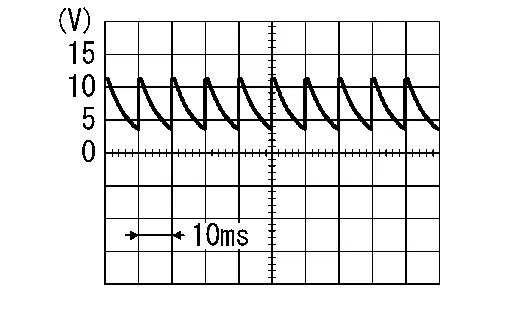
Front RH B108 Rear LH B18 Rear RH B116
Is the inspection result normal?
YES>>GO TO 3.
NO>>GO TO 2.
CHECK DOOR SWITCH CIRCUIT
-
Disconnect BCM connector.
-
Check continuity between door switch harness connector and BCM harness connector.
Door switch BCM Continuity Connector Terminal Connector Terminal Front LH B8 3 M20 96 Yes Front RH B108 94 Rear LH B18 82 Rear RH B116 93 -
Check continuity between door switch harness connector and ground.
Door switch Ground Continuity Connector Terminal Front LH B8 3 No Front RH B108 Rear LH B18 Rear RH B116
Is the inspection result normal?
YES>>Replace BCM. Refer to Removal and Installation.
NO>>Repair or replace harness.
CHECK DOOR SWITCH
Refer to Component Inspection.
Is the inspection result normal?
YES>>GO TO 4.
NO>>Replace malfunctioning door switch. Refer to Removal and Installation.
CHECK INTERMITTENT INCIDENT
Refer to Intermittent Incident.
>>
Inspection End.
CHECK DOOR SWITCH
-
Ignition switch OFF.
-
Disconnect door switch connector.
-
Check continuity between door switch terminals.
Door switch Condition Continuity Terminal 3 Ground contact is part of the switch. Door switch Pressed No Released Yes
Is the inspection result normal?
YES>>Inspection End.
NO>>Replace malfunctioning door switch. Refer to Removal and Installation.
 Power Supply and Ground Circuit. Automatic Back Door Control Module
Diagnosis Procedure
CHECK FUSIBLE LINK
Check that the following fusible link is not open:
Terminal Signal name Fusible link No. Capacity
25
Battery power supply
M
40 A
Is the fusible link open?
YES>>
Replace the open fusible link after repairing the affected circuit...
 Back Door Switch
Component Function Check
CHECK FUNCTION
CONSULT
Select “DOOR SW-BK” in “Data Monitor” mode of “BCM(DOOR LOCK)”.
Check that the function operates normally according to the following conditions:
Monitor Item Condition Status
DOOR SW-BK
Back door
Open
On
Closed
Off
Is the inspection result normal?
YES>>
Door switch is OK...
Other information:
Nissan Murano (Z52) 2015-2024 Owners Manual: Adjusting the screen
Press the MENU button. Touch the “Settings” key. Touch the “ > ” key to move to the next page. Touch the “Camera” key. Touch “Display settings” key. Touch the “Brightness,” “Contrast,” “Tint,” “Color,” or “Black Level” key...
Nissan Murano (Z52) 2015-2024 Service Manual: Structure and Operation
Positive Crankcase Ventilation (PCV) This system returns blow-by gas to the intake manifold.The positive crankcase ventilation (PCV) valve is provided to conduct crankcase blow-by gas to the intake manifold.During partial throttle operation of the engine, the intake manifold sucks the blow-by gas through the PCV valve...
Categories
- Manuals Home
- Nissan Murano Owners Manual
- Nissan Murano Service Manual
- Passenger compartment
- Jacking up vehicle and removing the damaged tire
- Power Steering Fluid (PSF)
- New on site
- Most important about car
Unfastening the seat belts. Checking seat belt operation
Unfastening the seat belts
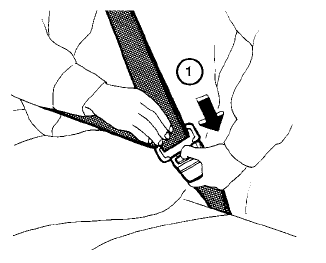
To unfasten the seat belt, press the button
on the buckle  . The seat belt
automatically
retracts.
. The seat belt
automatically
retracts.
