
Nissan Murano: Door & Lock :: Dtc/circuit Diagnosis / Power Supply and Ground Circuit. Automatic Back Door Control Module
Nissan Murano (Z52) 2015-2024 Service Manual / Body Exterior, Doors, Roof & Vehicle Security / Door & Lock :: Dtc/circuit Diagnosis / Power Supply and Ground Circuit. Automatic Back Door Control Module
CHECK FUSIBLE LINK
Check that the following fusible link is not open:
| Terminal | Signal name | Fusible link No. | Capacity |
|---|---|---|---|
| 25 | Battery power supply | M | 40 A |
Is the fusible link open?
YES>>Replace the open fusible link after repairing the affected circuit.
NO>>GO TO 2.
CHECK POWER SUPPLY CIRCUIT
-
Ignition switch OFF.
-
Disconnect automatic back door control module connector.
-
Check voltage between automatic back door control module harness connector and ground.
(+) (−) Voltage
(Approx.)Automatic back door control module Connector Terminal B56 25 Ground Battery voltage
Is the inspection result normal?
YES>>GO TO 3.
NO>>Repair or replace harness.
CHECK GROUND CIRCUIT
Check continuity between automatic back door control module harness connector and ground.
| Automatic back door control module | Ground | Continuity | |
| Connector | Terminal | ||
| B56 | 4 | Yes | |
| 10 | |||
| 32 | |||
Does continuity exist?
YES>>Inspection End.
NO>>Repair or replace harness.
 U1320 Reprogramming
DTC Description
DTC DETECTION LOGIC DTC No. CONSULT screen items (Trouble diagnosis content) DTC detecting condition
U1320–06
REPROGRAMMING
(Automatic back door reprogramming)
Diagnosis condition
All times
Signal (terminal)
–
Threshold
When the automatic back door control module configuration is not successful
Diagnosis delay time
–
U1320–42
REPROGRAMMING
(Automatic back door reprogramming)
Diagnosis condition
All times
Signal (terminal)
–
Threshold
When the automatic back door control module configuration is not successful
Diagnosis delay time
–
U1320–51
REPROGRAMMING
(Automatic back door reprogramming)
Diagnosis condition
All times
Signal (terminal)
–
Threshold
When the automatic back door control module configuration is not successful
Diagnosis delay time
–
POSSIBLE CAUSE
Improper installation of back door assembly
[CALIBRATION OF AUTOMATIC BACK DOOR POSITION INFORMATION]: not complete
Back door mechanism
Automatic back door control module
Harness or connectors
FAIL-SAFE—
DTC Confirmation Procedure
PERFORM DTC CONFIRMATION PROCEDURE
CONSULT
Ignition switch ON...
 Door Switch
Component Function Check
CHECK FUNCTION
CONSULT
Select “DOOR SW-DR”, “DOOR SW-AS”, “DOOR SW-RL” or “DOOR SW-RR” in “Data Monitor” mode of “BCM(DOOR LOCK)”...
Other information:
Nissan Murano (Z52) 2015-2024 Service Manual: Precaution. Precautions
Precaution for Supplemental Restraint System (SRS) "AIR BAG" and "SEAT BELT PRE-TENSIONER" The Supplemental Restraint System such as “AIR BAG” and “SEAT BELT PRE-TENSIONER”, used along with a front seat belt, helps to reduce the risk or severity of injury to the driver and front passenger for certain types of collisions...
Nissan Murano (Z52) 2015-2024 Service Manual: Front Suspension Assembly
Inspection COMPONENT PARTCheck the front suspension for the following: Check each component for looseness or play. Inspect each component for abnormal wear or damage. Ball Joint Axial End PlayWARNING: When moving the front tires up and down by hand, place a jack (A) at the rear floor jack lift point to stabilize the Nissan Murano vehicle or the vehicle could rock and fall off the lift resulting in serious personal injury or death...
Categories
- Manuals Home
- Nissan Murano Owners Manual
- Nissan Murano Service Manual
- System malfunction
- Intelligent Forward Collision Warning (I-FCW)
- GAS STATION INFORMATION
- New on site
- Most important about car
Autolight system
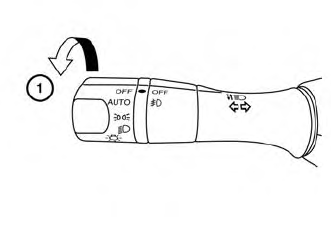
The autolight system allows the headlights to turn on and off automatically. The autolight system can:
Turn on the headlights, front parking, tail, license plate and instrument panel lights automatically when it is dark. Turn off all the lights (except daylight running lights) when it is light. Keep all the lights on for a period of time after you place the ignition switch in the OFF position and all doors are closed.
Copyright © 2026 www.nimurano.com