
Nissan Murano: Door & Lock :: Dtc/circuit Diagnosis / Back Door Switch
CHECK FUNCTION
 CONSULT
-
Select “DOOR SW-BK” in “Data Monitor” mode of “BCM(DOOR LOCK)”.
-
Check that the function operates normally according to the following conditions:
| Monitor Item | Condition | Status | |
|---|---|---|---|
| DOOR SW-BK | Back door | Open | On |
| Closed | Off | ||
Is the inspection result normal?
YES>>Door switch is OK.
NO>>Refer to Diagnosis Procedure (With Automatic Back Door)
NO>>Refer to Diagnosis Procedure (Without Automatic Back Door).
CHECK BACK DOOR SWITCH INPUT SIGNAL
-
Ignition switch OFF.
-
Disconnect back door lock assembly connector.
-
Check signal between back door lock assembly harness connector and ground using oscilloscope.
(+) (–) Signal
(Reference value)Back door lock assembly Connector Terminal D557 7 Ground
9.0 - 10.0 V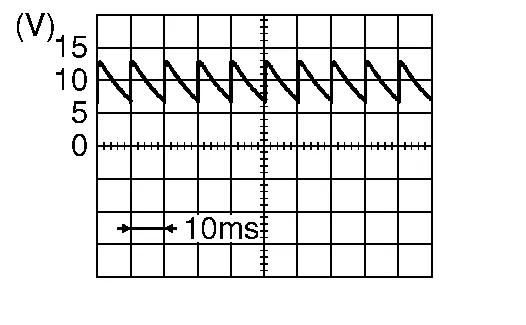
Is the inspection result normal?
YES>>GO TO 3.
NO>>GO TO 2.
CHECK BACK DOOR SWITCH CIRCUIT
-
Disconnect BCM connector.
-
Check continuity between back door lock assembly harness connector and BCM harness connector.
Back door lock assembly BCM Continuity Connector Terminal Connector Terminal D557 7 M20 97 Yes -
Check continuity between back door lock assembly harness connector and ground.
Back door lock assembly Ground Continuity Connector Terminal D557 7 No
Is the inspection result normal?
YES>>Replace BCM. Refer to Removal and Installation.
NO>>Repair or replace harness.
CHECK BACK DOOR SWITCH GROUND CIRCUIT
-
Check continuity between back door lock assembly harness connector and ground.
Back door lock assembly Ground Continuity Connector Terminal B557 8 No
Is the inspection result normal?
YES>>GO TO 4.
NO>>Repair or replace harness.
CHECK BACK DOOR SWITCH
Refer to Component Inspection (With Automatic Back Door).
Is the inspection result normal?
YES>>GO TO 5.
NO>>Replace back door lock assembly. Refer to Removal and Installation.
CHECK INTERMITTENT INCIDENT
Refer to Intermittent Incident.
>>
Inspection End.
CHECK BACK DOOR SWITCH INPUT SIGNAL
-
Ignition switch OFF.
-
Disconnect back door lock assembly connector.
-
Check signal between back door lock assembly harness connector and ground using oscilloscope.
(+) (–) Signal
(Reference value)Back door lock assembly Connector Terminal D567 3 Ground
9.0 - 10.0 V
Is the inspection result normal?
YES>>GO TO 3.
NO>>GO TO 2.
CHECK BACK DOOR SWITCH CIRCUIT
-
Disconnect BCM connector.
-
Check continuity between back door lock assembly harness connector and BCM harness connector.
Back door lock assembly BCM Continuity Connector Terminal Connector Terminal D567 3 M20 97 Yes -
Check continuity between back door lock assembly harness connector and ground.
Back door lock assembly Ground Continuity Connector Terminal D567 3 No
Is the inspection result normal?
YES>>Replace BCM. Refer to Removal and Installation.
NO>>Repair or replace harness.
CHECK BACK DOOR SWITCH GROUND CIRCUIT
Check continuity between back door lock assembly harness connector and ground.
| Back door lock assembly | Ground | Continuity | |
| Connector | Terminal | ||
| D567 | 4 | Yes | |
Is the inspection result normal?
YES>>GO TO 4.
NO>>Repair or replace harness.
CHECK BACK DOOR SWITCH
Refer to Component Inspection (Without Automatic Back Door).
Is the inspection result normal?
YES>>GO TO 5.
NO>>Replace back door lock assembly. Refer to Removal and Installation.
CHECK INTERMITTENT INCIDENT
Refer to Intermittent Incident.
>>
Inspection End.
CHECK BACK DOOR SWITCH
-
Ignition switch OFF.
-
Disconnect back door lock assembly connector.
-
Check continuity between back door lock assembly terminals.
Back door lock assembly Condition Continuity Terminal 7 8 Door switch Pressed No Released Yes
Is the inspection result normal?
YES>>Inspection End.
NO>>Replace back door lock assembly. Refer to Removal and Installation.
CHECK BACK DOOR SWITCH
-
Ignition switch OFF.
-
Disconnect back door lock assembly connector.
-
Check continuity between back door lock assembly terminals.
Back door lock assembly Condition Continuity Terminal 3 4 Door switch Pressed No Released Yes
Is the inspection result normal?
YES>>Inspection End.
NO>>Replace back door lock assembly. Refer to Removal and Installation.
 Door Switch
Component Function Check
CHECK FUNCTION
CONSULT
Select “DOOR SW-DR”, “DOOR SW-AS”, “DOOR SW-RL” or “DOOR SW-RR” in “Data Monitor” mode of “BCM(DOOR LOCK)”...
 Door Lock and Unlock Switch. Driver Side
Component Function Check
CHECK FUNCTION
CONSULT
Select “CDL LOCK SW” or “CDL UNLOCK SW” in “Data Monitor” mode of “BCM(DOOR LOCK)”...
Other information:
Nissan Murano (Z52) 2015-2024 Service Manual: Sliding Motor
Component Function Check ACTIVE TEST CONSULT Select “SEAT SLIDE” in “Active Test” mode of “AUTO DRIVE POS.”. Check that the function operates normally. Test Item Description SEAT SLIDE Off Seat sliding Stop FR Forward RR Backward Is the operation of relevant parts normal? YES>> Inspection End...
Nissan Murano (Z52) 2015-2024 Owners Manual: Turning the RAB system on/off
Perform the following steps to turn the RAB system on or off. Press the button until “Settings” displays in the vehicle information display and then press the OK button. Use the button to select “Driver Assistance.” Then press the OK button...
Categories
- Manuals Home
- Nissan Murano Owners Manual
- Nissan Murano Service Manual
- All-Wheel Drive (AWD) (if so equipped)
- Shift lock release
- Rear bench seat adjustment
- New on site
- Most important about car
Luggage hooks

When securing items using luggage hooks located on the back of the seat or side finisher do not apply a load over more than 6.5 lbs. (29 N) to a single hook.
The luggage hooks that are located on the floor should have loads less than 110 lbs. (490 N) to a single hook.
