
Nissan Murano: Basic Inspection / Diagnosis and Repair Work Flow
 NOTE:
NOTE:
“DTC” includes DTC at the 1st trip.
OBTAIN INFORMATION ABOUT SYMPTOM
Refer to Diagnostic Work Sheet and interview the customer to obtain the malfunction information (conditions and environment when the malfunction occurred) as much as possible when the customer brings in the Nissan Murano vehicle.
>>
GO TO 2.
CHECK DTC
-
Before checking the malfunction, check whether any DTC exists.
-
If DTC exists, perform the following operations.
-
Records the DTCs. (Print out using CONSULT and affix to the Work Order Sheet.)
-
Erase DTCs.
-
Check the relation between the cause found by DTC and the malfunction information from customer. Symptom Table can be used effectively.
-
Do malfunction information and DTC exist?
Malfunction information and DTC exist.>>GO TO 3.
Malfunction information exists but no DTC.>>GO TO 4.
NO>>GO TO 5.
REPRODUCE MALFUCTION SYSTEM
Check the malfunction described by the customer on the Nissan Murano vehicle.
Check if the behavior is fail safe or normal operation. Refer to Fail-safe.
Interview sheet can be used effectively when reproduce malfunction conditions. Refer to Diagnostic Work Sheet.
Verify the relationship between the symptom and the conditions in which the malfunction described by the customer occurs.
>>
GO TO 5.
REPRODUCE MALFUNCTION SYMPTOM
Check the malfunction described by the customer on the Nissan Murano vehicle.
Check if the behavior is fail safe or normal operation. Refer to Fail-safe.
Interview sheet can be used effectively when reproduce malfunction conditions. Refer to Diagnostic Work Sheet.
Verify the relationship between the symptom and the conditions in which the malfunction described by the customer occurs.
>>
GO TO 6.
PERFORM “DTC CONFIRMATION PROCEDURE”
Perform “DTC CONFIRMATION PROCEDURE” of the appropriate DTC to check if DTC is detected again.
Refer to DTC Inspection Priority Chart when multiple DTCs are detected, and then determine the order for performing the diagnosis.
Is any DTC detected?
YES>>GO TO 7.
NO>>Follow Intermittent Incident to check.
IDENTIFY MALFUNCTIONING SYSTEM WITH “DIAGNOSIS CHART BY SYMPTOM”
Use Symptom Table from the symptom inspection result in step 4. Then identify where to start performing the diagnosis based on possible causes and symptoms.
>>
GO TO 8.
REPAIR OR REPLACE THE MALFUNCTIONING PARTS
Repair or replace the detected malfunctioning parts.
Reconnect parts or connector after repairing or replacing, and then erase DTC if necessary.
>>
GO TO 8.
FINAL CHECK
Perform “DTC CONFIRMATION PROCEDURE” again to make sure that the repair is correctly performed.
Check that malfunctions are not reproduced when obtaining the malfunction information from the customer, referring to the symptom inspection result in step 3 or 4.
Is DTC or malfunction symptom reproduced?
YES-1>>DTC is reproduced: GO TO 5.
YES-2>>Malfunction is reproduced: GO TO 6.
NO>>Before delivering the Nissan Murano vehicle to the customer, make sure that DTC is erased.
DESCRIPTION
There are many operating conditions that may cause a malfunction of the transmission parts. By understanding those conditions properly, a quick and exact diagnosis can be achieved.
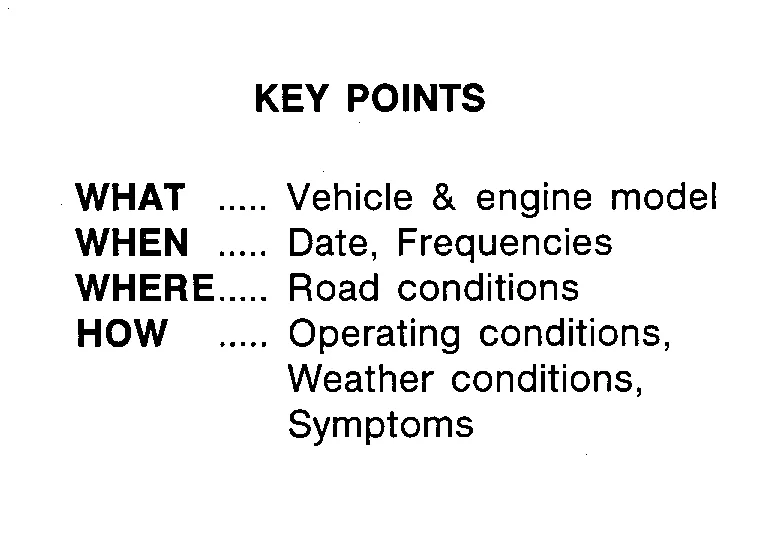
In general, perception of a problem varies depending on individuals. Ask the customer about his/her concerns carefully. It is important to understand the phenomenon or status. To systemize all the information for the diagnosis, prepare the question sheet referring to the question points.
In some cases, multiple conditions that appear simultaneously may cause a DTC to be detected.
Worksheet Sample
| Question sheet | |||||
|---|---|---|---|---|---|
| Customer's name | MR/MS | Registration number | Initial year registration |
Year Month day | |
| Nissan Murano Vehicle type | Chassis No. | ||||
| Storage date |
Year Month day | Engine | Mileage | km/mile | |
| Symptom | □ Nissan Murano Vehicle does not start. (□ R position □ D position □ L position) | ||||
| □ Upshifting does not occur. □ Downshifting does not occur. | |||||
| □ Lock-up malfunction | |||||
| □ Shift point is too high. □ Shift point is too low. | |||||
| □ Shift shock (□ N⇒D □ Lock-up □ R, D, and L position) | |||||
| □ Slip (□ N⇒D □ Lock-up □ R, D, and L position) | |||||
| □ Noise □ Vibration | |||||
| When selector lever position is shifted, shift pattern does not change. | |||||
|
□ Other ( ) |
|||||
| First occurrence | □ Recently (as from month of year ) | ||||
| Frequency of occurrence | □ Always □ Under certain conditions □ Sometimes ( time(s)/day) | ||||
| Climate conditions | Irrelevant | ||||
| Weather | □ Clear □ Cloud □ Rain □ Snow □ Others ) | ||||
| Temperature | □ Hot □ Warm □ Cool □ Cold □ Temperature (Approx. °C/°F) | ||||
| Relative humidity | □ High □ Moderate □ Low | ||||
| Transaxle condition |
□ In cold-start □ During warm-up (approx. °C/°F) □ After warm-up □Engine speed: rpm |
||||
| Road conditions |
□ Urban area □ Suburb area □ Highway □ Mountainous road (uphill or downhill) |
||||
| Operating condition, etc. |
Irrelevant □ When engine starts □ During idling □ During driving □ During acceleration □ At constant speed driving □ During deceleration □ During cornering (RH curve or LH curve) |
||||
| Other conditions | |||||

 Additional Service When Replacing Tcm
Description
Always perform the following items when the TCM is replaced. For work procedure, refer to Work Procedure.TCM PROGRAMMING
Since vehicle specifications are not yet written in a new TCM, it is necessary to write them with CONSULT...
Other information:
Nissan Murano (Z52) 2015-2024 Service Manual: Easy Fill Tire Alert Does Not Activate
Diagnosis Procedure The Easy Fill tire alert does not function while inflating a tire when the select lever position is in P-range with the ignition switch is placed ON.NOTE: After starting to inflate the tire, it takes a few seconds for the easy fill tire alert to function...
Nissan Murano (Z52) 2015-2024 Service Manual: P2758 Tcc Pressure Control Solenoid
DTC Description DTC DETECTION LOGIC DTC CONSULT screen terms (Trouble diagnosis content) DTC detection condition P2758 TCC PRESSURE CONT SOLENOID (Torque Converter Clutch Pressure Control Solenoid Control Circuit Stuck On) Diagnosis condition When all of the following conditions are satisfied: TCM power supply voltage: More than 11 V Lockup value learning is completed (After ignition switch ON) Signal — Threshold Coast capacity learning value: Less than –0...
Categories
- Manuals Home
- Nissan Murano Owners Manual
- Nissan Murano Service Manual
- Settings
- Turning the AEB system on/off
- Intelligent Forward Collision Warning (I-FCW)
- New on site
- Most important about car
Vehicle security system

Your vehicle has two types of security systems:
Vehicle security system NISSAN Vehicle Immobilizer SystemThe vehicle security system provides visual and audible alarm signals if someone opens the doors, liftgate or the hood when the system is armed. It is not, however, a motion detection type system that activates when a vehicle is moved or when a vibration occurs.
