
Nissan Murano: Instrument Panel :: Removal and Installation / Cluster Lid a
REMOVAL
Remove instrument lower panel LH. Refer to Removal and Installation.
Using a suitable tool, release pawls and remove gap hider (1) from steering column upper cover (2).
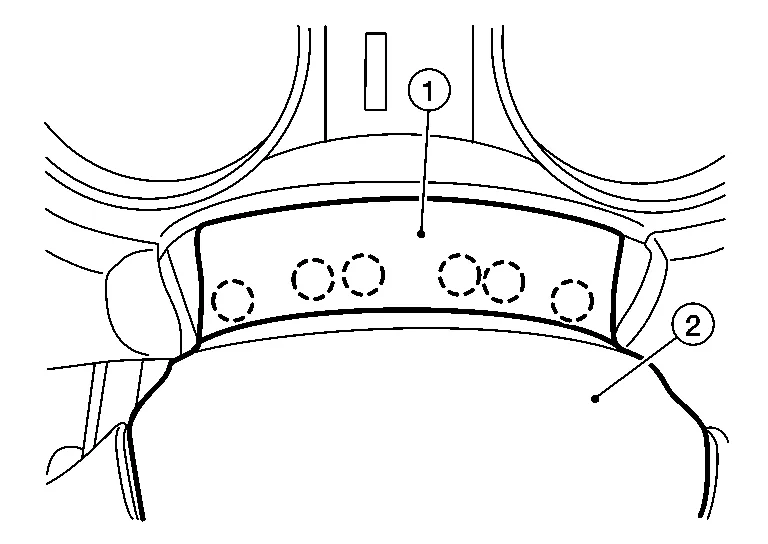
 : Pawl
Using a suitable tool, release clips and remove cluster lid A (1).
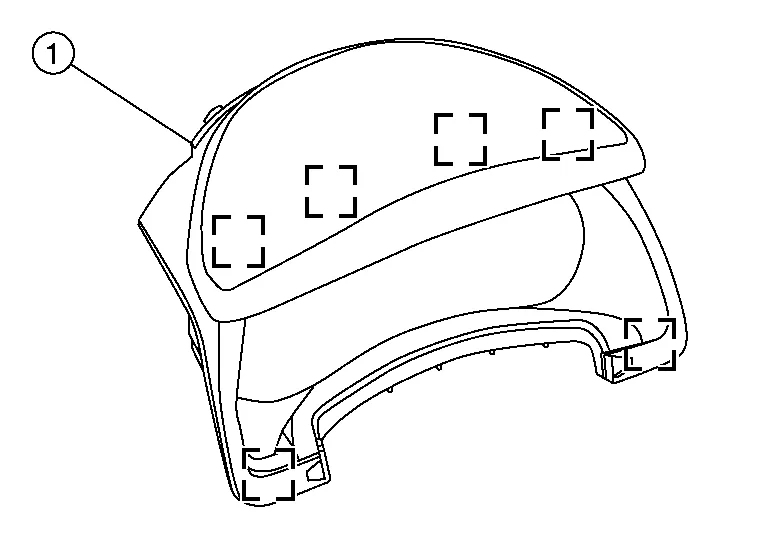
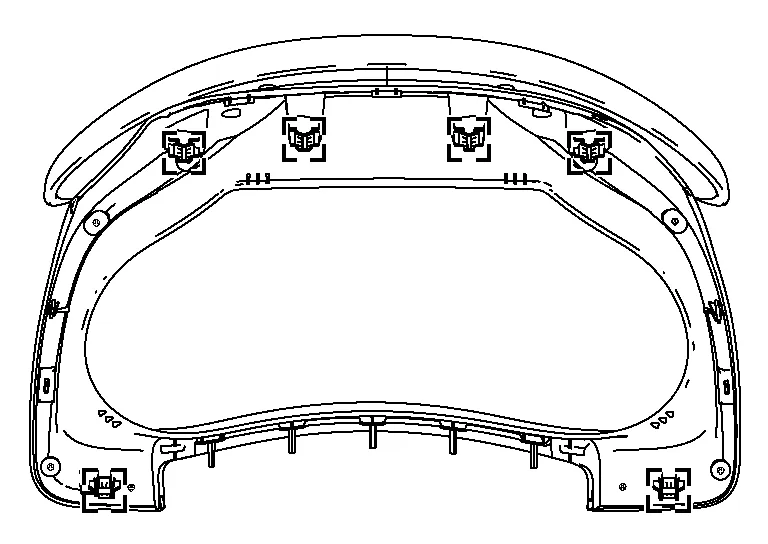
CAUTION:
Do not push or pull upward on the upper portion of cluster lid A or damage may occur.
 NOTE:
NOTE:
Cluster lid A shown removed for clarity.
 : Metal clip
INSTALLATION
Installation is in the reverse order of removal.
 Center Console Assembly
Exploded View
1.
Center console side finisher (RH)
2.
Center console side finisher (LH)
3.
Center console lower side finisher (LH)
4.
Center console reinforcement bracket
5...
 Cluster Lid C
Component Parts Location
1.
Audio unit or AV control unit
2.
Cluster lid D
3.
A/C switch assembly
4.
Cluster lid C
Removal and Installation
REMOVALApply the parking brake...
Other information:
Nissan Murano (Z52) 2015-2024 Service Manual: Both Doors Mirror Defogger Dont Operate but Rear Window Defogger Operates
Diagnosis Procedure CHECK DOOR MIRROR DEFOGGER FUSE Check if the following fuse in fuse block (J/B) is blown: Component Fuse No. Capacity Fuse block (J/B) 22 10 A Is the inspection result normal? YES>> GO TO 2. NO>> Replace the blown fuse after repairing the affected circuit...
Nissan Murano (Z52) 2015-2024 Service Manual: P1572 Icc Brake Switch
DTC Description DTC DETECTION LOGICNOTE: This self-diagnosis has the one trip detection logic. When malfunction A is detected, DTC is not stored in ECM memory. And in that case, 1st trip DTC and 1st trip freeze frame data are displayed. 1st trip DTC is erased when ignition switch OFF...
Categories
- Manuals Home
- Nissan Murano Owners Manual
- Nissan Murano Service Manual
- Indicator lights
- Shift lock release
- Turning the AEB system on/off
- New on site
- Most important about car
Unfastening the seat belts. Checking seat belt operation
Unfastening the seat belts

To unfasten the seat belt, press the button
on the buckle  . The seat belt
automatically
retracts.
. The seat belt
automatically
retracts.

Copyright © 2026 www.nimurano.com