
Nissan Murano: Dtc/circuit Diagnosis / B1339 Rear Camera Connection
DTC DETECTION LOGIC
| DTC No. |
CONSULT screen terms (Trouble diagnosis content) | DTC detection condition | ||
|---|---|---|---|---|
| B1339-8F |
Rear camera connection (Rear view camera connection) |
[–] | Diagnosis condition | When ignition switch is ON. |
| Signal (terminal) | Camera image signal circuit (terminal 49) | |||
| Threshold | – | |||
| Diagnosis delay time | 30 seconds or more | |||
POSSIBLE CAUSE
-
Camera image signal circuit
-
Rear view camera
-
Audio unit
FAIL-SAFE
Rear view camera is inoperative.
PERFORM DTC CONFIRMATION PROCEDURE
 CONSULT
-
Ignition switch ON.
-
Ignition switch OFF and wait at least 30 seconds.
-
Ignition switch ON and wait at least 30 seconds or more.
-
Select “Self Diagnostic Result” mode of “MULTI AV”.
-
Check DTC.
Is DTC B1339–8F detected?
YES>>Proceed to DTC Diagnosis Procedure.
NO>>To check malfunction symptom before repair: Refer to Intermittent Incident.
NO>>Confirmation after repair: Inspection End.
CHECK CAMERA IMAGE SIGNAL CIRCUIT FOR OPEN
-
Ignition switch OFF.
-
Disconnect audio unit connector and rear view camera connector.
-
Check the continuity between audio unit connector and rear view camera connector.
Audio unit Rear view camera Continuity Connector Terminal Connector Terminal M122 49 D568 4 Yes
Is the inspection result normal?
YES>>GO TO 2.
NO>>Repair harness or connector.
CHECK CAMERA IMAGE SIGNAL CIRCUIT FOR SHORT
Check the continuity between audio unit connector and ground.
| (+) | (−) | Continuity | |
|---|---|---|---|
| Audio unit | |||
| Connector | Terminal | ||
| M122 | 49 | Ground | No |
Is the inspection result normal?
YES>>GO TO 3.
NO>>Repair harness or connector.
CHECK CAMERA IMAGE SIGNAL
-
Connect audio unit connector and rear view camera connector.
-
Ignition switch ON.
-
Shift the selector lever to “R” position
-
Check the signal between audio unit connector and ground.
Audio unit ( - ) Condition Reference value ( + ) Connector Terminal M122 49 Ground Camera image is displayed 
Is the inspection result normal?
YES>>Replace audio unit. Refer to Removal and Installation.
NO>>Replace rear view camera. Refer to Removal and Installation.
 B132a External Usb
DTC Description
DTC DETECTION LOGIC DTC No.
CONSULT screen terms
(Trouble diagnosis content) DTC detection condition
B132A–13
External USB
(USB)
[OPEN]
Diagnosis condition
When ignition switch is ON...
 B1341 Head Unit
DTC Description
DTC DETECTION LOGIC DTC No.
CONSULT screen terms
(Trouble diagnosis content) DTC detection condition
B1341–16
Head unit
(Audio unit)
[VB–LOW]
Diagnosis condition
When ignition switch is ON...
Other information:
Nissan Murano (Z52) 2015-2024 Service Manual: Front Fog Lamp Circuit
Component Function Check CHECK FRONT FOG LAMP OPERATION CONSULT Select “EXTERNAL LAMPS” in “Active Test” mode of “IPDM E/R”. While operating the test items, check that the front fog lamp is turned ON. Fog : Front fog lamp ON Off : Front fog lamp OFF Is the inspection result normal? YES>> Front fog lamp circuit is normal...
Nissan Murano (Z52) 2015-2024 Service Manual: U1010 Control Unit(can)
DTC Description DESCRIPTIONAir bag diagnosis sensor unit performs self-tests at ignition switch ON. If CAN communication failure within control unit is detected, DTC is set.DTC DETECTION LOGIC DTC No. CONSULT screen items (Trouble diagnosis content) DTC detecting condition U1010-49 CONTROL UNIT(CAN) Diagnosis condition When ignition switch is ON...
Categories
- Manuals Home
- Nissan Murano Owners Manual
- Nissan Murano Service Manual
- Rear bench seat adjustment
- Jacking up vehicle and removing the damaged tire
- Checking engine oil level
- New on site
- Most important about car
Fuel gauge
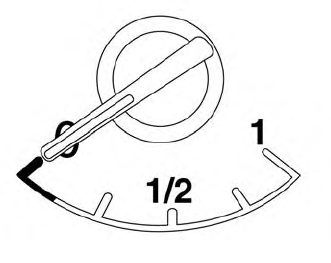
The gauge indicates the approximate fuel level in the tank.
The gauge may move slightly during braking, turning, acceleration, or going up or down hills.
The gauge needle returns to 0 (Empty) after the ignition switch is placed in the OFF position.
