
Nissan Murano: Dtc/circuit Diagnosis / B1310 Tcu Temperature Error
DTC DETECTION LOGIC
| DTC No. |
CONSULT screen terms (Trouble diagnosis content) | DTC detection condition | |
|---|---|---|---|
| B1310 |
TCU TEMPERATURE ERROR (TCU temperature error) |
Diagnosis condition | When ignition switch is ON. |
| Signal (terminal) | — | ||
| Threshold | TCU internal temperature is high | ||
| Diagnosis delay time | 1 second or more | ||
POSSIBLE CAUSE
-
TCU internal temperature is high
-
TCU
FAIL-SAFE
Telematics system function stops
PERFORM DTC CONFIRMATION PROCEDURE
 CONSULT
-
Ignition switch ON.
-
Erase DTC.
-
Select “Self Diagnostic Result” mode of “TELEMATICS”.
-
Check DTC.
Is DTC B1310 detected?
YES>>Proceed to DTC Diagnosis Procedure.
NO>>To check malfunction symptom before repair: Refer to Intermittent Incident.
NO>>Confirmation after repair: Inspection End.
CHECK AROUND TCU
Check whether there is any factor which causes a temperature rise near TCU.
Was there any factor?
YES>>Remove the factor.
NO>>GO TO 2.
PERFORM DTC CONFIRMATION PROCEDURE AGAIN
Perform DTC confirmation procedure again. Refer to DTC Description.
Is DTC B1310 detected again?
YES>>Replace TCU. Refer to Removal and Installation.
NO>>Inspection End.
 B130d Tel Line Out Error
DTC Description
DTC DETECTION LOGIC DTC No.
CONSULT screen terms
(Trouble diagnosis content) DTC detection condition
B130D
TEL LINE OUT ERROR
(Telephone line out error)
Diagnosis condition
When ignition switch is ON...
 B13d9 Usb Connection
DTC Description
DTC DETECTION LOGIC DTC No.
CONSULT screen terms
(Trouble diagnosis content) DTC detection condition
B13D9
USB CONNECTION
(USB connection)
Diagnosis condition
When ignition switch is ON...
Other information:
Nissan Murano (Z52) 2015-2024 Service Manual: Luggage Room Lamp
Removal and Installation REMOVALRelease luggage room lamp (1) pawl using a suitable tool. : Pawl Disconnect the harness connector from the luggage room lamp and remove.INSTALLATIONInstallation is in the reverse order of removal. Bulb or Lens Replacement WARNING: Do not touch glass surface of a bulb while it is lit or right after being turned OFF to prevent burns...
Nissan Murano (Z52) 2015-2024 Service Manual: C1601 Battery Volt
DTC Description DTC DETECTION LOGIC DTC No. CONSULT screen terms (Trouble diagnosis content) DTC detection condition C1601 BATTERY VOLT (Battery voltage) Diagnosis condition When ignition switch ON. Signal (terminal) Power steering control module supply voltage (terminals 1 and 5) Threshold Less than 8 V or more than 19 V Diagnosis delay time Less than 1 second POSSIBLE CAUSE Harness or connectors Power steering control module Fuse Battery power supply circuit Battery FAIL-SAFEManual steering state DTC Confirmation Procedure PRECONDITIONING If “DTC CONFIRMATION PROCEDURE” has been previously conducted, always place the ignition switch in the OFF position and wait at least 10 seconds before conducting the next test...
Categories
- Manuals Home
- Nissan Murano Owners Manual
- Nissan Murano Service Manual
- Fuel recommendation
- Tire rotation
- Shift lock release
- New on site
- Most important about car
Unfastening the seat belts. Checking seat belt operation
Unfastening the seat belts
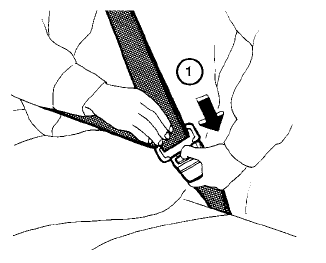
To unfasten the seat belt, press the button
on the buckle  . The seat belt
automatically
retracts.
. The seat belt
automatically
retracts.
