
Nissan Murano: Symptom Diagnosis / Awd High Temp Is Displayed on Information Display
Nissan Murano (Z52) 2015-2024 Service Manual / Transmission & Driveline / Driveline :: Transfer: Ty21c / Symptom Diagnosis / Awd High Temp Is Displayed on Information Display
While driving, AWD warning icon/display (AWD High Temp. Stop vehicle) is displayed on information display and it turns OFF after 1 minute.
-
This symptom protects drivetrain parts when a heavy load is applied to the electric controlled coupling and multiple disc clutch temperature increases. Also, optional distribution of torque sometimes becomes rigid before icon/display is displayed. Both cases are not malfunction. Refer to Protection Function.
-
When this symptom occurs, stop Nissan Murano vehicle and allow it to idle for some times. Displays will stop and system will be restored.
 Vehicle Does Not Enter Awd Mode
Diagnosis Procedure
Vehicle does not enter 4-wheel drive mode even though AWD warning icon/display is not displayed.CHECK AWD WARNING ICON/DISPLAY
Perform the trouble diagnosis of the AWD warning icon/display...
 Tire Size Incorrect Is Displayed on Information Display
Diagnosis Procedure
While driving, AWD warning icon/display (Tire Size Incorrect: See Owner′s Manual) is displayed on information display.CHECK TIRE
Check the following:
Tire pressure
Wear condition
Front and rear tire size (There is no difference between front and rear tires...
Other information:
Nissan Murano (Z52) 2015-2024 Owners Manual: System maintenance
Observe the following items to ensure proper operation of the system: Always keep the parking sensors clean. If the parking sensors are dirty, wipe them off with a soft cloth while being careful to not damage them. Do not subject the area around the parking sensors to strong impact...
Nissan Murano (Z52) 2015-2024 Service Manual: Variable Induction Air System
Component Function Check CHECK OVERALL FUNCTION-I With CONSULT Start engine and warm it up to the normal operating temperature. Perform “VIAS S/V-1” in “ACTIVE TEST” mode with CONSULT. Turn VIAS control solenoid valve 1 “ON” and “OFF”, and check that power valve actuator 1 rod moves...
Categories
- Manuals Home
- Nissan Murano Owners Manual
- Nissan Murano Service Manual
- Fuel recommendation
- Passenger compartment
- All-Wheel Drive (AWD) (if so equipped)
- New on site
- Most important about car
Seatback pockets
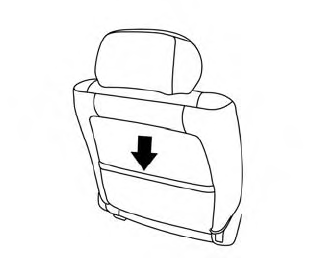
Theremaybe one or two seatback pockets located on the back of the driver and passenger seats. The pockets can be used to store maps.
WARNING

Copyright © 2026 www.nimurano.com