
Nissan Murano: Automatic Back Door Operation Does Not Operate / All Switches
Automatic back door open/close function does not operate using all switches.
 NOTE:
Automatic back door open/close operation condition is extremely complicated. During operating confirmations, reconfirm the list above twice in order to ensure proper operation. Refer to System Description.
CHECK DTC WITH AUTOMATIC BACK DOOR CONTROL MODULE
Check that DTC is not detected with automatic back door control module.
Is the inspection result normal?
YES>>GO TO 2.
NO>>Perform trouble diagnosis relevant to DTC indicated.
CHECK BACK DOOR AUTO CLOSURE FUNCTION
Check back door auto closure function.
Is the inspection result normal?
YES>>GO TO 3.
NO>>Refer to Diagnosis Procedure.
CHECK POWER SUPPLY AND GROUND CIRCUIT
Check automatic back door control module power supply and ground circuit.
Refer to Diagnosis Procedure.
Is the inspection result normal?
YES>>GO TO 4.
NO>>Repair or replace the malfunctioning parts.
CHECK GROUND CIRCUIT
Check automatic back door control module ground circuit.
Refer to Diagnosis Procedure.
Is the inspection result normal?
YES>>GO TO 5.
NO>>Repair or replace the malfunctioning parts.
CHECK TOUCH SENSOR LH
Check touch sensor LH.
Refer to Component Inspection.
Is the inspection result normal?
YES>>GO TO 6.
NO>>Repair or replace the malfunctioning parts.
CHECK TOUCH SENSOR RH
Check touch sensor RH.
Refer to Component Inspection.
Is the inspection result normal?
YES>>GO TO 7.
NO>>Repair or replace the malfunctioning parts.
REPLACE AUTOMATIC BACK DOOR CONTROL MODULE
-
Replace automatic back door control module. Refer to Removal and Installation.
-
Confirm the operation after replacement.
Is the result normal?
YES>>Inspection End.
NO>>Check intermittent incident. Refer to Intermittent Incident.

 Automatic Back Door Switch
Diagnosis Procedure
Automatic back door open/close function does not operate using automatic back door switch.NOTE:
Automatic back door open/close operation condition is extremely complicated...
Other information:
Nissan Murano (Z52) 2015-2024 Owners Manual: Warning and indicator lights
..
Nissan Murano (Z52) 2015-2024 Service Manual: Engine Can Not Start
Diagnosis Procedure Engine does not start when ignition switch is pressed.SYMPTOM TABLE (BOTH INTELLIGENT KEYS HAVE THE SAME SYMPTOMS) Door lock operation (remote keyless entry) Door lock operation (request switch) or back door open operation (opener switch of back door panel) Engine started with push-button ignition switch operation (registered Intelligent Key is within the detection area of inside key antenna) Engine started with push-button ignition switch operation (registered Intelligent Key placed next to push-button ignition switch) OK OK No start No start CONDITIONS OF VEHICLE (OPERATING CONDITIONS)“ENGINE START BY I-KEY” setting in “Work support” mode of “BCM(INTELLIGENT KEY)” is ON...
Categories
- Manuals Home
- Nissan Murano Owners Manual
- Nissan Murano Service Manual
- Indicator lights
- Tire rotation
- System malfunction
- New on site
- Most important about car
LATCH (Lower Anchors and Tethers for CHildren) system
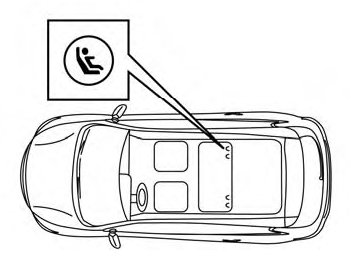
LATCH system lower anchor locations - bench seat
Your vehicle is equipped with special anchor points that are used with LATCH system compatible child restraints. This system may also be referred to as the ISOFIX or ISOFIX compatible system. With this system, you do not have to use a vehicle seat belt to secure the child restraint unless the combined weight of the child and child restraint exceeds 65 lbs. (29.5 kg). If the combined weight of the child and child restraint is greater than 65 lbs. (29.5 kg), use the vehicle’s seat belt (not the lower anchors) to install the child restraint. Be sure to follow the child restraint manufacturer’s instructions for installation.
