
Nissan Murano: Chassis and Body Maintenance / Wheels
Check tires for wear and improper inflation.
Check wheels for deformation, cracks and other damage. If deformed, remove wheel and check wheel runout.
Remove tire from wheel and mount wheel on a balancer machine.
CAUTION:
DO NOT use center hole cone-type clamping machines to hold the wheel during tire removal/installation or balancing or damage to the wheel paint, cladding or chrome may result. Use only rim-type or universal lug-type clamping machines to hold the wheel during servicing.
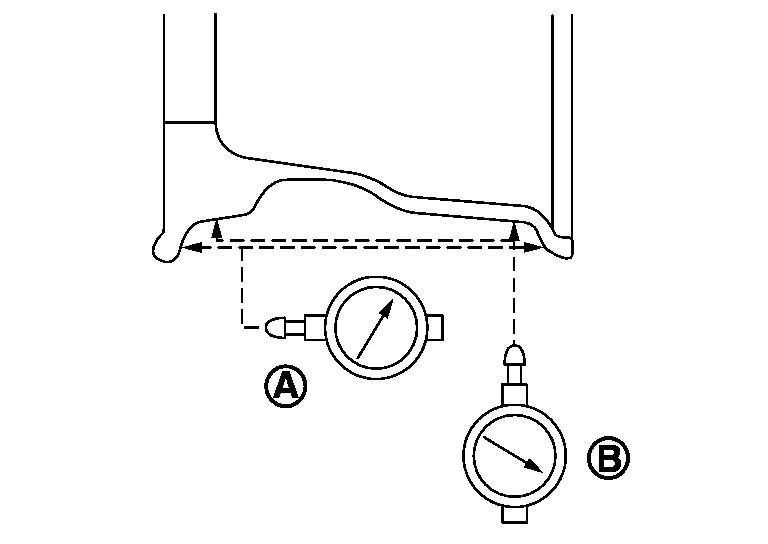
Set dial indicator as shown. Check runout, if runout value exceeds the limit, replace wheel.| Limit | |
| Axial Runout (A) | Refer to Wheel. |
| Radial Runout (B) | Refer to Wheel. |
BALANCING WHEELS (ADHESIVE WEIGHT TYPE)
Preparation Before Adjustment
Remove inner and outer balance weights from the wheel. Using releasing agent, remove double-faced adhesive tape from the wheel and tire.
CAUTION:
-
Be careful not to scratch the wheel and tire during removal.
-
After removing double-faced adhesive tape, wipe clean all traces of releasing agent from the wheel and tire.
Wheel Balance Adjustment
CAUTION:
-
DO NOT use center hole cone-type clamping machines to hold the wheel during tire removal/installation or balancing or damage to the wheel paint, cladding or chrome may result. Use only rim-type or universal lug-type clamping machines to hold the wheel during servicing.
-
If a balancer machine has an adhesive weight mode setting, select the adhesive weight mode setting and skip Step 2 below. If a balancer machine only has the clip-on (rim flange) weight mode setting, follow Step 2 to calculate the correct size adhesive weight.
-
Set wheel and tire on balancer machine using center hole as a guide. Start balancer machine.
-
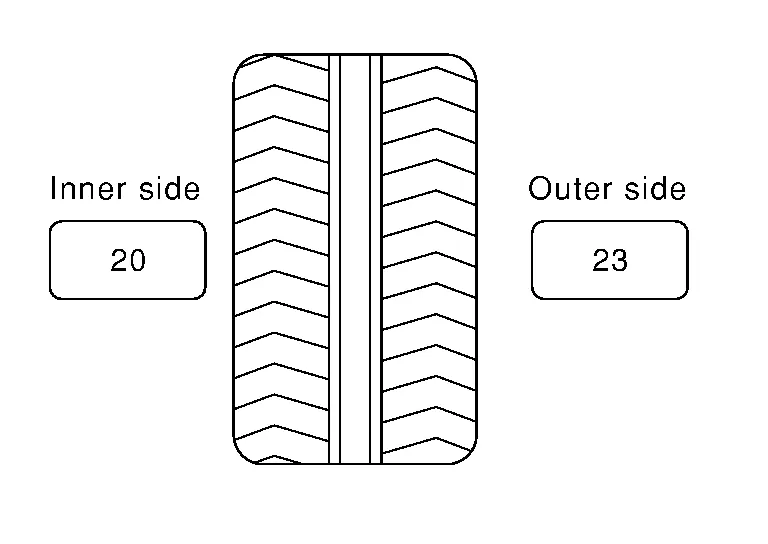
For balancer machines that only have a clip-on (rim flange) weight mode setting, follow this step to calculate correct size adhesive weight to use. When inner and outer imbalance values are shown on balancer machine indicator, multiply outer imbalance value by 5/3 (1.67) to determine balance weight that should be used. Select outer balance weight with a value closest to calculated value above and install into designated outer position of or at designated angle in relation to the wheel and tire.
-
Indicated imbalance value × 5/3 (1.67) = balance weight to be installed
Calculation example:
23 g (0.81 oz) × 5/3 (1.67) = 38.33 g (1.35 oz) ⇒ 40 g (1.41 oz) balance weight (closer to calculated balance weight value)
 NOTE:
NOTE:
Note that balance weight value must be closer to calculated balance weight value.
Example:
37.4 ⇒ 35 g (1.23 oz)
37.5 ⇒ 40 g (1.41 oz)
-
-
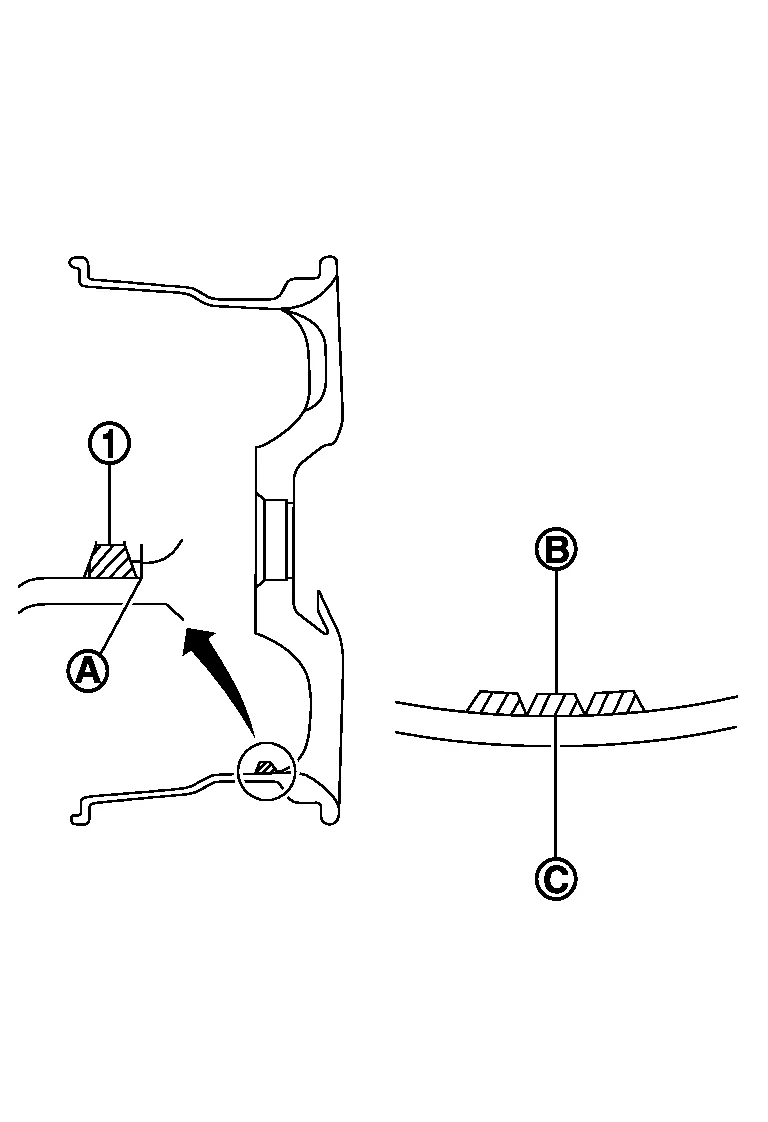
Install balance weight in position shown.
CAUTION:
-
Do not install inner balance weight before installing outer balance weight.
-
Before installing balance weight, be sure to clean mating surface of wheel and tire.
-
When installing balance weight (1) to wheel and tire, set it into grooved area (A) on inner wall of wheel and tire as shown so that balance weight center (B) is aligned with balancer machine indication position (angle) (C).
CAUTION:
-
Always use Genuine NISSAN adhesive balance weights.
-
Balance weights are non-reusable; always replace with new ones.
-
Do not install more than three sheets of balance weights.
-
-
-
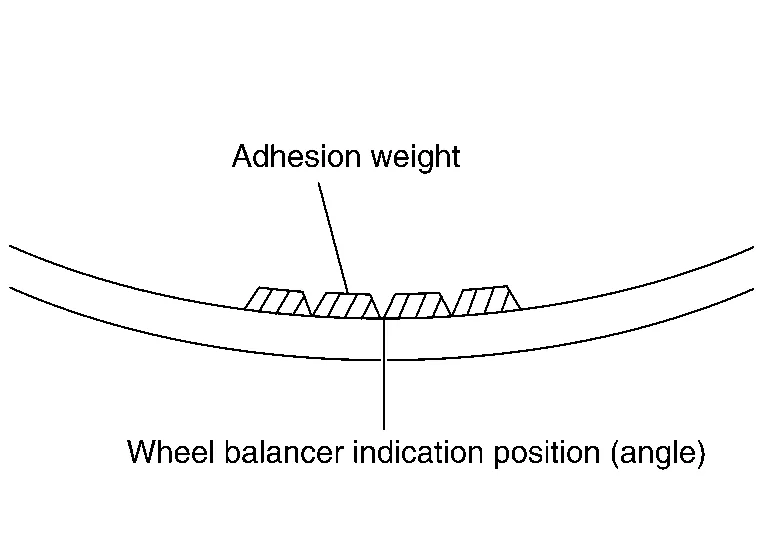
If calculated balance weight value exceeds 50 g (1.76 oz), install two balance weight sheets in line with each other as shown.
CAUTION:
Do not install one balance weight sheet on top of another.
-
Start balancer machine again.
-
Install balance weight on inner side of wheel and tire in the balancer machine indication position (angle).
CAUTION:
Do not install more than two balance weights.
-
Start balancer machine. Make sure that inner and outer residual imbalance values are 5 g (0.17 oz) each or below.
-
If either residual imbalance value exceeds 5 g (0.17 oz), repeat installation procedures.
| Wheel balance | Dynamic (At flange) | Static (At flange) |
|---|---|---|
| Maximum allowable imbalance | Refer to Wheel. | |
Follow the maintenance schedule for tire rotation service intervals. Refer to Introduction of Periodic Maintenance.
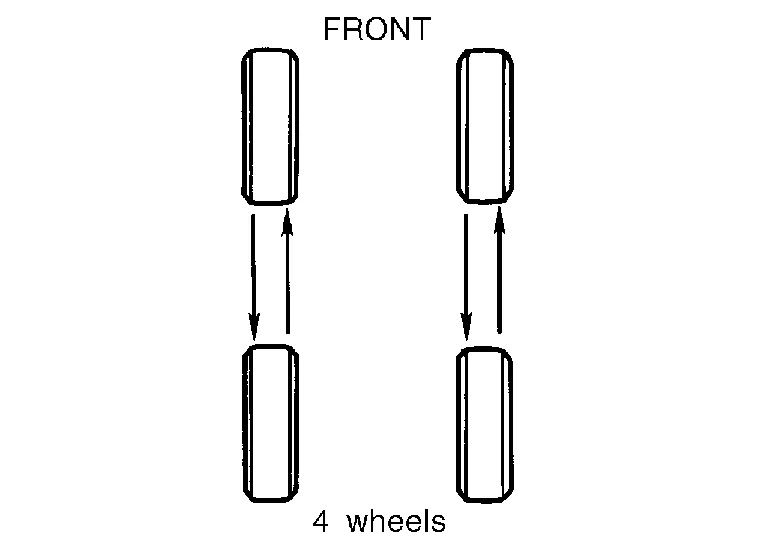
Rotate the wheels and tires front to back in the pattern as shown.
When installing the wheel, tighten wheel nuts to the specified torque. Refer to Exploded View.
WARNING:
-
Do not include the spare tire when rotating tires.
-
After rotating tires, check and adjust the tire pressure.
CAUTION:
-
When installing wheel nuts, tighten them diagonally by dividing the work two to three times in order to prevent the wheels from developing any distortion.
-
Be careful not to tighten the wheel nuts to a torque exceeding specification to prevent strain on the disc brake rotor.
-
Use Genuine NISSAN wheel nuts.
Wheel nut tightening torque : Refer to Exploded View. -
Perform the ID registration after tire rotation. Refer to Description.
-
 Propeller Shaft
Inspection
LOOSENESS OF CONNECTED PARTCheck each fixing bolt and nut for looseness using torque wrench. For each tightening torque, refer to Exploded View...
 Brake Fluid Level and Leaks
Inspection
BRAKE FLUID LEVEL
Make sure that the brake fluid level in the reservoir sub tank is between the MAX and MIN lines.
Visually check around the reservoir sub tank and reservoir tank for brake fluid leakage...
Other information:
Nissan Murano (Z52) 2015-2024 Service Manual: Configuration (bcm)
Description Vehicle specification needs to be written with CONSULT because it is not written after replacing BCM.Configuration has three functions as follows: Function Description "Before Replace ECU" Reads the Nissan Murano vehicle configuration of current BCM...
Nissan Murano (Z52) 2015-2024 Service Manual: Seat Belt Buckle
Removal and Installation SEAT BELT BUCKLE - (LH/CONNECTOR)RemovalRelease pawls and remove rear seat (LH) front bolt covers (1) then remove bolts. : Pawl Lift and support seat cushion (LH) using a suitable tool then disconnect seat belt buckle harness connector...
Categories
- Manuals Home
- Nissan Murano Owners Manual
- Nissan Murano Service Manual
- Intelligent Forward Collision Warning (I-FCW)
- High Beam Assist (if so equipped)
- Vehicle Dynamic Control (VDC) OFF switch
- New on site
- Most important about car
Driver and passenger supplemental knee air bag

Driver’s side
The knee air bag is located in the knee bolster, on the driver’s and passenger’s side. All of the information, cautions and warnings in this manual apply and must be followed. The knee air bag is designed to inflate in higher severity frontal collisions, although it may inflate if the forces in another type of collision are similar to those of a higher severity frontal impact. It may not inflate in certain collisions.

Passenger’s side
