
Nissan Murano: Headlight and turn signal switch / Turn signal switch
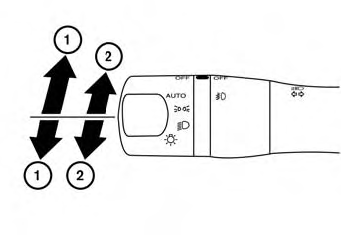
 Move the lever up or down to
signal the
turning direction. When the turn is
completed, the turn signal cancels automatically.
Move the lever up or down to
signal the
turning direction. When the turn is
completed, the turn signal cancels automatically.
Lane change signal
Move the lever up or down until the turn signal begins to flash, but the lever does not latch, to signal a lane change. Hold the lever until the lane change is completed.
Move the lever up or down until the turn signal begins to flash, but the lever does not latch, and release the lever. The turn signal will automatically flash three times.
Choose the appropriate method to signal a lane change based on road and traffic conditions.
NOTE:
The 3 Flash Pass feature may be disabled. For additional information, refer to “How to use the vehicle information display” in this section.
 Instrument brightness control
Press the “+” button to increase
the
brightness of instrument panel lights.
Press the “-” button to decrease
the
brightness of instrument panel lights...
 Fog light switch (if so equipped)
To turn the fog lights on, turn the headlight
switch to the position, then turn
the
fog light switch to the position.
To turn the fog lights on with the headlight
switch in the AUTO position, the headlights
must be on, then turn the fog light switch to
the position...
Other information:
Nissan Murano (Z52) 2015-2024 Service Manual: Exhaust Valve Timing Control
System Description SYSTEM DIAGRAMINPUT/OUTPUT SIGNAL CHART Sensor Input signal to ECM ECM function Actuator Crankshaft position sensor (POS) Engine speed and piston position Exhaust valve timing control Exhaust valve timing control solenoid valve Camshaft position sensor (PHASE) Engine oil temperature sensor Engine oil temperature Exhaust valve timing control position sensor Exhaust valve timing signal Combination meter CAN communication Nissan Murano Vehicle speed signal SYSTEM DESCRIPTIONThis mechanism hydraulically controls cam phases continuously with the fixed operating angle of the exhaust valve...
Nissan Murano (Z52) 2015-2024 Service Manual: Power Window and Door Lock/unlock Switch Rh
Description Main power window and door lock/unlock switch, power window and door lock/unlock switch RH and BCM transmit and receive the signal by power window serial link.The signal mentioned below is transmitted from BCM to main power window and door lock/unlock switch and power window and door lock/unlock switch RH Keyless power window down signal The signal mentioned below is transmitted from main power window and door lock/unlock switch to power window and door lock/unlock switch RH Front door window RH operation signal Retained power operation signal Power window lock switch signal Component Function Check CHECK POWER WINDOW AND DOOR LOCK/UNLOCK SWITCH RH OUTPUT SIGNAL CONSULT Select “CDL LOCK SW ” or “CDL UNLOCK SW” in “Data Monitor” mode of “BCM(DOOR LOCK)”...
Categories
- Manuals Home
- Nissan Murano Owners Manual
- Nissan Murano Service Manual
- Jacking up vehicle and removing the damaged tire
- Indicator lights
- How to enable/disable the LDW system
- New on site
- Most important about car
Autolight system
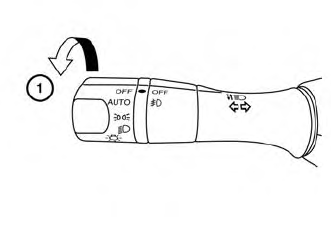
The autolight system allows the headlights to turn on and off automatically. The autolight system can:
Turn on the headlights, front parking, tail, license plate and instrument panel lights automatically when it is dark. Turn off all the lights (except daylight running lights) when it is light. Keep all the lights on for a period of time after you place the ignition switch in the OFF position and all doors are closed.