
Nissan Murano: Audio, Visual & Navigation System :: Intelligent Around View Monitor with Display Audio System / Symptom Diagnosis. Intelligent Around View Monitor System
INTELLIGENT AROUND VIEW MONITOR SYSTEM
 NOTE:
NOTE:
Inspect the vehicle for a front license plate frame or cover. If there is a front license plate frame or cover, the front camera will see it and show it on the monitor.
| Symptom | Check items | Probable malfunction location | |
|---|---|---|---|
| Screen is not switched to camera image when CAMERA button is pressed or when shift position is shifted to “R”. | “AVM” is not displayed on the system selection screen of CONSULT. | Around view monitor control unit power supply or ground circuit. Refer to Diagnosis Procedure. | |
|
Check that Data Monitor item values are normal using CONSULT:
|
CAMERA SWITCH SIGNAL and REVERSE SIGNAL are normal. | Around view monitor control unit. Refer to Removal and Installation. | |
| CAMERA SWITCH SIGNAL is not normal. | CAN communication circuit. Refer to Trouble Diagnosis Flow Chart. | ||
| REVERSE SIGNAL is not normal. | Reverse signal circuit. Refer to Reference Value. | ||
|
Check the following Data Monitor item using CONSULT:
|
F-CAMERA IMAGE SIGNAL: NG |
Front camera power supply circuit and image signal circuit. Refer to Diagnosis Procedure. |
|
Check the following Data Monitor item using CONSULT:
|
REAR CAMERA IMAGE SIGNAL: NG |
Rear camera power supply circuit and image signal circuit. Refer to Diagnosis Procedure. |
| LH side of birds-eye view is not displayed. |
Check the following Data Monitor item using CONSULT:
|
DR-SIDE CAMERA IMAGE SIGNAL: NG |
Side camera LH power supply circuit and image signal circuit. Refer to Diagnosis Procedure. |
| RH side of birds-eye view is not displayed. |
Check the following Data Monitor item using CONSULT:
|
PA-SIDE CAMERA IMAGE SIGNAL: NG | Side camera RH power supply circuit and image signal circuit. Refer to Diagnosis Procedure. |
 Power Supply and Ground Circuit
Diagnosis Procedure
CHECK FUSE
Check that the following fuses are not blown:
Terminal No. Signal name Fuse No. Capacity
40
Ignition signal
29
10 A
Are the fuses blown?
YES>>
Replace the blown fuse after repairing the affected circuit...

Other information:
Nissan Murano (Z52) 2015-2024 Service Manual: Oil
Description MAINTENANCE OF OIL LEVELThe compressor oil is circulating in the system together with the refrigerant. It is necessary to fill compressor with oil when replacing A/C system parts or when a large amount of refrigerant leaks are detected. It is important to always maintain oil level within the specified level or the following conditions may occur: Insufficient oil amount: Stuck compressor Excessive oil amount: Insufficient cooling (caused by insufficient heat exchange) Oil Type : "Oil"...
Nissan Murano (Z52) 2015-2024 Service Manual: Configuration (audio Unit)
Description Vehicle specification needs to be written with CONSULT because it is not written after replacing audio unit.Configuration has three functions as follows: Function Description "Before Replace ECU" Reads the Nissan Murano vehicle configuration of current audio unit...
Categories
- Manuals Home
- Nissan Murano Owners Manual
- Nissan Murano Service Manual
- Fuel recommendation
- All-Wheel Drive (AWD) (if so equipped)
- Tire rotation
- New on site
- Most important about car
Fuel gauge
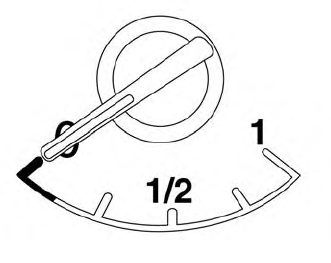
The gauge indicates the approximate fuel level in the tank.
The gauge may move slightly during braking, turning, acceleration, or going up or down hills.
The gauge needle returns to 0 (Empty) after the ignition switch is placed in the OFF position.
