
Nissan Murano: Automatic operation / Remote Engine Start with Intelligent Climate Control (if so equipped)
Nissan Murano (Z52) 2015-2024 Owners Manual / Monitor, climate, audio, phone and voice recognition systems / Heater and Air Conditioner (automatic) / Automatic operation / Remote Engine Start with Intelligent Climate Control (if so equipped)
Vehicles equipped with automatic climate controls and Remote Engine Start function may go into automatic heating or cooling mode when Remote Engine Start is activated depending on outside and cabin temperatures. During this period, the climate control display and buttons will be inoperable until the ignition switch is turned on. In Remote Engine Start defrosting mode, the rear window defroster and heated steering wheel (if so equipped) may be activated automatically.
 Dehumidified defrosting or defogging
Press the front defroster
button
on. The indicator light on the button will
come on.
Turn the temperature control dial to set
the maximum temperature to aid in
defrosting or defogging...
 Manual operation
Fan speed control
Press the fan speed control
buttons
to manually control the fan speed.
Press the AUTO button to return to automatic
control of the fan speed...
Other information:
Nissan Murano (Z52) 2015-2024 Service Manual: U111a Rear Camera Image Signal Circuit
DTC Description DTC DETECTION LOGIC DTC No. CONSULT screen terms (Trouble diagnosis content) DTC detection condition U111A REAR CAMERA IMAGE SIGNAL (CAN COMM CIRCUIT) Diagnosis condition When ignition switch is ON Signal (terminal) Rear camera image signal (terminal 20) Threshold Rear camera image signal circuit is shorted or open Diagnosis delay time — POSSIBLE CAUSE Rear camera image signal circuit Around view monitor control unit Rear camera FAIL-SAFECamera image is not displayed (gray screen display) DTC Confirmation Procedure PERFORM DTC CONFIRMATION PROCEDURE CONSULT Ignition switch ON...
Nissan Murano (Z52) 2015-2024 Service Manual: B2e33 Ecall Button
DTC Description DTC DETECTION LOGIC DTC No. CONSULT screen terms (Trouble diagnosis content) DTC detection condition B2E33 ECALL BUTTON (Ecall button) Diagnosis condition When ignition switch is ON. Signal (terminal) SOS switch LED signal (terminal 5) Threshold — Diagnosis delay time 1 second or more POSSIBLE CAUSE SOS switch LED signal circuit SOS switch TCU FAIL-SAFE Telematics system does not function (Only SOS call does not operate) SOS switch LED indicator is turned OFF DTC Confirmation Procedure PERFORM DTC CONFIRMATION PROCEDURE CONSULT Ignition switch ON...
Categories
- Manuals Home
- Nissan Murano Owners Manual
- Nissan Murano Service Manual
- Rear bench seat adjustment
- System malfunction
- How to enable/disable the LDW system
- New on site
- Most important about car
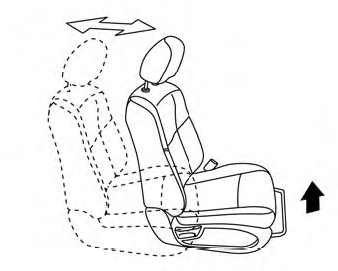
Front manual seat adjustment (if so equipped)
Your vehicle seats can be adjusted manually. For additional information about adjusting the seats, refer to the steps outlined in this section.
Forward and backward

Copyright © 2026 www.nimurano.com