
Nissan Murano: Automatic operation / Dehumidified defrosting or defogging
Nissan Murano (Z52) 2015-2024 Owners Manual / Monitor, climate, audio, phone and voice recognition systems / Heater and Air Conditioner (automatic) / Automatic operation / Dehumidified defrosting or defogging
- Press the
 front defroster
button
on. The indicator light on the button will
come on.
front defroster
button
on. The indicator light on the button will
come on. - Turn the temperature control dial to set
the maximum temperature to aid in
defrosting or defogging.
- To quickly remove ice from the outside
of the windows, use the
 fan
speed
control buttons to set the fan speed to
maximum.
fan
speed
control buttons to set the fan speed to
maximum. - As soon as possible after the windshield is clean, press the AUTObutton to return to the automatic mode.
- When the
 front
defroster button
is pressed, the air conditioner will automatically
be turned on at outside temperatures
above 36°F (2°C). The air recirculate
mode automatically turns off,
allowing outside air to be drawninto the
passenger compartment to further improve
the defogging performance.
When the air recirculate mode automatically
turns off, the air fresh mode
will automatically turn on.
front
defroster button
is pressed, the air conditioner will automatically
be turned on at outside temperatures
above 36°F (2°C). The air recirculate
mode automatically turns off,
allowing outside air to be drawninto the
passenger compartment to further improve
the defogging performance.
When the air recirculate mode automatically
turns off, the air fresh mode
will automatically turn on.
- To quickly remove ice from the outside
of the windows, use the
 Heating (A/C OFF)
The air conditioner does not activate.When
you need to heat only, use this mode.
Press the AUTO button.
Turn the temperature control dial to set
the desired temperature...
 Remote Engine Start with Intelligent Climate Control (if so equipped)
Vehicles equipped with automatic climate
controls and Remote Engine Start function
may go into automatic heating or cooling
mode when Remote Engine Start is activated
depending on outside and cabin
temperatures...
Other information:
Nissan Murano (Z52) 2015-2024 Owners Manual: Audible reminders
Brake pad wear warning The disc brake pads have audible wear warnings. When a disc brake pad requires replacement, it makes a high pitched scraping sound when the vehicle is in motion, whether or not the brake pedal is depressed. Have the brakes checked as soon as possible if the warning sound is heard...
Nissan Murano (Z52) 2015-2024 Owners Manual: Vehicle-to-vehicle distance control mode operation
The vehicle-to-vehicle distance control mode is designed to maintain a selected distance from the vehicle in front of you and can reduce the speed to match a slower vehicle ahead. The system will decelerate the vehicle as necessary and if the vehicle ahead comes to a stop, the vehicle decelerates to a standstill...
Categories
- Manuals Home
- Nissan Murano Owners Manual
- Nissan Murano Service Manual
- Rear bench seat adjustment
- High Beam Assist (if so equipped)
- Fuel recommendation
- New on site
- Most important about car
Fuel gauge
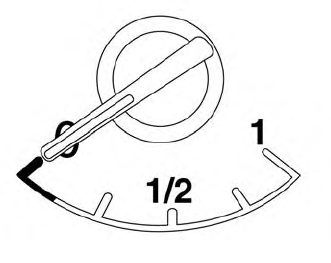
The gauge indicates the approximate fuel level in the tank.
The gauge may move slightly during braking, turning, acceleration, or going up or down hills.
The gauge needle returns to 0 (Empty) after the ignition switch is placed in the OFF position.

Copyright © 2026 www.nimurano.com