
Nissan Murano: Power Window Control System :: Removal and Installation / Rear Power Window Switch
REMOVAL
-
Pull armrest in direction shown (
 ) then starting at rear release rear power window switch finisher (1) pawls using a suitable tool (A).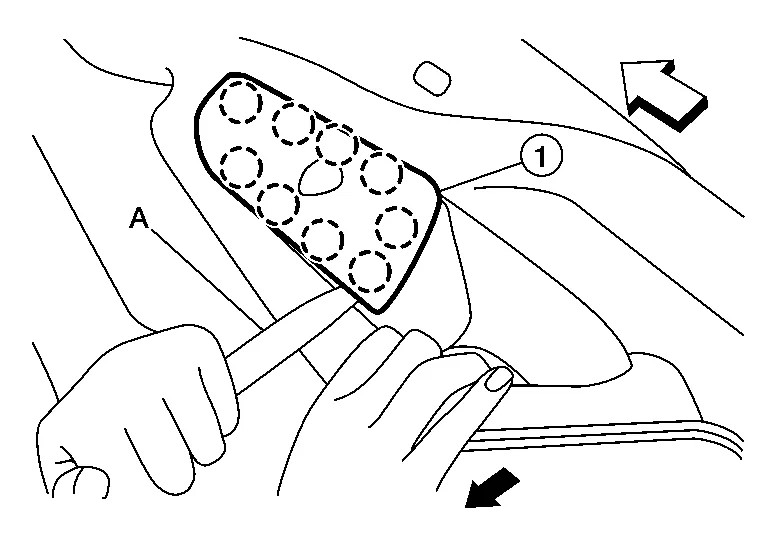
 : Front
 : Pawl
 -
Disconnect the harness connector from the rear power window switch and remove.
-
Release the pawls then separate the rear power window switch (1) from the switch finisher (2).
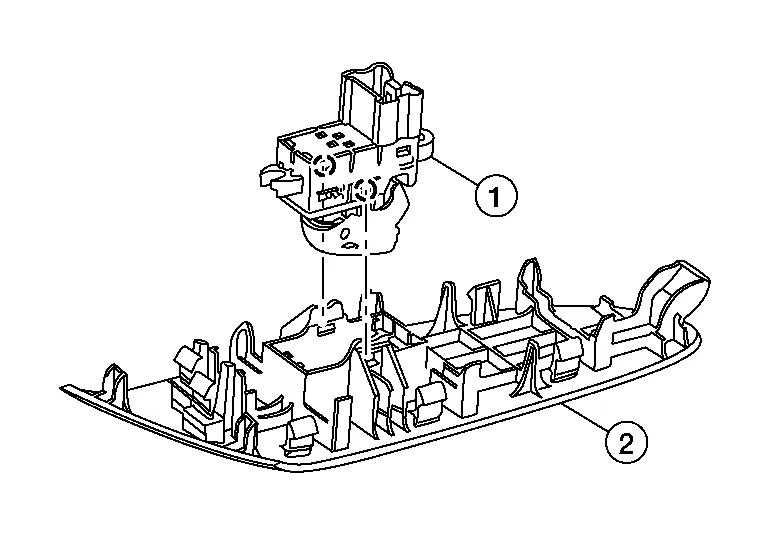 : Pawl
INSTALLATION
Installation is in the reverse order of removal.
 Main Power Window and Door Lock/unlock Switch
Removal and Installation
REMOVAL
Pull armrest in direction shown () then starting at rear release main power window and door lock/unlock switch finisher (1) pawls using a suitable tool (A)...
 Roof :: Precaution. Precautions
Precaution for Supplemental Restraint System (SRS) "AIR BAG" and "SEAT BELT PRE-TENSIONER"
The Supplemental Restraint System such as “AIR BAG” and “SEAT BELT PRE-TENSIONER”, used along with a front seat belt, helps to reduce the risk or severity of injury to the driver and front passenger for certain types of collisions...
Other information:
Nissan Murano (Z52) 2015-2024 Service Manual: Roof Antenna
Removal and Installation REMOVALLower headlining (rear). Refer to Exploded View. Disconnect the harness connectors from the antenna feeder. Loosen bolt (A) and remove roof antenna (1). INSTALLATIONInstallation is in the reverse order of removal. Roof antenna nut : 8 N·m (0...
Nissan Murano (Z52) 2015-2024 Service Manual: Tpms
Symptom Table LOW TIRE PRESSURE WARNING LAMP SYMPTOM CHART Diagnosis items Symptom (Ignition switch ON) Low tire pressure warning lamp Cause Action Low tire pressure warning lamp The low tire pressure warning lamp illuminates for 1 second, then turns OFF...
Categories
- Manuals Home
- Nissan Murano Owners Manual
- Nissan Murano Service Manual
- Fuel recommendation
- Tire rotation
- Passenger compartment
- New on site
- Most important about car
Front manual seat adjustment (if so equipped)
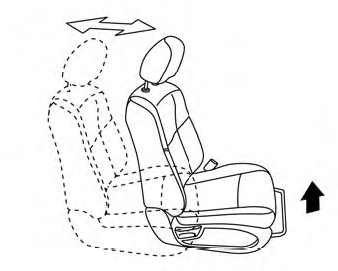
Your vehicle seats can be adjusted manually. For additional information about adjusting the seats, refer to the steps outlined in this section.
Forward and backward

Copyright © 2026 www.nimurano.com