
Nissan Murano: Power Window Control System :: Removal and Installation / Main Power Window and Door Lock/unlock Switch
REMOVAL
-
Pull armrest in direction shown (
 ) then starting at rear release main power window and door lock/unlock switch finisher (1) pawls using a suitable tool (A).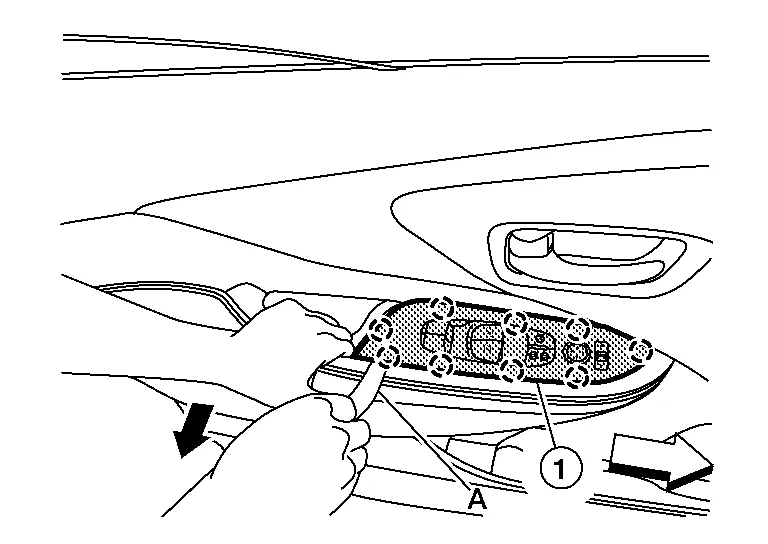
 : Front
 : Pawl
 -
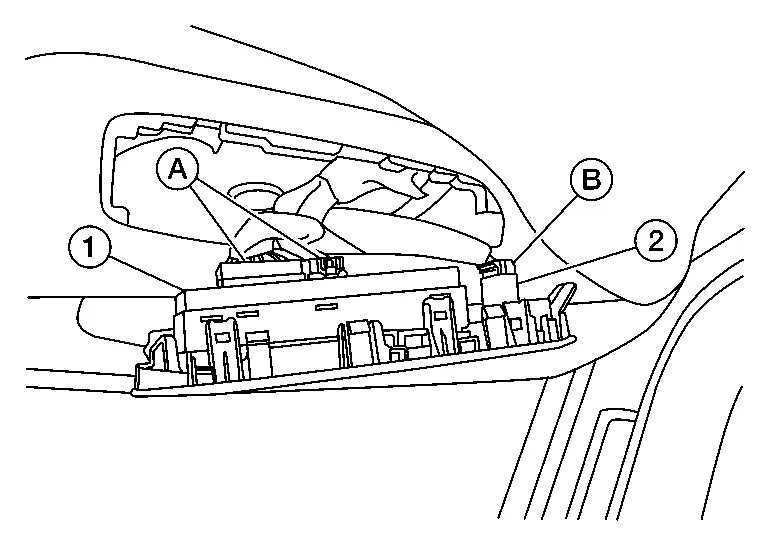
Disconnect the harness connectors (A) from the main power window and door lock/unlock switch (1) and harness connector (B) from the door mirror remote control switch (2) and remove.
-
Release pawls then separate main power window and door lock/unlock switch (1) from switch finisher (2).
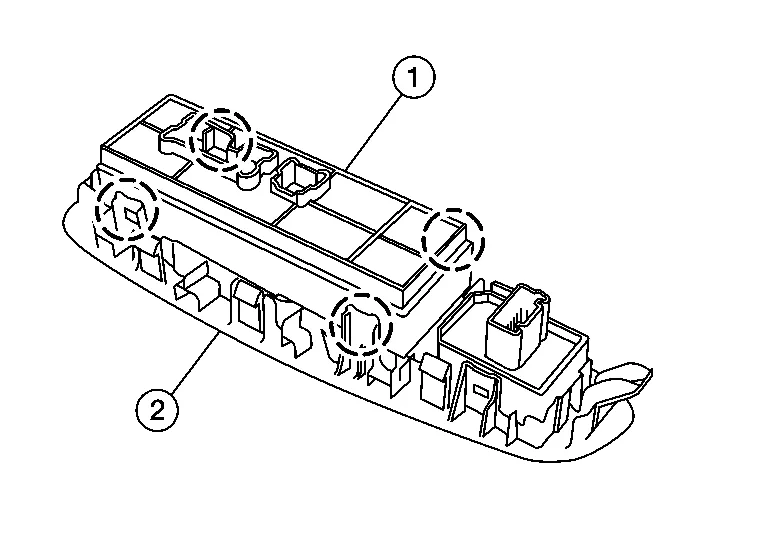 : Pawl
INSTALLATION
Installation is in the reverse order of removal.
 NOTE:
NOTE:
When main power window and door lock/unlock switch is removed or replaced, it is necessary to perform initialization procedure. Refer to Description.

 Rear Power Window Switch
Removal and Installation
REMOVAL
Pull armrest in direction shown () then starting at rear release rear power window switch finisher (1) pawls using a suitable tool (A)...
Other information:
Nissan Murano (Z52) 2015-2024 Service Manual: B242e Hands Free Sensor 2
DTC Description DTC DETECTION LOGIC DTC No. CONSULT screen items (Trouble diagnosis content) DTC detecting condition B242E HANDS FREE SENOR 2 (Kick sensor 2) Diagnosis condition All times Signal (terminal) – Threshold BCM detects the abnormal resistance value of motion activated back door sensor (upper) via serial communication Diagnosis delay time – POSSIBLE CAUSE Motion activated back door sensor (upper) Harness or connectors [motion activated back door sensor (upper) circuit is open or shorted] BCM Motion activated back door control unit FAIL-SAFEInhibit motion activated automatic back door system DTC Confirmation Procedure PERFORM DTC CONFIRMATION PROCEDURE CONSULT Ignition switch ON...
Nissan Murano (Z52) 2015-2024 Service Manual: Diagnosis and Repair Work Flow
Work Flow DETAILED FLOWINTERVIEW THE CUSTOMER Clarify customer concerns before inspection. First of all, perform an interview utilizing Diagnostic Work Sheet and reproduce the symptom as well as fully understand it. Ask customer about his/her concerns carefully...
Categories
- Manuals Home
- Nissan Murano Owners Manual
- Nissan Murano Service Manual
- Turning the AEB system on/off
- How to enable/disable the LDW system
- Rear bench seat adjustment
- New on site
- Most important about car
Luggage hooks
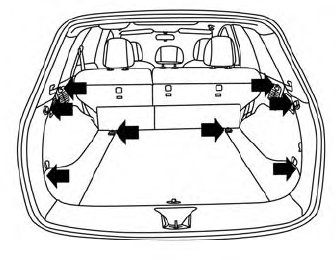
When securing items using luggage hooks located on the back of the seat or side finisher do not apply a load over more than 6.5 lbs. (29 N) to a single hook.
The luggage hooks that are located on the floor should have loads less than 110 lbs. (490 N) to a single hook.
