
Nissan Murano: Parking Brake System :: Removal and Installation / Parking Brake Rear Cable
REMOVAL
Remove center console assembly. Refer to Removal and Installation.
Loosen adjusting nut. Refer to Exploded View.
 NOTE:
NOTE:
It is not necessary to remove parking brake front cable.
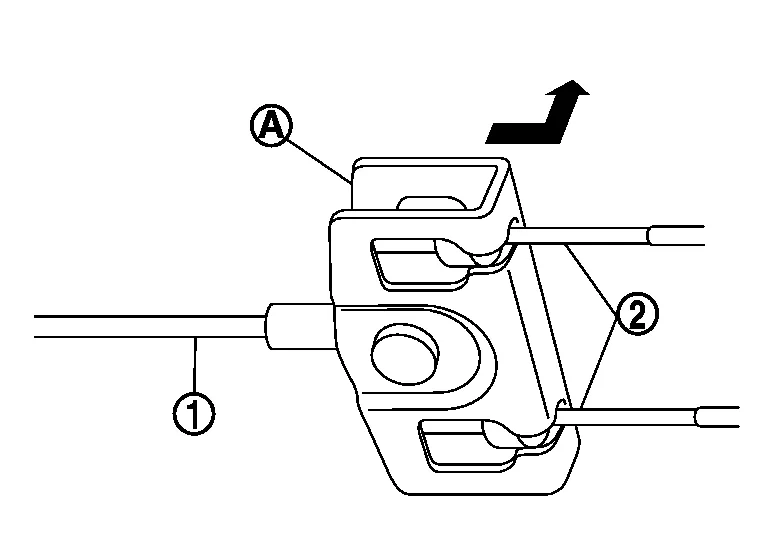
Pull equalizer (A) on parking brake front cable (1) in a rearward direction and then push upward to separate each parking brake rear cable (2) from the parking brake front cable (1).
CAUTION:
To prevent damage to the parts, do not bend the parking brake cables.
For AWD Nissan Murano vehicles, remove rear propeller shaft. Refer to Removal and Installation.
Remove rear disc brake rotor. Refer to Removal and Installation.
Separate parking brake rear cable from toggle lever. Refer to Exploded View.
Remove retainers from rear parking brake cable.
Remove parking brake rear cable.
INSTALLATION
Installation is in the reverse order of removal.
CAUTION:
Do not reuse the adjusting nut if the nut is removed.
After installation, inspect and adjust the parking brake shoes. Refer to Inspection and Adjustment.
 Parking Brake Front Cable
Removal and Installation
REMOVALRemove parking brake control. Refer to Removal and Installation.
NOTE:
It is not necessary to remove parking brake switch...
 Parking Brake Switch
Removal and Installation
REMOVALRemove lower instrument panel LH. Refer to Removal and Installation.
Place fuse box aside.
Disconnect harness connector from parking brake switch...
Other information:
Nissan Murano (Z52) 2015-2024 Service Manual: Shipping Mode Cancel Operation
Work Procedure SHIPPING MODE CANCEL OPERATION Ignition switch OFF. Press in (turn on) the extended storage switch. Refer to How To Check. Ignition switch ON. Ignition switch OFF and wait at least 2 seconds. NOTE: Pressing in the extended storage switch moves the mode from Shipping to Normal...
Nissan Murano (Z52) 2015-2024 Owners Manual: Answer back horn feature
If desired, the answer back horn feature can be deactivated using the Intelligent Key. When it is deactivated and the button is pushed, the hazard indicator lights flash twice. When the button is pushed, neither the hazard indicator lights nor the horn operates...
Categories
- Manuals Home
- Nissan Murano Owners Manual
- Nissan Murano Service Manual
- How to enable/disable the LDW system
- GAS STATION INFORMATION
- Intelligent Forward Collision Warning (I-FCW)
- New on site
- Most important about car
Autolight system

The autolight system allows the headlights to turn on and off automatically. The autolight system can:
Turn on the headlights, front parking, tail, license plate and instrument panel lights automatically when it is dark. Turn off all the lights (except daylight running lights) when it is light. Keep all the lights on for a period of time after you place the ignition switch in the OFF position and all doors are closed.