
Nissan Murano: NISSAN Intelligent Key® / Operating range
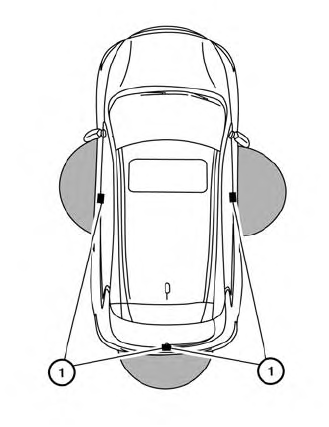
The Intelligent Key functions can only be
used when the Intelligent Key is within the
specified operating range fromthe request
switch  .
.
When the Intelligent Key battery is discharged or strong radio waves are present near the operating location, the Intelligent Key operating range becomes narrower, and the Intelligent Key may not function properly.
The operating range is within 31.5 in (80 cm)
from each request switch  .
.
If the Intelligent Key is too close to the door glass, handle or rear bumper, the request switches may not function.
When the Intelligent Key is within the operating range, it is possible for anyone, even someone who does not carry the Intelligent Key, to push the request switch to lock/unlock the doors.
 NISSAN Intelligent Key®
WARNING
Radio waves could adversely affect
electric medical equipment. Those
who use a pacemaker should contact
the electric medical equipment
manufacturer for the possible influences
before use...
 Door locks/unlocks precaution
Do not push the door handle request
switch with the Intelligent Key held in
your hand as illustrated. The close distance
to the door handle will cause the
Intelligent Key system to have difficulty
recognizing that the Intelligent Key is
outside the vehicle...
Other information:
Nissan Murano (Z52) 2015-2024 Service Manual: Cluster Lid a
Removal and Installation REMOVALRemove instrument lower panel LH. Refer to Removal and Installation. Using a suitable tool, release pawls and remove gap hider (1) from steering column upper cover (2). : Pawl Using a suitable tool, release clips and remove cluster lid A (1)...
Nissan Murano (Z52) 2015-2024 Service Manual: Diagnosis and Repair Workflow
Work Flow OVERALL SEQUENCEDETAILED FLOWGET INFORMATION FOR SYMPTOM Get detailed information from the customer about the symptom (the condition and the environment when the incident/malfunction occurred). >> GO TO 2. CONFIRM THE SYMPTOM Try to confirm the symptom described by the customer...
Categories
- Manuals Home
- Nissan Murano Owners Manual
- Nissan Murano Service Manual
- Power Steering Fluid (PSF)
- Turning the AEB system on/off
- Rear bench seat adjustment
- New on site
- Most important about car

Copyright © 2026 www.nimurano.com