
Nissan Murano: Precautions when starting and driving / Off-road recovery
Nissan Murano (Z52) 2015-2024 Owners Manual / Starting and driving / Precautions when starting and driving / Off-road recovery
While driving, the right side or left side wheels may unintentionally leave the road surface. If this occurs, maintain control of the vehicle by following the procedure below. Please note that this procedure is only a general guide. The vehicle must be driven as appropriate based on the conditions of the vehicle, road and traffic.
- Remain calm and do not overreact.
- Do not apply the brakes.
- Maintain a firm grip on the steering wheel with both hands and try to hold a straight course.
- When appropriate, slowly release the accelerator pedal to gradually slow the vehicle.
- If there is nothing in the way, steer the vehicle to follow the road while vehicle speed is reduced. Do not attempt to drive the vehicle back onto the road surface until vehicle speed is reduced.
- When it is safe to do so, gradually turn
the steering wheel until both tires return
to the road surface. When all tires
are on the road surface, steer the vehicle
to stay in the appropriate driving
lane.
- If you decide that it is not safe to return the vehicle to the road surface based on vehicle, road or traffic conditions, gradually slow the vehicle to a stop in a safe place off the road.
 Avoiding collision and rollover
WARNING
Failure to operate this vehicle in a safe
and prudent manner may result in loss
of control or an accident.
Be alert and drive defensively at all times...
 Rapid air pressure loss
Rapid air pressure loss or a “blow-out” can
occur if the tire is punctured or is damaged
due to hitting a curb or pothole. Rapid air
pressure loss can also be caused by driving
on under-inflated tires...
Other information:
Nissan Murano (Z52) 2015-2024 Service Manual: P0643 Sensor Power Supply
DTC Description DESCRIPTIONECM supplies a voltage of 5 V to some of the sensors systematically divided into 2 groups, respectively. Accordingly, when a short circuit develops in a sensor power source, a malfunction may occur simultaneously in the sensors belonging to the same group as the short-circuited sensor...
Nissan Murano (Z52) 2015-2024 Service Manual: Wiper and Washer System Symptoms
Symptom Table CAUTION: Perform the “Self Diagnostic Result” with Consult before performing the diagnosis by symptom. Perform the diagnosis by DTC if DTC is detected. Symptom Probable malfunction location Inspection item Front wiper does not operate in ...
Categories
- Manuals Home
- Nissan Murano Owners Manual
- Nissan Murano Service Manual
- High Beam Assist (if so equipped)
- Power Steering Fluid (PSF)
- All-Wheel Drive (AWD) (if so equipped)
- New on site
- Most important about car
Autolight system
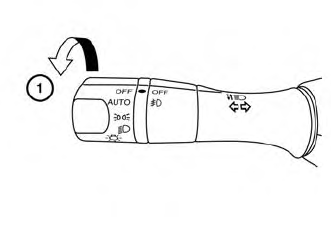
The autolight system allows the headlights to turn on and off automatically. The autolight system can:
Turn on the headlights, front parking, tail, license plate and instrument panel lights automatically when it is dark. Turn off all the lights (except daylight running lights) when it is light. Keep all the lights on for a period of time after you place the ignition switch in the OFF position and all doors are closed.
Copyright © 2026 www.nimurano.com