
Nissan Murano: Changing a flat tire / Getting the spare tire and tools
Nissan Murano (Z52) 2015-2024 Owners Manual / In case of emergency / Flat tire / Changing a flat tire / Getting the spare tire and tools
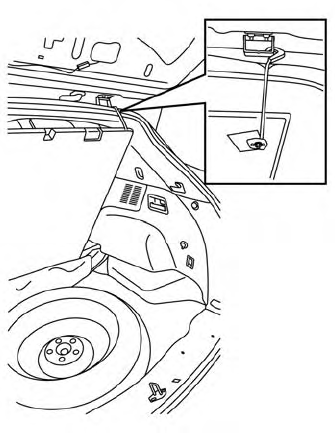
- Open the rear liftgate.
- Pull up on the handle to lift the carpeted
floorboard and attach the hook
as shown.
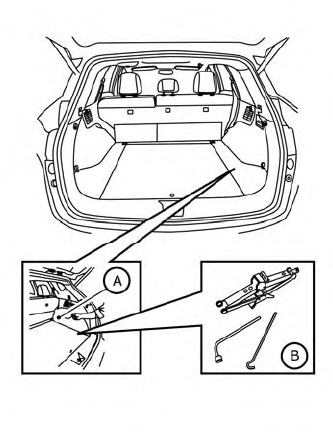
- Open the storage compartment
 by
pulling on the strap to locate the jack
and tools
by
pulling on the strap to locate the jack
and tools  .
. - Remove the jack and tools from the storage area.
- To remove the spare tire, loosen the
bolt by turning counterclockwise.
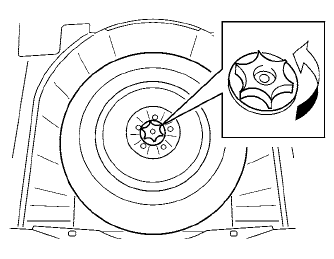
- Once free, remove the bolt.
- Remove the spare tire.
- Once the flat tire is exchanged with the spare tire, store the flat tire where the spare tire was located.
- Turn the bolt clockwise to tighten and place the carpeted floorboard back over the tire.
 Blocking wheels
Place suitable blocks at both the front and
back of the wheel diagonally opposite the
flat tire to prevent the vehicle from moving
when it is jacked up...
 Changing the spare tire with BOSE® sub-woofer (if so equipped)
To loosen the bolt, turn counterclockwise.
Once free, remove the bolt.
Place the sub-woofer in the lower left
corner of the cargo area, leaning
against the driver side wall...
Other information:
Nissan Murano (Z52) 2015-2024 Service Manual: Configuration (adas Control Unit)
Description Since vehicle specifications are not included in the ADAS control unit after replacement, it is required to write Nissan Murano vehicle specifications using CONSULT. Configuration has three functions as follows: Function Description Read/Write Configuration Before ECU Allows the reading of Nissan Murano vehicle specification written in ADAS control unit to store the specification in CONSULT...
Nissan Murano (Z52) 2015-2024 Service Manual: Memory Function
System Description SYSTEM DIAGRAMSIGNAL TRANSMISSION FUNCTION LISTSeveral types of signals are transmitted from the following units to the driver seat control unit via CAN communication. Component Signal ABS actuator and electric unit (control unit) Nissan Murano Vehicle speed signal Combination meter Vehicle speed signal IPDM E/R Detention switch signal BCM Ignition switch signal TCM Shift position signal DESCRIPTIONThe driver seat control unit can store the optimum driving positions (seat, steering column and door mirror position) for 2 people...
Categories
- Manuals Home
- Nissan Murano Owners Manual
- Nissan Murano Service Manual
- Memory storage function (key-link)
- Power Steering Fluid (PSF)
- Passenger compartment
- New on site
- Most important about car
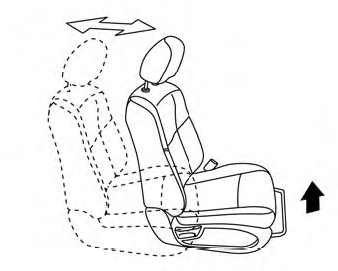
Front manual seat adjustment (if so equipped)
Your vehicle seats can be adjusted manually. For additional information about adjusting the seats, refer to the steps outlined in this section.
Forward and backward

Copyright © 2026 www.nimurano.com