
Nissan Murano: Starting and driving / Front and rear sonar system (if so equipped)
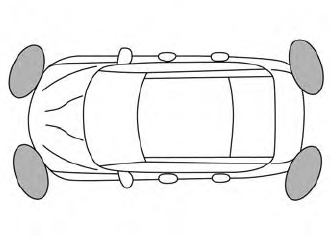
The sonar (parking sensor) system sounds a tone to inform the driver of obstacles near the bumper.
When the “DISPLAY” key is ON, the sonar view will automatically appear in the meter.
WARNING
- The sonar (parking sensor) system is a convenience but it is not a substitute for proper parking.
- The driver is always responsible for safety during parking and other maneuvers. Always look around and check that it is safe to do so before parking.
- Read and understand the limitations of the sonar (parking sensor) system as contained in this section. The colors of the corner sonar indicator and the distance guide lines in the front/rear view indicate different distances to the object.
- Inclement weather or ultrasonic sources such as an automatic car wash, a truck’s compressed-air brakes or a pneumatic drill may affect the function of the system; this may include reduced performance or a false activation.
- This function is designed as an aid to the driver in detecting large stationary objects to help avoid damaging the vehicle.
- The system is not designed to prevent contact with small or moving objects. Always move slowly. The system will not detect small objects below the bumper, and may not detect objects close to the bumper or on the ground.
- The system may not detect the following objects: fluffy objects such as snow, cloth, cotton, glass, wool, etc., and thin objects such as rope, wire and chain, etc., or wedge-shaped objects.
If your vehicle sustains damage to the bumper fascia, leaving it misaligned or bent, the sensing zone may be altered causing inaccurate measurement of obstacles or false alarms.
CAUTION
- Excessive noise (such as audio system volume or an open vehicle window) will interfere with the tone and it may not be heard.
- Keep the sonar sensors (located on the bumper fascia) free fromsnow, ice and large accumulations of dirt. Do not clean the sensors with sharp objects. If the sensors are covered, the accuracy of the sonar function will be diminished.
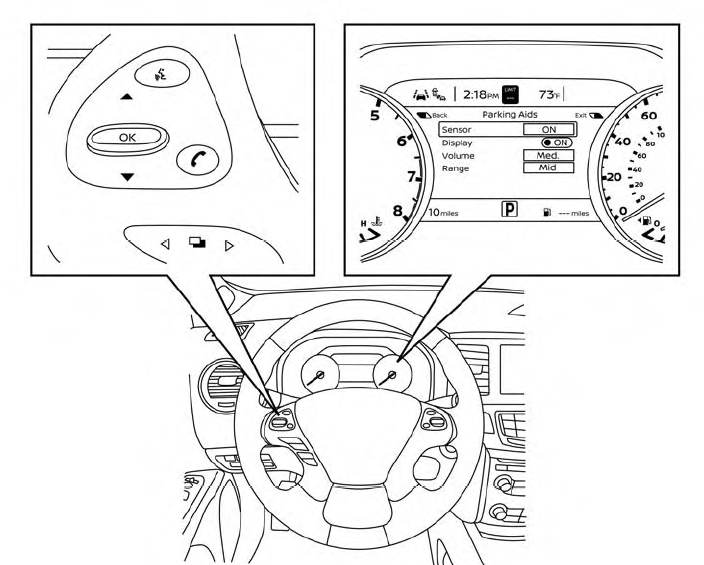
HOW TO ENABLE/DISABLE THE FRONT AND REAR SONAR SYSTEM
The system is automatically activated when the ignition is in the ON position and the shift lever is in the R (Reverse) position.
Perform the following steps to enable or disable the sonar system:
- Press the
 button until
“Settings”
appears in the vehicle information display
and then press OK. Use the
button until
“Settings”
appears in the vehicle information display
and then press OK. Use the  button to select “Driver Assistance.”
Then press the OK button.
button to select “Driver Assistance.”
Then press the OK button. - Select “Parking Aids” and press the OK button.
- Select “Sensor” and press the OK button. Select “ON” and press the OK button.
NOTE:
The system will automatically be turned on when the engine is restarted.
 Hill start assist system
WARNING
Never rely solely on the hill start assist
system to prevent the vehicle from
moving backward on a hill. Always
drive carefully and attentively...

Other information:
Nissan Murano (Z52) 2015-2024 Service Manual: Electric Controlled Coupling
Exploded View Stud bolt Connector bracket Reamer bolt Electric controlled coupling assembly Wave spring Drive pinion oil seal Drive pinion lock nut Pinion front bearing Gear carrier Collapsible spacer Drive pinion adjusting shim Pinion rear bearing Drive pinion Drive gear Differential case Side bearing Side bearing adjusting shim Side oil seal Rear cover Stud bolt Gasket Drain plug Filler plug Pinion mate thrust washer Pinion mate gear Side gear thrust washer Side gear Pinion mate shaft Lock pin Oil seal lip Screw hole : N·m (kg-m, in-lb) : N·m (kg-m, ft-lb) : Always replace after every disassembly...
Nissan Murano (Z52) 2015-2024 Service Manual: Power Supply and Ground Circuit. Driver Seat Control Unit
Diagnosis Procedure NOTE: Do not disconnect the battery negative terminal and the driver seat control unit connector until DTC is confirmed with CONSULT. CHECK FUSE Check that the following fusible link is not blown: Signal name Fusible link No. Capacity Battery power supply L 40 A Is the inspection result normal? YES>> GO TO 2...
Categories
- Manuals Home
- Nissan Murano Owners Manual
- Nissan Murano Service Manual
- Tire rotation
- Memory storage function (key-link)
- How to enable/disable the LDW system
- New on site
- Most important about car
Autolight system

The autolight system allows the headlights to turn on and off automatically. The autolight system can:
Turn on the headlights, front parking, tail, license plate and instrument panel lights automatically when it is dark. Turn off all the lights (except daylight running lights) when it is light. Keep all the lights on for a period of time after you place the ignition switch in the OFF position and all doors are closed.