
Nissan Murano: Basic Inspection / Diagnosis and Repair Workflow
OVERALL SEQUENCE
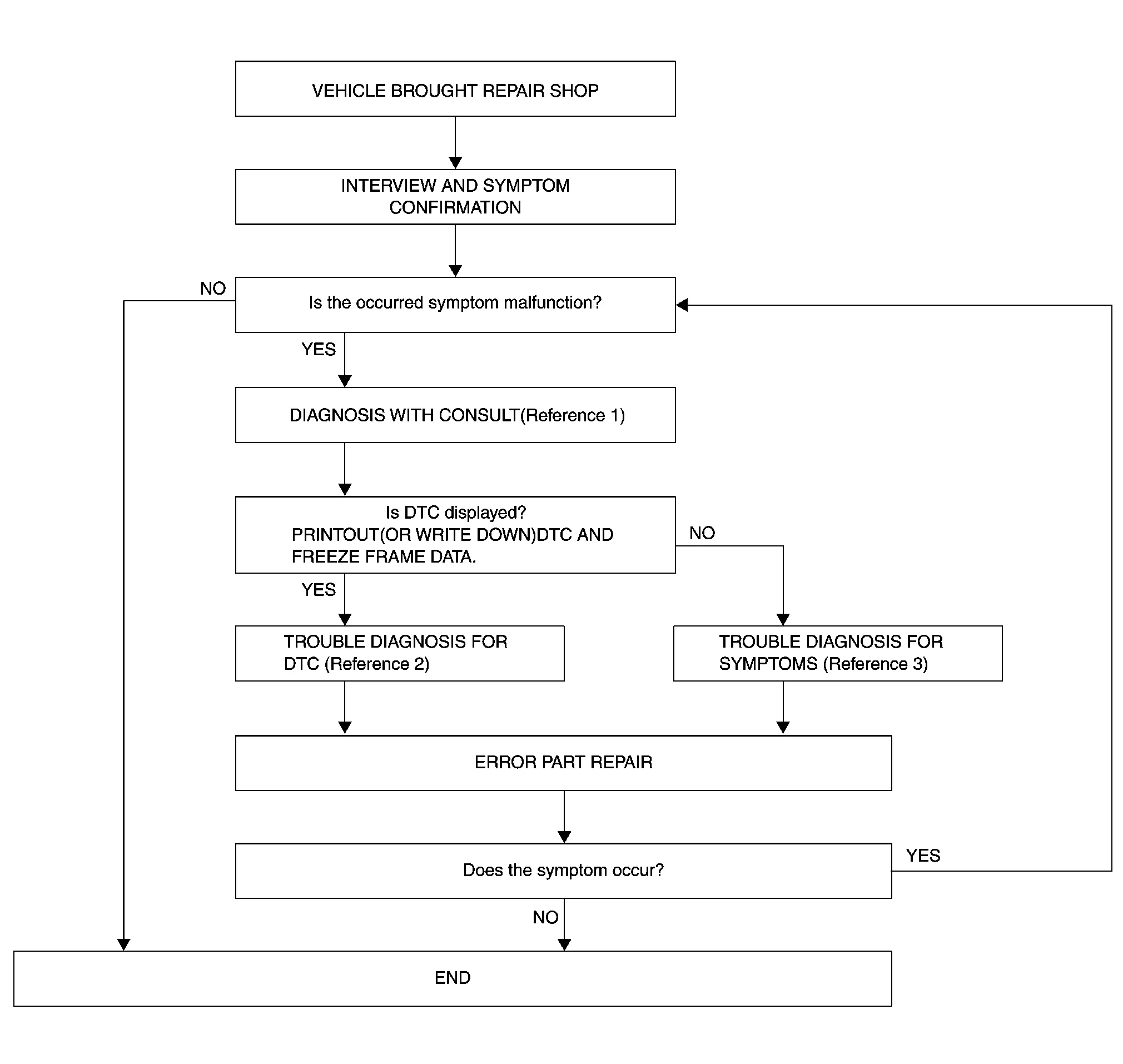
-
Reference 1: Refer to CONSULT Function.
-
Reference 2: Refer to DTC Index.
-
Reference 3: Refer to Symptom Table.
DETAILED FLOW
INTERVIEW AND SYMPTOM CONFIRMATION
Check the malfunction symptoms by performing the following items:
-
Interview the customer to obtain the malfunction information (conditions and environment when the malfunction occurred).
-
Check the symptom.
Is the occurred symptom a malfunction?
YES>>GO TO 2.
NO>>Inspection End.
DIAGNOSIS
 CONSULT
-
Select “Self Diagnostic Result” mode of “AVM”. Refer to CONSULT Function.
 NOTE:
NOTE:
Skip to step 4 of the diagnosis procedure if “AVM” is not displayed.
-
When DTC is detected, follow the instructions below:
-
Record DTC and Freeze Frame Data (FFD).
-
Is DTC displayed?
YES>>GO TO 3.
NO>>GO TO 4.
TROUBLE DIAGNOSIS FOR DTC
CONSULT
-
Check the DTC indicated in the “Self Diagnostic Result”.
-
Perform the relevant diagnosis referring to the DTC Index. Refer to DTC Index.
>>
GO TO 5.
TROUBLE DIAGNOSIS FOR SYMPTOMS
Perform the relevant diagnosis referring to the diagnosis chart by symptom. Refer to Symptom Table.
>>
GO TO 5.
ERROR PART REPAIR
CONSULT
-
Repair or replace the identified malfunctioning parts.
-
Select “Self Diagnostic Result” mode of “AVM”.
NOTE:
Erase the stored self-diagnosis results after repairing or replacing the relevant components if any DTC has been indicated in the “Self Diagnostic Result”.
-
Check that the symptom does not occur.
Does the symptom occur?
YES>>GO TO 1.
NO>>Inspection End.

 Additional Service When Replacing Around View Monitor Control Unit
Description
BEFORE REPLACEMENTWhen replacing around view monitor control unit, save or print current vehicle specification with CONSULT configuration before replacement...
Other information:
Nissan Murano (Z52) 2015-2024 Service Manual: Additional Service When Replacing Tcm and Transaxle Assembly
Description When replacing TCM and transaxle assembly simultaneously, perform the following work. For work procedure, refer to Work Procedure.NOTE: The CD provided with the new transaxle assembly contains important calibration data that must be installed with CONSULT after installation of the new transaxle assembly...
Nissan Murano (Z52) 2015-2024 Service Manual: Door Lock
CONSULT Function (BCM - DOOR LOCK) ECU IDENTIFICATIONThe BCM part number is displayed.SELF DIAGNOSTIC RESULTRefer to DTC Index.DATA MONITOR Monitor Item [Unit] Description REQ SW-DR [On/Off] Indicates condition of door request switch LH. REQ SW-AS [On/Off] Indicates condition of door request switch RH...
Categories
- Manuals Home
- Nissan Murano Owners Manual
- Nissan Murano Service Manual
- System malfunction
- Passenger compartment
- Shift lock release
- New on site
- Most important about car
Driver and passenger supplemental knee air bag

Driver’s side
The knee air bag is located in the knee bolster, on the driver’s and passenger’s side. All of the information, cautions and warnings in this manual apply and must be followed. The knee air bag is designed to inflate in higher severity frontal collisions, although it may inflate if the forces in another type of collision are similar to those of a higher severity frontal impact. It may not inflate in certain collisions.

Passenger’s side
