
Nissan Murano: Basic Inspection / Diagnosis and Repair Work Flow
OVERALL SEQUENCE
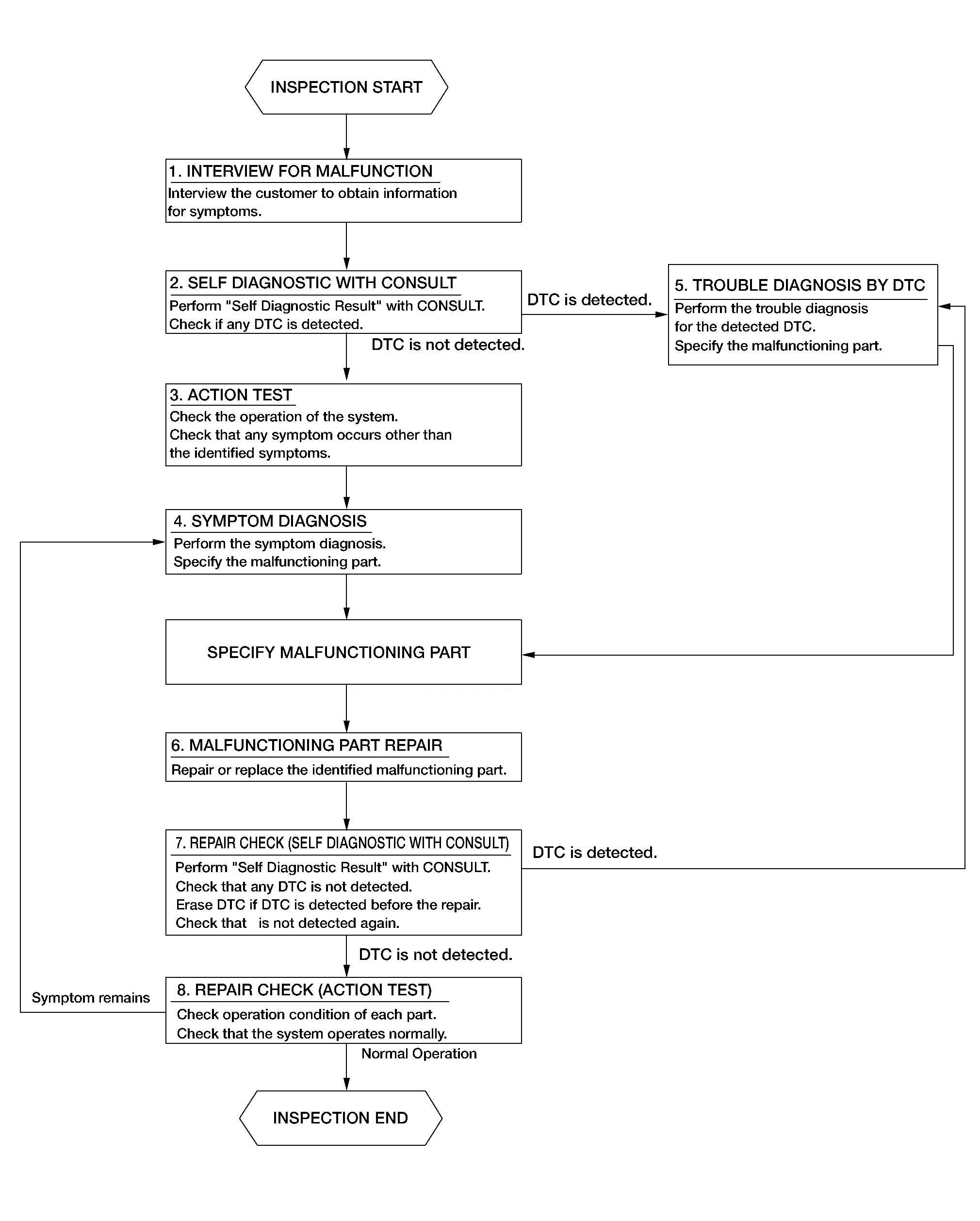
DETAILED FLOW
INTERVIEW FOR MALFUNCTION
It is important to clarify the customer’s concerns before starting the inspection. Interview the customer about the concerns carefully and understand the symptoms fully.
 NOTE:
NOTE:
The customers are not professionals. Never assume that “maybe the customer means...” or “maybe the customer mentioned this symptom”.
>>
GO TO 2.
SELF DIAGNOSTIC RESULT WITH CONSULT
-
Select “Self Diagnostic Result” with CONSULT.
-
Check if the DTC is detected on the “Self Diagnostic Result” mode of “LASER/RADAR”.
Is any DTC detected?
YES>>Record or print self-diagnosis results and freeze frame data (FFD). GO TO 5.
NO>>GO TO 3.
ACTION TEST
Perform the AEB system action test to check the system operation. Check if any other malfunctions occur.
>>
GO TO 4.
SYMPTOM DIAGNOSIS
Perform the applicable diagnosis according to the diagnosis chart by symptom. Refer to Symptom Table.
>>
GO TO 6.
TROUBLE DIAGNOSIS BY DTC
-
Erase self-diagnostic results.
-
Ignition switch OFF → ON.
CAUTION:
Be sure to wait of 10 seconds after turning ignition switch OFF or ON.
-
Check the DTC in the “Self Diagnostic Result”.
-
Perform trouble diagnosis for the detected DTC. Refer to DTC Index.
>>
GO TO 6.
MALFUNCTIONING PART REPAIR
Repair or replace the identified malfunctioning parts.
>>
GO TO 7.
REPAIR CHECK (SELF DIAGNOSTIC RESULT WITH CONSULT)
-
Erase “Self Diagnostic Result”.
-
Select “Self Diagnostic Result” again after repairing or replacing the specific items.
-
Check if any DTC is detected in “Self Diagnostic Result” mode of “LASER/RADAR”.
Is any DTC detected?
YES>>GO TO 5.
NO>>GO TO 8.
REPAIR CHECK (ACTION TEST)
Perform the AEB system action test. Check that the malfunction symptom is solved or no other symptoms occur.
Is there a malfunction symptom?
YES>>GO TO 4.
NO>>Inspection End.

 Additional Service When Replacing Distance Sensor (icc Sensor)
Description
Always perform the radar alignment aiming adjustment after removing and installing or replacing the distance sensor (ICC sensor).
CAUTION:
The system does not operate normally unless the distance sensor (ICC sensor) is aligned properly...
Other information:
Nissan Murano (Z52) 2015-2024 Service Manual: Automatic Back Door System
Component Parts Location A. View of LH side of instrument panel B. View with luggage side lower finisher removed C. View of back door open D. View with kick sensor assembly removed from rear fascia E. View with rear fascia removed F...
Nissan Murano (Z52) 2015-2024 Owners Manual: Rear center seat belt
The rear center seat belt has a connector tongue and a seat belt tongue . Both the connector tongue and the seat belt tongue must be securely latched for proper seat belt operation. WARNING Always fasten the connector tongue and the seat belt in the order shown...
Categories
- Manuals Home
- Nissan Murano Owners Manual
- Nissan Murano Service Manual
- High Beam Assist (if so equipped)
- Jacking up vehicle and removing the damaged tire
- Fuel recommendation
- New on site
- Most important about car
Seatback pockets

Theremaybe one or two seatback pockets located on the back of the driver and passenger seats. The pockets can be used to store maps.
WARNING
