
Nissan Murano: Basic Inspection / Cvt Position
INSPECTION
Turn ON the ignition switch with the shift selector at the “P” position.
Press the shift selector button with the brake pedal depressed, and confirm that the shift selector can be moved to positions other than “P”. Also confirm that movement is not allowed from the “P” position to other positions without depressing the brake pedal.
Move the shift selector and check for “excessive effort”, “sticking”, “noise” or “rattle”.
Confirm that the shift selector stops at each position with the feel of engagement when it is moved through all the positions. Check whether or not the actual position the shift selector is in matches the position shown by the transaxle body.
Make sure that the shift selector is moved to all the shift positions in the manner shown.
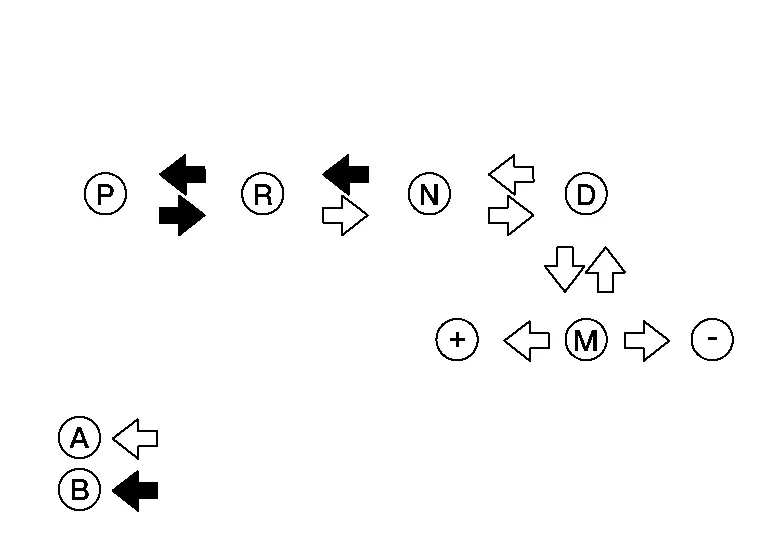
-
(A): Shift selector can operate without pressing the shift selector button.
-
(B): Press shift selector button to operate shift selector, while depressing the brake pedal.
When the shift selector button is pressed without applying forward/backward force to the shift selector at “P”, “R”, “N”, “D” or “M” positions, there should be no “sticking” on the shift selector button operation.
Check that the back-up lamps do not illuminate when the shift selector is in the “P” position.
Check that the engine can be started with the shift selector in the “P” and “N” positions only.
Check that the transaxle is locked completely when the shift selector is in the “P” position.
ADJUSTMENT
Move the selector lever to the “P” position.
CAUTION:
Rotate the wheels at least a quarter turn and be certain the park position mechanism is fully engaged.
Loosen control cable nut (A) and set manual lever (B) to the “P” position.
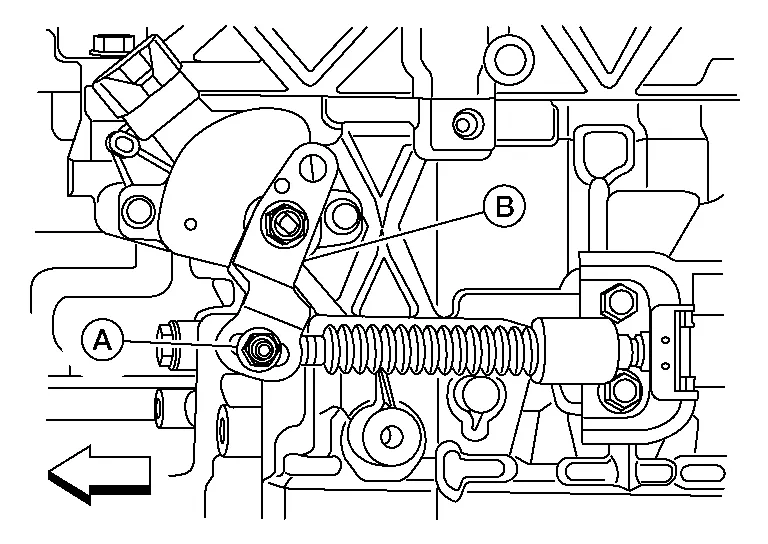
CAUTION:
Do not apply force to the manual lever.
 |
Front |
Tighten control cable nut to the specified torque. Refer to Exploded View.
CAUTION:
Hold the manual lever securely in the "P" position when tightening control cable nut.
 Stall Test
Work Procedure
INSPECTIONCheck the engine oil level. Replenish if necessary. Refer to Inspection.
Check for leak of the CVT fluid. Refer to Inspection...
 How to Erase Permanent Dtc
Description
OUTLINEPermanent DTC is erased with MIL shutoff if the same malfunction is not detected after performing the driving pattern for MIL shutoff three times...
Other information:
Nissan Murano (Z52) 2015-2024 Service Manual: B133a Avm Connection
DTC Description DTC DETECTION LOGIC DTC No. CONSULT screen terms (Trouble diagnosis content) DTC detection condition B133A-8F AVM connection (Camera image signal) Diagnosis condition When ignition switch is ON. Signal (terminal) Camera image signal circuit (terminal 49) Threshold — Diagnosis delay time — POSSIBLE CAUSE Camera image signal circuit Around view monitor control unit AV control unit FAIL-SAFECamera image is inoperative DTC Confirmation Procedure PERFORM DTC CONFIRMATION PROCEDURE CONSULT Ignition switch ON...
Nissan Murano (Z52) 2015-2024 Service Manual: Warning System Chime Does Not Sound
Diagnosis Procedure Symptom check: In the following conditions, the warning system chime may not sound even if the vehicle distance is short. When the vehicles are traveling at the same speed and the distance between vehicles is not changing. When the Nissan Murano vehicle ahead is traveling faster and the distance between vehicles is increasing...
Categories
- Manuals Home
- Nissan Murano Owners Manual
- Nissan Murano Service Manual
- How to enable/disable the LDW system
- Rear bench seat adjustment
- System malfunction
- New on site
- Most important about car
Vehicle security system

Your vehicle has two types of security systems:
Vehicle security system NISSAN Vehicle Immobilizer SystemThe vehicle security system provides visual and audible alarm signals if someone opens the doors, liftgate or the hood when the system is armed. It is not, however, a motion detection type system that activates when a vehicle is moved or when a vibration occurs.
