
Nissan Murano: Electrical & Power Control / Charging System :: Removal and Installation. Generator
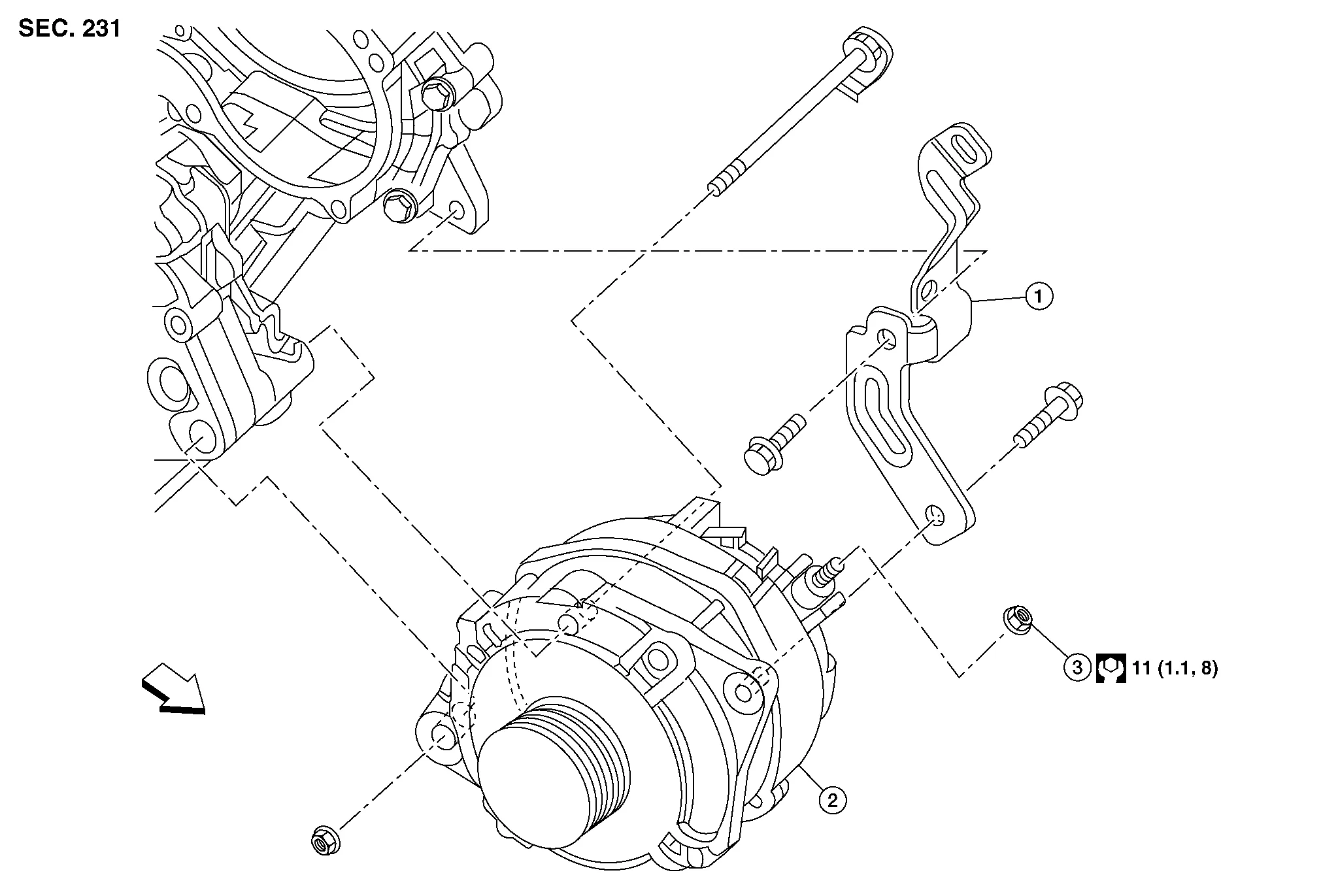
| 1. | Generator bracket | 2. | Generator | 3. | "B" terminal nut |
 |
Front |
REMOVAL
Remove radiator assembly. Refer to Removal and Installation.
Remove cooling fan assembly. Refer to Removal and Installation.
Remove drive belt auto-tensioner assembly. Refer to Removal and Installation of Drive Belt Auto-tensioner.
Disconnect the harness connectors from the generator.
Remove generator bracket.
Remove generator bolts and nut using power tools.
Slide the generator out and remove.
INSTALLATION
Installation is in the reverse order of removal.
CAUTION:
Be sure to tighten “B” terminal nut carefully.
-
Temporarily tighten bolts and nut then tighten nut and bolts in the specified numerical order.
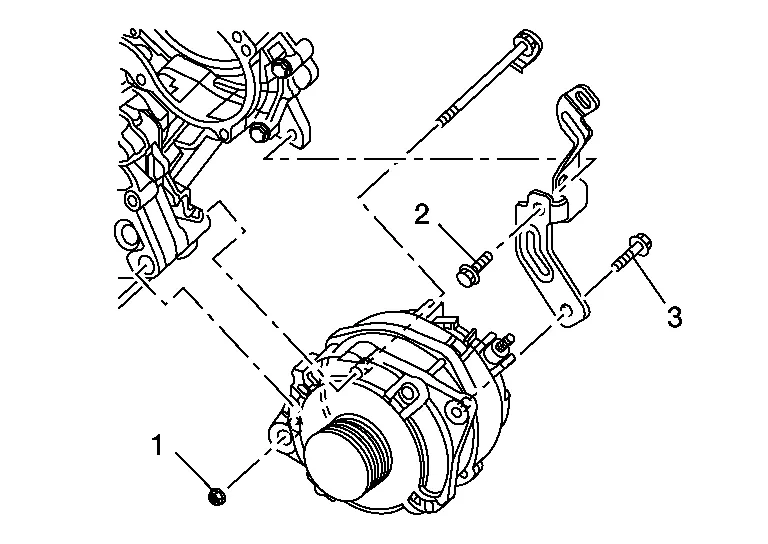
Nut 1 64.7 N·m (6.6 kg-m, 48 ft-lb) Bolt 2 28 N·m (2.9 kg-m, 21 ft-lb) Bolt 3 25 N·m (2.6 kg-m, 18 ft-lb)
-
Install generator and check tension of belt. Refer to Checking Drive Belt.
Perform the following.
Make sure that generator pulley does not rattle.
Make sure that generator pulley nut is tight.
 NOTE:
NOTE:
Replace the generator as an assembly if necessary.
 Charging System :: Symptom Diagnosis. Charging System
Symptom Table
Symptom Reference
Battery discharged.
Refer to Work Flow (With 165-DSS-5000P), or (Without 165-DSS-5000P).
The charge warning lamp does not illuminate when ignition switch ON...
 Charging System :: Service Data and Specifications (sds). Service Data and Specifications (sds)
Generator
Application
VQ35DE
Type*
A003TJ4791ZC
Mitsubishi
Nominal rating
12V-130A
Ground polarity
Negative
Minimum revolution under no-load
1,000 rpm
Hot output current (when 13...
Other information:
Nissan Murano (Z52) 2015-2024 Service Manual: Electronic Controlled Engine Mount
Component Function Check CHECK OVERALL FUNCTION Start engine and warm it up to normal operating temperature. Shift selector position is D while depressing the brake pedal and parking brake pedal. Disconnect electronic controlled engine mount control solenoid valve harness connector...
Nissan Murano (Z52) 2015-2024 Service Manual: Front Axle :: Symptom Diagnosis. Noise, Vibration and Harshness (nvh) Troubleshooting
NVH Troubleshooting Chart Use chart below to find the cause of the symptom. If necessary, repair or replace these parts. Reference — Inspection — Exploded View — Inspection NVH Troubleshooting Chart Inspection NVH Troubleshooting Chart NVH Troubleshooting Chart Inspection NVH Troubleshooting Chart NVH Troubleshooting Chart Possible cause and SUSPECTED PARTS Excessive joint angle Joint sliding resistance Imbalance Improper installation, looseness Parts interference Wheel bearing damage FRONT SUSPENSION FRONT AXLE TIRE WHEEL DRIVE SHAFT BRAKE STEERING Symptom DRIVE SHAFT Noise × × - - - × × × × × - × × Shake × - × - - × × × × × - × × FRONT AXLE Noise - - - × × × × × × × × × Shake - - - × × × × × × × × × Vibration - - - × × × × - × - × - × Shimmy - - - × × - × - × × - × × Shudder - - - × - × - × × - × × Poor quality ride or handling - - - × × - × - × × - - - Inspect Front Axle for cracks or damage...
Categories
- Manuals Home
- Nissan Murano Owners Manual
- Nissan Murano Service Manual
- Turning the AEB system on/off
- Checking engine oil level
- Tire rotation
- New on site
- Most important about car
Vehicle security system

Your vehicle has two types of security systems:
Vehicle security system NISSAN Vehicle Immobilizer SystemThe vehicle security system provides visual and audible alarm signals if someone opens the doors, liftgate or the hood when the system is armed. It is not, however, a motion detection type system that activates when a vehicle is moved or when a vibration occurs.
