
Nissan Murano: Do-it-yourself / Battery replacement
CAUTION
Be careful not to allow children to swallow the battery or removed parts.
NISSAN INTELLIGENT KEY®
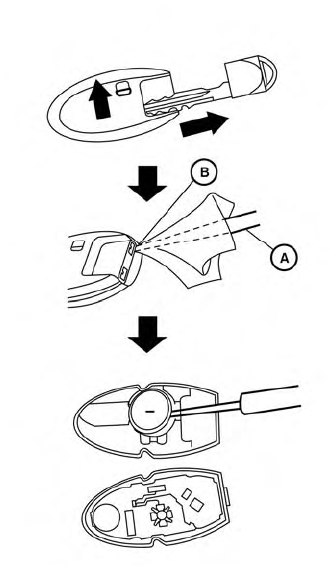
Replace the battery in the Intelligent Key as follows:
- Remove the mechanical key from the Intelligent Key.
- Insert a small flathead screwdriver
 into the slit
  of the corner
and twist it
to separate the upper part from the
lower part. Place a cloth over the
screwdriver to protect the casing.
of the corner
and twist it
to separate the upper part from the
lower part. Place a cloth over the
screwdriver to protect the casing.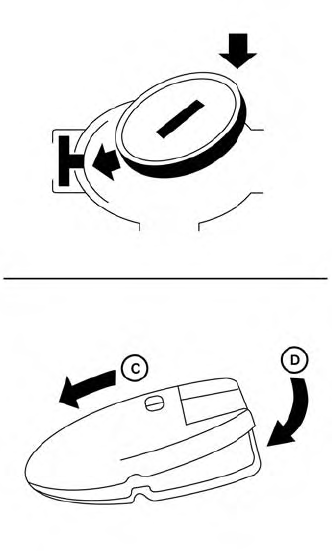
- Replace the battery with a new one.
Recommended battery: CR2032 or equivalent.
- Do not touch the internal circuit and electric terminals as doing so could cause a malfunction.
- Hold the battery by the edges. Holding the battery across the contact points will seriously deplete the storage capacity.
- Make sure that the + side faces the bottom of the lower part.
- Close the lid securely as illustrated with
 and
and
 .
. - Operate the buttons to check the operation.
If you need assistance with replacement, it is recommended that you visit a NISSAN dealer for this service.
FCC Notice:
For USA:
This device complies with Part 15 of the FCC Rules. Operation is subject to the following two conditions: (1) This device maynot cause harmful interference,and (2) this device must accept any interference received, including interference that may cause undesired operation.
Note:
Changes or modifications not expressly approved by the party responsible for compliance could void the user’s authority to operate the equipment.
For Canada:
This device complies with Industry Canada licence-exempt RSS standard(s). Operation is subject to the following two conditions: (1) this device may not cause interference, and (2) this device must accept any interference, including interference that may cause undesired operation of the device.
 Passenger compartment
WARNING
Never use a fuse of higher or lower amperage
rating than that specified on the
fuse box cover. This could damage the
electrical system or electronic control
units or cause a fire...
 Lights
..
Other information:
Nissan Murano (Z52) 2015-2024 Service Manual: Component Parts. Intelligent Around View Monitor with Navigation System
Component Parts Location No. Component Function 1. Rear camera Refer to Rear Camera. 2. Door mirror RH (side camera) Refer to Side Cameras. 3. ABS actuator and electric unit (Control unit) Provides around view monitor control unit with wheel speed signal via CAN communication...
Nissan Murano (Z52) 2015-2024 Service Manual: C1b0a-16 Power Supply Circuit2
DTC Description DTC DETECTION LOGIC DTC No. CONSULT screen terms (Trouble diagnosis content) DTC detection condition C1B0A-16 POWER SUPPLY CIRCUIT2 (Power supply circuit) Diagnosis condition When ignition switch is ON. Signal (terminal) - Threshold Lane camera unit ignition voltage is less than 10...
Categories
- Manuals Home
- Nissan Murano Owners Manual
- Nissan Murano Service Manual
- All-Wheel Drive (AWD) (if so equipped)
- Jacking up vehicle and removing the damaged tire
- Vehicle Dynamic Control (VDC) OFF switch
- New on site
- Most important about car
Fuel gauge
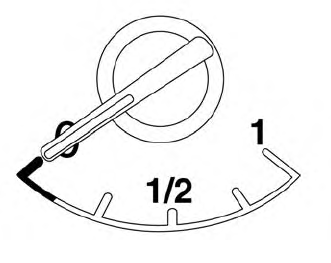
The gauge indicates the approximate fuel level in the tank.
The gauge may move slightly during braking, turning, acceleration, or going up or down hills.
The gauge needle returns to 0 (Empty) after the ignition switch is placed in the OFF position.
