
Nissan Murano: Luggage Floor Trim / Back Door Kicking Plate
Nissan Murano (Z52) 2015-2024 Service Manual / Body Interior / Interior :: Removal and Installation / Luggage Floor Trim / Back Door Kicking Plate
REMOVAL
Remove storage box (LH/RH). Refer to Removal and Installation.
Release pawls using a suitable tool and remove back door striker escutcheon.
Release back door kicking plate clips and pawls using a suitable tool and remove.
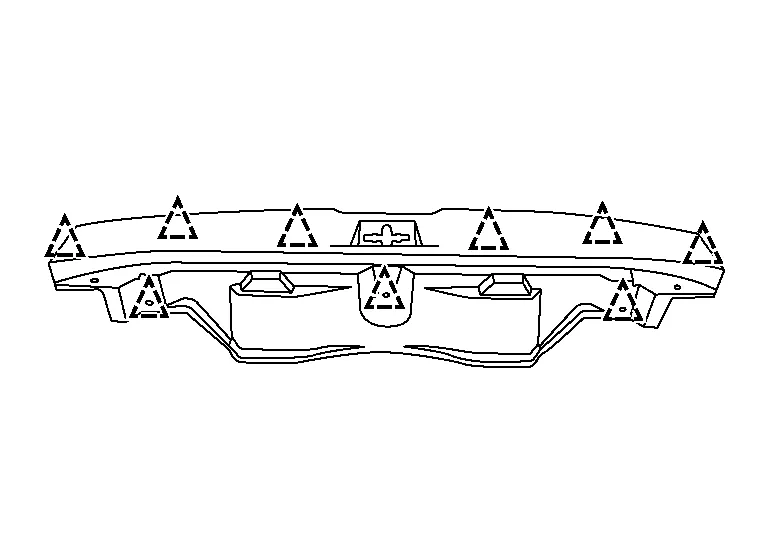
 : Clip
 : Pawl
INSTALLATION
Installation is in the reverse order of removal.
CAUTION:
-
Visually check clips for deformation and damage during installation. Replace with new ones if necessary.
-
When installing back door kicking plate, check that clips are securely placed in body panel holes.
 Storage Box
Removal and Installation
REMOVALRemove luggage side floor board. Refer to Exploded View.
Raise and support luggage floor board using a suitable tool.
Remove screws (A) and remove storage box side finisher (1)...
 Back Door Trim
Exploded View
1.
Back door upper finisher
2.
Back door side finisher (RH)
3.
Back door lower finisher
4.
Back door pull handle
5.
Automatic back door close switch (if equipped)
6...
Other information:
Nissan Murano (Z52) 2015-2024 Service Manual: Diagnosis and Repair Workflow
Work Flow OVERALL SEQUENCEDETAILED FLOWINTERVIEW CUSTOMER Interview the customer to obtain as much information as possible about the conditions and environment under which the malfunction occurred. >> GO TO 2. REPRODUCE THE MALFUNCTION Reproduce the malfunction on the Nissan Murano vehicle that the customer describes...
Nissan Murano (Z52) 2015-2024 Service Manual: Intelligent Key Battery
Removal and Installation Release lock knob on back of Intelligent Key and remove key. Insert a suitable tool (A) wrapped with a cloth into slit of corner and twist it to separate upper part from lower part. CAUTION: Do not insert a tool into notches of Intelligent Key to pry it open as this may damage circuit board...
Categories
- Manuals Home
- Nissan Murano Owners Manual
- Nissan Murano Service Manual
- Shift lock release
- How to enable/disable the LDW system
- Checking engine oil level
- New on site
- Most important about car
Autolight system
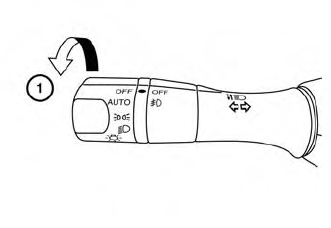
The autolight system allows the headlights to turn on and off automatically. The autolight system can:
Turn on the headlights, front parking, tail, license plate and instrument panel lights automatically when it is dark. Turn off all the lights (except daylight running lights) when it is light. Keep all the lights on for a period of time after you place the ignition switch in the OFF position and all doors are closed.
Copyright © 2026 www.nimurano.com