
Nissan Murano: Dtc/circuit Diagnosis / B130b Rear Right Speaker
DTC DETECTION LOGIC
| DTC No. |
CONSULT screen terms (Trouble diagnosis content) | DTC detection condition | ||
|---|---|---|---|---|
| B130B–13 |
Rear RH speaker (Rear door speaker RH) |
[OPEN] | Diagnosis condition | When ignition switch is ON. |
| Signal (terminal) |
|
|||
| Threshold | – | |||
| Diagnosis delay time | 30 seconds or more | |||
| B130B–1C | [SHORT] | Diagnosis condition | When ignition switch is ON. | |
| Signal (terminal) |
|
|||
| Threshold | – | |||
| Diagnosis delay time | 30 seconds or more | |||
| B130B–11 | [GND–SHORT] | Diagnosis condition | When ignition switch is ON. | |
| Signal (terminal) |
|
|||
| Threshold | – | |||
| Diagnosis delay time | 30 seconds or more | |||
| B130B–12 | [VB–SHOR] | Diagnosis condition | When ignition switch is ON. | |
| Signal (terminal) |
|
|||
| Threshold | – | |||
| Diagnosis delay time | 30 seconds or more | |||
POSSIBLE CAUSE
-
RR SP RH+ open, short, short to ground, short to voltage
-
RR SP RH− open, short, short to ground, short to voltage
-
Rear door speaker RH
-
AV control unit
FAIL-SAFE
Rear door speaker RH inoperative.
PERFORM DTC CONFIRMATION PROCEDURE
 CONSULT
-
Ignition switch ON.
-
Ignition switch OFF and wait at least 30 seconds.
-
Ignition switch ON and wait at least 30 seconds or more.
-
Select “Self Diagnostic Result” mode of “MULTI AV”.
-
Check DTC.
Is DTC B130B detected?
YES>>Proceed to DTC Diagnosis Procedure.
NO>>To check malfunction symptom before repair: Refer to Intermittent Incident.
NO>>Confirmation after repair: Inspection End.
DETERMINE MALFUNCTION TYPE
CONSULT
-
Ignition switch ON.
-
Ignition switch OFF and wait at least 30 seconds.
-
Ignition switch ON and wait at least 30 seconds or more.
-
Select “Self Diagnostic Result” mode of “MULTI AV”.
-
Check DTC.
Is DTC B130B–11, 12, 13 or 1C detected?
YES>>13 [OPEN], or 11 [GND–SHORT] – GO TO 2.
YES>>1C [SHORT] – GO TO 3.
YES>>12 [VB–SHOR] – GO TO 4.
NO>>Refer to Intermittent Incident.
CHECK SOUND SIGNAL CIRCUITS FOR OPEN OR SHORT TO GROUND
-
Ignition switch OFF.
-
Disconnect AV control unit connector and rear door speaker RH connector.
-
Check the continuity between AV control unit connector and rear door speaker RH connector.
AV control unit Rear door speaker RH Continuity Connector Terminal Connector Terminal M161 13 D306 1 Yes 14 2 -
Check the continuity between AV control unit connector and ground.
AV control unit Continuity Connector Terminal Ground M161 13 — No 14
Is the inspection result normal?
YES>>GO TO 5.
NO>>Repair or replace harness or connectors.
CHECK SOUND SIGNAL CIRCUITS FOR SHORT
-
Ignition switch OFF.
-
Disconnect AV control unit connector and rear door speaker RH connector.
-
Check the continuity between the terminals of AV control unit connector.
AV control unit Continuity Connector Terminal M161 13 14 No
Is the inspection result normal?
YES>>GO TO 5.
NO>>Repair or replace harness or connectors.
CHECK SOUND SIGNAL CIRCUIT FOR SHORT TO POWER SUPPLY
-
Ignition switch OFF.
-
Disconnect AV control unit connector and rear door speaker RH connector.
-
Ignition switch ON.
-
Check the voltage between AV control unit connector and ground.
AV control unit Ground Voltage
(Approx.)Connector Terminal M161 13 — 0 V 14
Is the inspection result normal?
YES>>GO TO 5.
NO>>Repair or replace harness or connectors.
CHECK REAR RH SPEAKER SIGNAL
-
Connect AV control unit connector and rear door speaker RH connector.
-
Ignition switch ON.
-
Push AV control unit POWER switch.
-
Check signal between the terminals of AV control unit connector.
AV control unit Condition Reference value Connector (+) (−) Terminal Terminal M161 13 14 Audio signal output 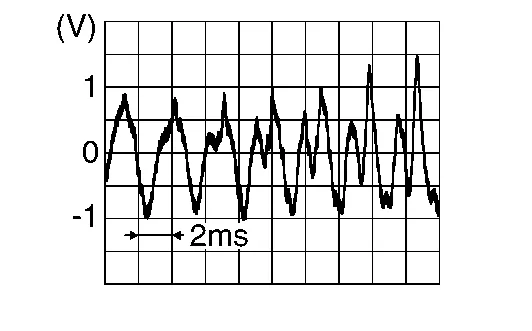
Is the inspection result normal?
YES>>Replace rear door speaker RH. Refer to Removal and Installation.
NO>>Replace AV control unit. Refer to Removal and Installation.
 B1305 Control Unit Internal Fault
DTC Description
DTC DETECTION LOGIC DTC No.
CONSULT screen terms
(Trouble diagnosis content) DTC detection condition
B1305–04
Control unit internal error
(AV control unit internal fault)
[—]
Diagnosis condition
When ignition switch is ON...
 B1315 Am/fm 1 Antenna
DTC Description
DTC DETECTION LOGIC DTC No.
CONSULT screen terms
(Trouble diagnosis content) DTC detection condition
B1315–13
AM/FM 1 antenna
(Radio antenna)
[OPEN]
Diagnosis condition
When ignition switch is ON...
Other information:
Nissan Murano (Z52) 2015-2024 Service Manual: Door Mirror Motor
Component Function Check ACTIVE TEST CONSULT Select “MIRROR MOTOR RH” and “MIRROR MOTOR LH” in “Active Test” mode of “AUTO DRIVE POS.”. Check that the function operates normally. Test item Description MIRROR MOTOR LH UP Door mirror LH Upward DWN Downward L Leftward R Rightward Off Stop MIRROR MOTOR RH UP Door mirror RH Upward DWN Downward L Leftward R Rightward Off Stop Is the inspection result normal? YES>> Door mirror motor function is OK...
Nissan Murano (Z52) 2015-2024 Service Manual: Information Display
System Description SYSTEM DIAGRAMFUNCTIONThe information display can indicate the following items: Outside air temperature Trip computer Intelligent Key operation information Odometer Warning/Indication messages (door open, back door open, low oil pressure, AWD, Intelligent Key, low fuel, low washer fluid, release parking brake, low tire pressure and loose fuel cap)...
Categories
- Manuals Home
- Nissan Murano Owners Manual
- Nissan Murano Service Manual
- High Beam Assist (if so equipped)
- Indicator lights
- Turning the AEB system on/off
- New on site
- Most important about car
Seatback pockets
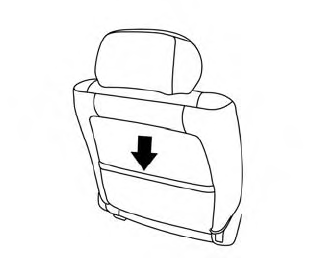
Theremaybe one or two seatback pockets located on the back of the driver and passenger seats. The pockets can be used to store maps.
WARNING
