
Nissan Murano: Vehicle loading information / Vehicle load capacity
Do not exceed the load limit of your vehicle shown as “The combined weight of occupants and cargo” on the Tire and Loading Information label. Do not exceed the number of occupants shown as “Seating Capacity” on the Tire and Loading Information label.
To get “the combined weight of occupants and cargo”, add the weight of all occupants, then add the total luggage weight. Examples are shown in the following illustration.
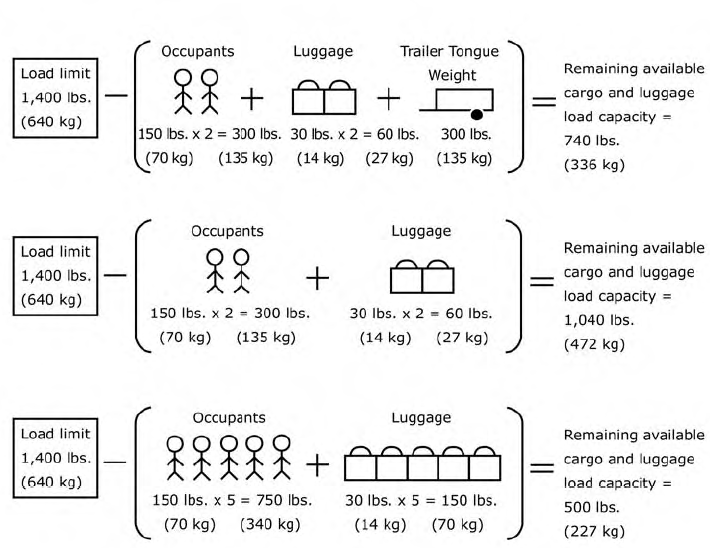
Example
Steps for determining correct load limit
- Locate the statement “The combined weight of occupants and cargo should never exceed XXX lbs. or XXX kg” on your vehicle’s Tire and Loading Information label.
- Determine the combined weight of the driver and passengers that will be riding in your vehicle.
- Subtract the combined weight of the driver and passengers from XXX lbs. or XXX kg.
- The resulting figure equals the available amount of cargo and luggage load capacity. For example, if the XXX amount equals 1,400 lbs. and there will be five 150 lbs. passengers in your vehicle, the amount of available cargo and luggage load capacity is 650 lbs. (1,400-750 (5 X 150) = 650 lbs.) or (640-340 (5 X 70) = 300 kg.)
- Determine the combined weight of luggage and cargo being loaded on the vehicle. That weight may not safely exceed the available cargo and luggage load capacity calculated in step 4.
- If your vehicle will be towing a trailer, load from your trailer will be transferred to your vehicle. Consult this manual to determine how this reduces the available cargo and luggage load capacity of your vehicle.
Before driving a loaded vehicle, confirm that you do not exceed the GVWR or the GAWR for your vehicle. For additional information, refer to “Measurement of weights” in this section.
Also check tires for proper inflation pressures. For additional information, refer to “Tire and Loading Information label” in the “Do-it-yourself” section of this manual.
 Terms
Terms
It is important to familiarize yourself
with the following terms before
loading your vehicle:
Curb Weight (actual weight of
your vehicle) - vehicle weight including:
standard and optional
equipment, fluids, emergency
tools, and spare tire assembly...
 Securing the load
Cargo area luggage hooks
There are luggage hooks located in the
cargo area as shown. The hooks can be
used to secure cargo with ropes or other
types of straps...
Other information:
Nissan Murano (Z52) 2015-2024 Service Manual: Vdc Function
System Description SYSTEM DIAGRAM Side slip or tail slip may occur while driving on a slippery road or intending urgent evasive driving. VDC function detects side slip status using each sensor when side slip or tail slip is about to occur and improves Nissan Murano vehicle stability by brake control and engine output control during driving...
Nissan Murano (Z52) 2015-2024 Owners Manual: How to switch the display
With the ignition switch in the ON position, press the CAMERA button or move the shift lever to the R (Reverse) position to operate the Intelligent Around View Monitor. The Intelligent Around View Monitor displays different split screen views depending on the position of the shift lever...
Categories
- Manuals Home
- Nissan Murano Owners Manual
- Nissan Murano Service Manual
- GAS STATION INFORMATION
- High Beam Assist (if so equipped)
- Turning the AEB system on/off
- New on site
- Most important about car
