
Nissan Murano: System Description / System
SYSTEM DIAGRAM
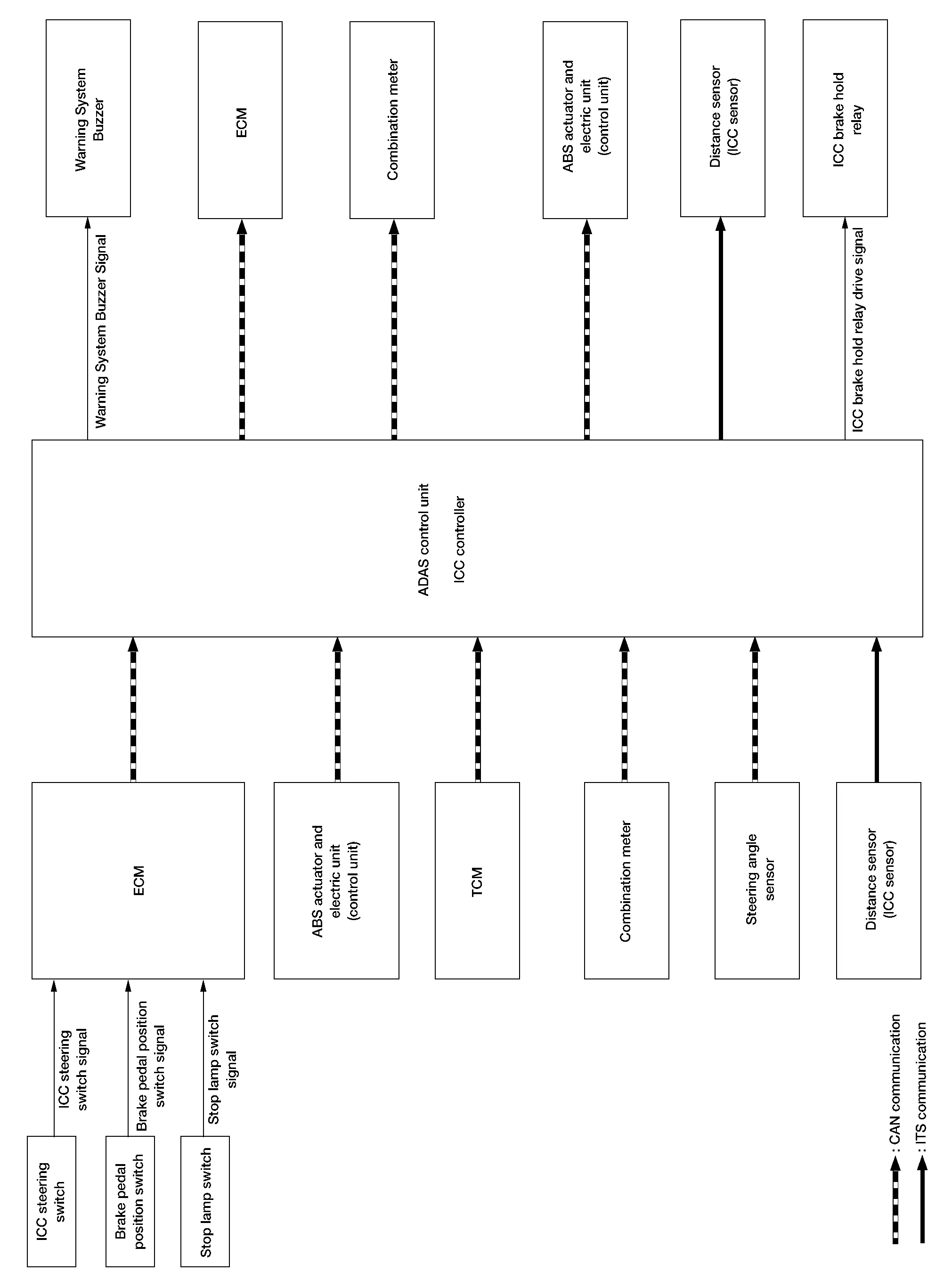
DISTANCE SENSOR (ICC SENSOR) INPUT/OUTPUT SIGNAL ITEM
Input Signal Item
| Transmit unit | Signal name | Description | ||
|---|---|---|---|---|
| ADAS control unit | ITS communication | ADAS sensor signal | State of ADAS | |
Output Signal Item
| Reception unit | Signal name | Description | ||
|---|---|---|---|---|
| ADAS control unit | ITS communication | Distance sensor (ICC sensor) signal | Transmits information for ICC | |
ADAS CONTROL UNIT INPUT/OUTPUT SIGNAL ITEM
Input Signal
| Reception unit | Signal name | Description | ||
|---|---|---|---|---|
| ECM | CAN communication | Engine speed signal | Receives engine speed | |
| Accelerator pedal position signal | Receives accelerator pedal position (angle) | |||
| Closed throttle position signal | Receives idle position state (ON/OFF) | |||
| ICC prohibition signal | Receives operable/inoperable state of the ICC system | |||
| ICC steering switch signal | Main switch signal | Receives the operational state of the ICC steering switch | ||
| SET/COAST switch signal | ||||
| CANCEL switch signal | ||||
| RESUME/ACCELERATE switch signal | ||||
| DISTANCE switch signal | ||||
| Stop lamp switch signal | Receives an operational state of the brake pedal | |||
| Brake pedal position switch signal | Receives an operational state of the brake pedal | |||
| TCM | CAN communication | Input speed signal | Receives the number of revolutions of input shaft | |
| Output shaft revolution signal | Receives the number of revolutions of output shaft | |||
| Current gear position signal | Receives a current gear position | |||
| Shift position signal | Receives a selector lever position | |||
| ABS actuator and electric unit (control unit) | CAN communication | ABS malfunction signal | Receives a malfunction state of ABS | |
| ABS operation signal | Receives an operational state of ABS | |||
| ABS warning lamp signal | Receives an ON/OFF state of ABS warning lamp | |||
| TCS malfunction signal | Receives a malfunction state of TCS | |||
| TCS operation signal | Receives an operational state of TCS | |||
| VDC OFF switch signal | Receives an ON/OFF state of VDC | |||
| VDC malfunction signal | Receives an malfunction state of VDC | |||
| VDC operation signal | Receives an operational state of VDC | |||
| Nissan Murano Vehicle speed signal (ABS) | Receives wheel speeds of four wheels | |||
| Stop lamp switch signal | Receives an operational state of the brake pedal | |||
| Yaw rate signal | Receives yaw rate acting on Nissan Murano vehicle | |||
| Combination meter | CAN communication | Parking brake switch signal | Receives an operational state of the parking brake | |
| System selection signal | Receives a selection state of AEB system | |||
| Steering angle sensor | CAN communication | Steering angle sensor malfunction signal | Receives a malfunction state of steering angle sensor | |
| Steering angle sensor signal | Receives the number of revolutions and turning direction of the steering wheel | |||
| Steering angle speed signal | Receives the turning angle speed of the steering wheel | |||
| Distance sensor (ICC sensor) | ITS communication | Distance sensor (ICC sensor) signal | Receives detection information, such as the presence or absence of a leading Nissan Murano vehicle, and distance from the vehicle. | |
Output Signal
| Reception unit | Signal name | Description | ||
|---|---|---|---|---|
| ECM | CAN communication | ICC operation signal | Transmits an ICC operation signal necessary for Intelligent Cruise Control | |
| TCM | CAN communication | ICC operation signal | Transmits an ICC operation signal necessary for Intelligent Cruise Control via ECM | |
| ABS actuator and electric unit (control unit) | CAN communication | Brake fluid pressure control signal | Transmits a brake fluid pressure control signal to activate the brake | |
| Combination meter | CAN communication | Meter display signal | ICC warning lamp signal | Transmits a signal to display a state of the system on the information display |
| Nissan Murano Vehicle ahead detection indicator signal | ||||
| Set vehicle speed indicator signal | ||||
| Set distance indicator signal | ||||
| SET switch indicator signal | ||||
| MAIN switch indicator signal | ||||
| AEB indicator lamp signal |
|
|||
| Warning system buzzer output signal |
Transmits a buzzer output signal to turn ON the buzzer of the following systems:
|
|||
| Distance sensor (ICC sensor) | ITS communication | ADAS status signal | State of ADAS | |
| ICC brake hold relay | ICC brake hold relay drive signal | Activates the brake hold relay and turns ON the stop lamp | ||
FUNCTION DESCRIPTION
The Intelligent Cruise Control (ICC) system automatically maintains a selected distance from the vehicle traveling in front of own Nissan Murano vehicle according to that vehicle's speed (up to the set speed) or at the set speed when the road ahead is clear.
With ICC system, the driver can maintain the same speed as other vehicles without the constant need to adjust the set speed as the driver would with a normal cruise control system.
The following items are controlled:
-
When there are no vehicles traveling ahead, the ICC system maintains the speed set by the driver. The set speed range is between approximately 32 and 144 km/h (20 and 90 MPH).
-
When there is a Nissan Murano vehicle traveling ahead, the ICC system adjusts the speed to maintain the distance, selected by driver, from a Nissan Murano vehicle ahead. The adjusting speed range is up to the set speed.
-
When the vehicle traveling ahead has moved out from its lane of travel, the ICC system accelerates and maintains Nissan Murano vehicle speed up to the set speed.
CAUTION:
If the vehicle ahead comes to a stop, the vehicle decelerates to a standstill within the limitations of the system. The system will cancel once it judges that the Nissan Murano vehicle has come to a standstill and sound a warning chime.
To prevent the vehicle from moving, the driver must depress the brake pedal.
 NOTE:
NOTE:
When the accelerator pedal is depressed, the brake operation and the warning are not performed by the ICC system.
OPERATION DESCRIPTION
Push and release the MAIN switch ON.
The MAIN switch indicator, set distance indicator and set vehicle speed indicator come on and ICC system is set to a standby state.
ADAS control unit performs the control as per the following:
| Constant speed | Comparing the set Nissan Murano vehicle speed with the current vehicle speed, it transmits the command to ECM via CAN communication to reach the set Nissan Murano vehicle speed and controls the electric throttle control actuator. |
| Deceleration | When a Nissan Murano vehicle ahead (slower than driver set vehicle speed) appears or when a vehicle ahead slows down, the system controls the electric throttle control actuator into the close direction and decelerates the Nissan Murano vehicle. If greater deceleration is necessary, the system transmits the brake fluid pressure control signal to the ABS actuator and electric unit (control unit) via CAN communication and operates the brake. |
| Following | The system controls the electric throttle control actuator and the brake fluid pressure to keep the proper distance between the Nissan Murano vehicles according to the vehicle speed change of the vehicle ahead. |
| Acceleration | When a Nissan Murano vehicle ahead is not detected because it changes lanes or own vehicle changes lanes during the following driving, the system controls the electric throttle control actuator to the open direction and accelerates the Nissan Murano vehicle to the set vehicle speed slowly. |
Set Condition
Under a standby state, pushing down the SET/COAST switch will start system control.
-
When vehicle speed is between approximately 32 km/h and 144 km/h (20 MPH and 90 MPH).
-
When Nissan Murano vehicle speed is below approximately 32 km/h (20 MPH) if the vehicle ahead is detected. The set vehicle speed becomes 32 km/h (20 MPH).
If the system is canceled by conditions 1-6 below, the system will resume control at the last set cruising speed by pushing up the RESUME/ACCELERATE switch.
NOTE:
-
When the SET/COAST switch is pushed under the following conditions, the system cannot be set and the set Nissan Murano vehicle speed indicator will blink for approximately 2 seconds:
-
When traveling below 32 km/h (20 MPH) and the Nissan Murano vehicle ahead is not detected.
-
When the selector lever is not in the “D” position or manual mode.
-
When the parking brake is applied.
-
When the brakes are operated by the driver.
-
-
When the SET/COAST switch is pushed under the following conditions, the system cannot be set and a warning chime will sound and display causes in combination meter (information display):
-
When the VDC is OFF. (To use the ICC system, turn ON the VDC system, push the MAIN switch to turn OFF the ICC system and reset the ICC system by pushing the MAIN switch again.)
-
When ABS or VDC (including the TCS) operates.
-
When the wheel is slipping. (To use the ICC system, make sure the wheels are no longer spinning, push the MAIN switch to turn OFF the ICC system and reset the ICC system by pushing the MAIN switch again.)
-
Cancel Conditions
-
When CANCEL switch is pressed.
-
When brake pedal is depressed.
-
When the Nissan Murano vehicle ahead is not detected below the speed of 24 km/h (15 MPH).
-
When the selector lever is not in the “D” position or manual mode.
-
When the parking brake is applied.
-
When the system judges the Nissan Murano vehicle is at a standstill.
-
When ABS or VDC (including the TCS) operates.
-
When the MAIN switch is turned OFF.
-
When a wheel slips.
-
When the VDC is turned OFF.
-
When the system malfunction occurs.
Refer to Fail-safe (ADAS Control Unit).
If a malfunction occurs in the distance sensor (ICC sensor), ADAS control unit cancels control, sounds a beep, and turns ON the ICC system warning lamp in the combination meter.
 Component Parts. Intelligent Cruise Control System
Component Parts Location
A.
Center of instrument panel (view with center console assembly removed)
B.
Engine room right side
C.
Center area of front bumper
D...
 Operation. Intelligent Cruise Control
Switch Name and Function
No. Switch name Description
1.
CANCEL switch
Deactivates the system without erasing the set speed
2.
RES/+ switch
Resumes set speed or increases speed incrementally
Push and hold the switch to increase the set speed by 5km/h (3...
Other information:
Nissan Murano (Z52) 2015-2024 Service Manual: Bcm (body Control Module)
L..
Nissan Murano (Z52) 2015-2024 Service Manual: P0107 Barometric Pressure Sensor
DTC Description DTC DETECTION LOGIC DTC No. CONSULT screen terms (Trouble diagnosis content) DTC detecting condition Possible cause P0107 ABSL PRES SEN/CIRC (Manifold Absolute Pressure/Barometric Pressure Sensor Circuit Low) An excessively low voltage from the sensor is sent to ECM...
Categories
- Manuals Home
- Nissan Murano Owners Manual
- Nissan Murano Service Manual
- System malfunction
- High Beam Assist (if so equipped)
- How to enable/disable the LDW system
- New on site
- Most important about car
LATCH (Lower Anchors and Tethers for CHildren) system

LATCH system lower anchor locations - bench seat
Your vehicle is equipped with special anchor points that are used with LATCH system compatible child restraints. This system may also be referred to as the ISOFIX or ISOFIX compatible system. With this system, you do not have to use a vehicle seat belt to secure the child restraint unless the combined weight of the child and child restraint exceeds 65 lbs. (29.5 kg). If the combined weight of the child and child restraint is greater than 65 lbs. (29.5 kg), use the vehicle’s seat belt (not the lower anchors) to install the child restraint. Be sure to follow the child restraint manufacturer’s instructions for installation.
