
Nissan Murano: Sonar System :: System Description / System
SYSTEM DIAGRAM
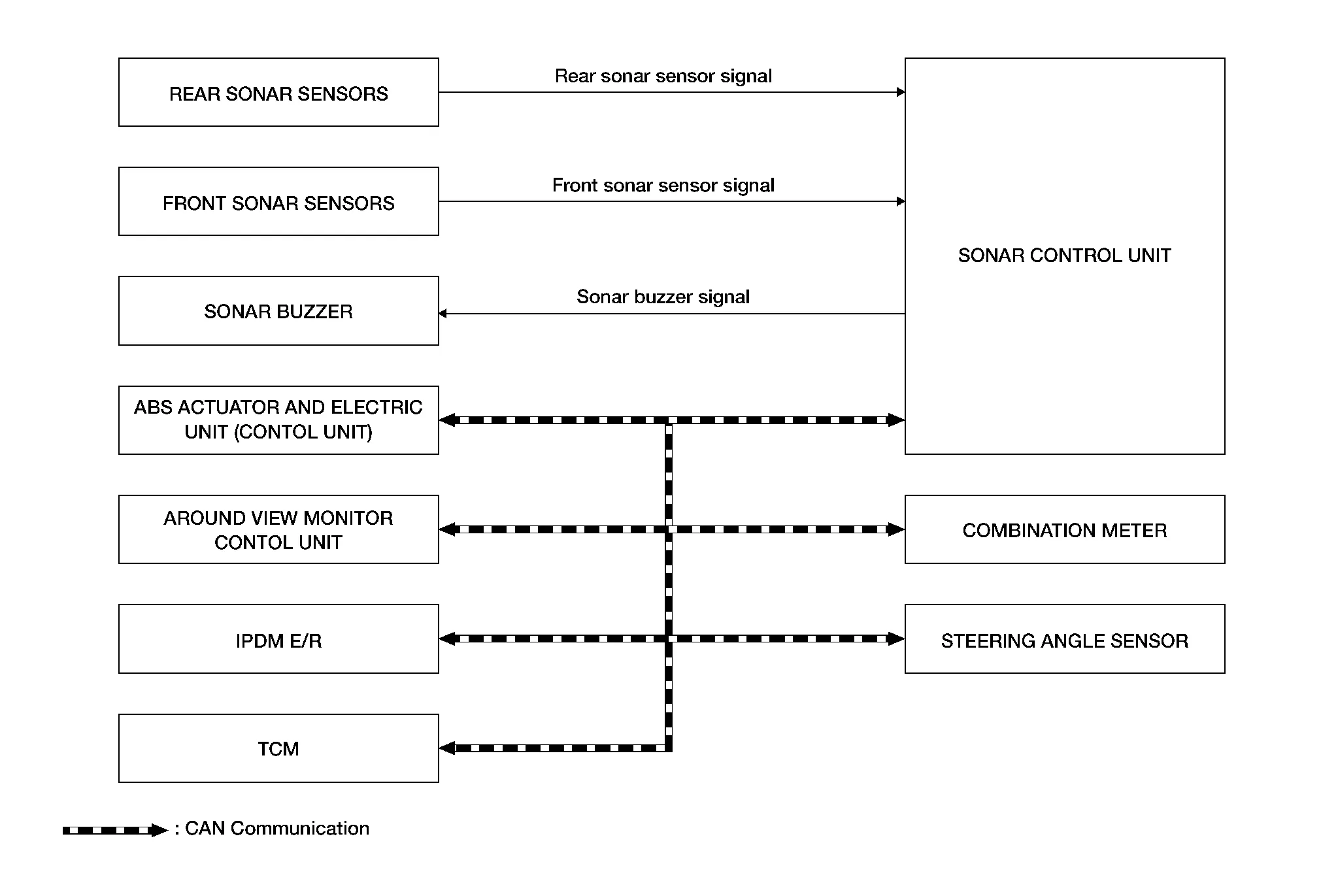
Sonar Control Unit Input Signal (CAN Communication)
| Component parts | Signal description |
|---|---|
| ABS actuator and electric unit (control unit) | Transmits the Nissan Murano vehicle speed signal to sonar control unit via CAN communication. |
| Around view monitor control unit | Transmits the setting change request signal to sonar control unit via CAN communication. |
| Combination meter | Transmits the setting change request signal to sonar control unit via CAN communication. |
| IPDM E/R | Transmits the battery voltage signal to sonar control unit via CAN communication. |
| Steering angle sensor | Transmits the steering angle signal to sonar control unit via CAN communication. |
| TCM | Transmits the transmission range indication signal to sonar control unit via CAN communication. |
CAMERA ASSISTANCE SONAR FUNCTION
-
For vehicles with Intelligent Around View® Monitor system, sonar sensors are installed on front bumper and rear bumper. When an obstacle is detected while Intelligent Around View Monitor is displayed, a sonar indicator display and sonar buzzer sound notify the driver of the proximity of an obstacle. When an obstacle is detected while Intelligent Around View Monitor is not displayed, Intelligent Around View Monitor screen is displayed automatically, and then notification is similarly indicated as per the display and sonar buzzer sound.
-
For Nissan Murano vehicles with Rear View Monitor system, sonar sensors are installed on front bumper and rear bumper. When an obstacle is detected while rear view monitor is displayed, a sonar indicator display and buzzer sound notify the driver of the proximity of an obstacle. When an obstacle is detected while rear view monitor is not displayed, rear view monitor screen is displayed automatically, and then notification is similarly indicated as per the display and buzzer sound.
-
Approaching distance between bumper and obstacle is displayed in 3 stages according to the color of the sonar indicator in display and blinking cycle of indicator.
-
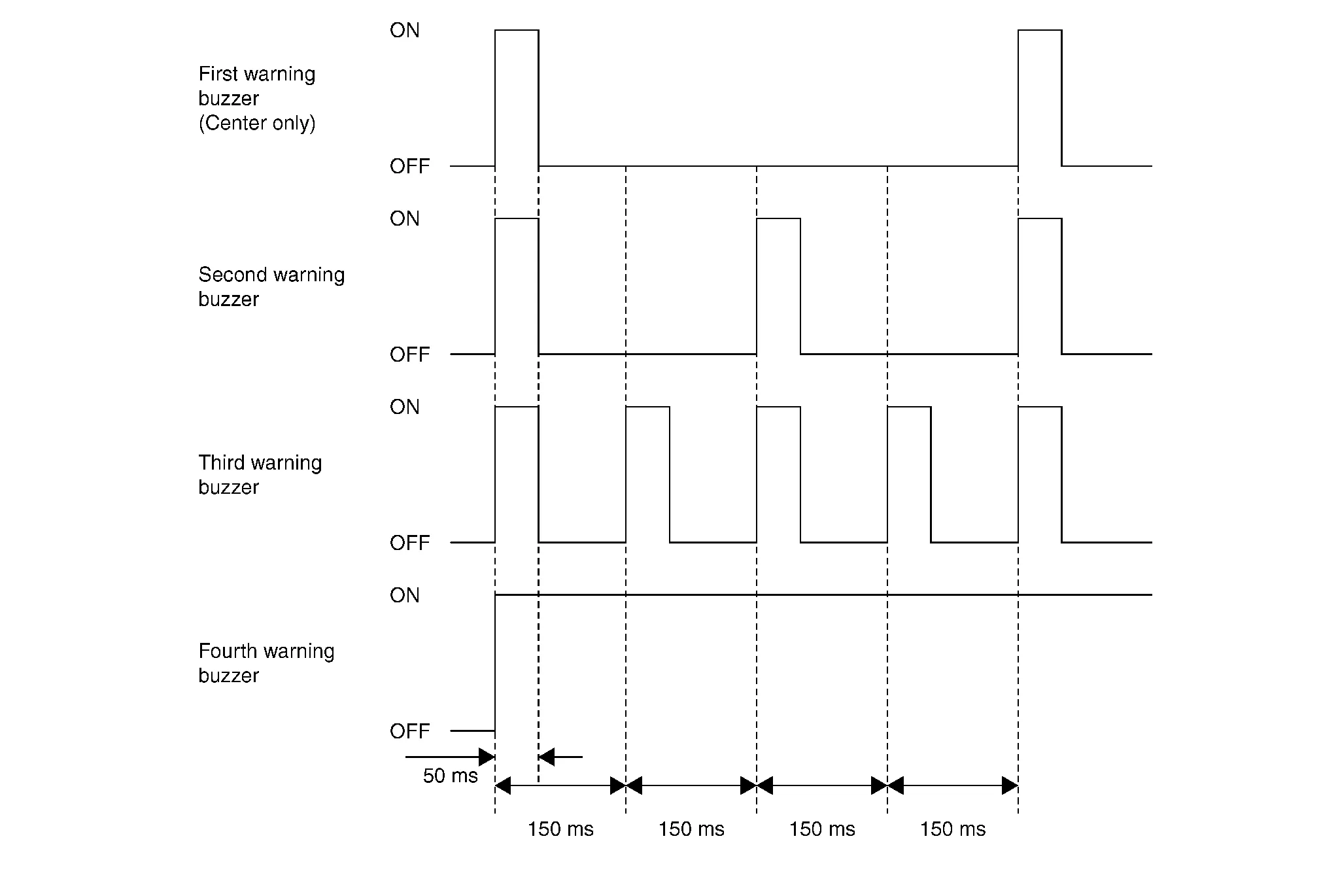
Warning by sonar buzzer sound notifies distance to obstacle according to a 3-stage cycle.
System Operation Description
-
Sonar control unit receives shift position signal from TCM and vehicle speed signal from ABS actuator control unit via CAN communication, and controls ON/OFF of sonar system.
-
For Nissan Murano vehicles with Intelligent Around View Monitor system, sonar control unit transmits detection signal and detection distance signal to Intelligent Around View Monitor via CAN communication, according to signal from corner sensor depending on conditions shown in the following table: Intelligent Around View Monitor displays the applicable sonar indicator.
-
For Nissan Murano vehicles without Intelligent Around View Monitor system, sonar control unit transmits detection signal and detection distance signal to audio unit (without Navigation system) or AV control unit (with Navigation system) via CAN communication, according to signal from sonar sensors depending on conditions shown in the following table: Rear view monitor displays the applicable sonar indicator.
Sonar system operation condition Sonar operation Shift position Nissan Murano Vehicle speed Obstacle Sonar indicator Sonar buzzer R position Less than 10 km/h (6 MPH) Yes Detection status is displayed Yes P or N position Less than 10 km/h (6 MPH) Yes Detection status is displayed* None — 10 km/h (6 MPH) or more Yes Not displayed None *: Only when camera image is displayed.
-
For Nissan Murano vehicles with around view monitor system:
-
When sonar is OFF in “Settings”, sonar OFF display is displayed. Sonar OFF display is a function that displays frame in orange on the 4 corners of Nissan Murano vehicle icon on Birds-Eye view to notify driver of sonar OFF status. When sonar is switched to OFF by “Settings”, sonar OFF display is only displayed for rear side of Nissan Murano vehicle icon.
-
Sonar control unit is equipped with diagnosis function. Corner sensor malfunction and sensor harness open circuit can be detected. Malfunction status is transmitted to around view monitor control unit. Sonar OFF status is displayed and notified to the driver.
-
-
For Nissan Murano vehicles without around view monitor system, sonar control unit is equipped with diagnosis function. Corner sensor malfunction and sensor harness open circuit can be detected. Malfunction status is transmitted to audio unit (without Navigation system) or AV control unit (with Navigation system). Sonar OFF status is displayed and notified to the driver.
Obstacle Detection Distance
-
Sonar control unit changes output of sonar display and sonar buzzer according to obstacle detection distance from sensors.
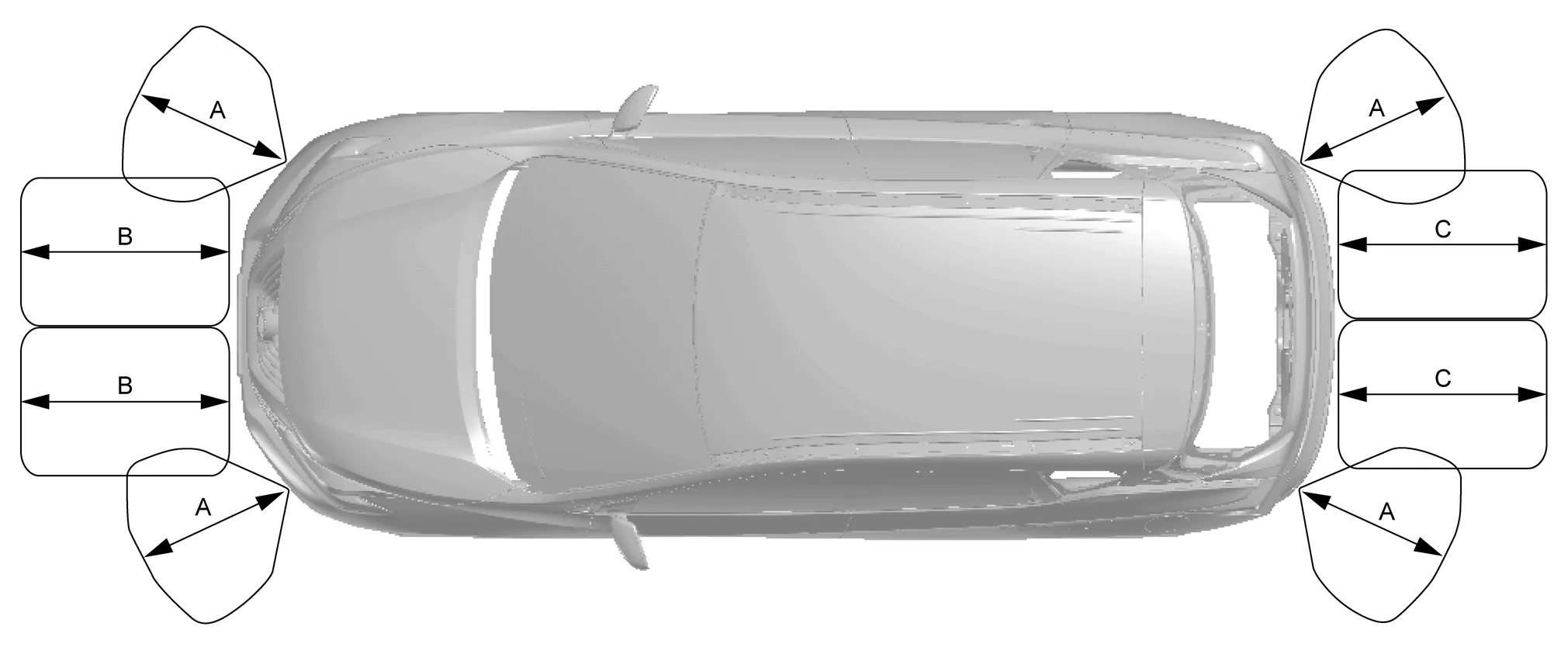
A. Approx. 60 cm (23.62 in)
(default value)B. Approx. 100 cm (39.37 in)
(default value)C. Approx. 150 cm (59.06 in)
(default value) -
Sonar control unit changes setting of obstacle detection distance in 4 stages.
Detection distance Item (detection range) Corner sensor Front center sensor Rear center sensor Far (default + 10%) Approx. 66 cm (25.98 in) Approx. 110 cm (43.31 in) Approx. 165 cm (64.96 in) Mid (default value) Approx. 60 cm (23.62 in) Approx. 100 cm (39.37 in) Approx. 150 cm (59.06 in) Near (default - 10%) Approx. 54 cm (21.26 in) Approx. 90 cm (35.43 in) Approx. 135 cm (53.15 in)
Sonar Indicator Display
-
For vehicles with Intelligent Around View Monitor system:
-
When around view monitor control unit receives detection signal and detection distance signal from sonar control unit, the around view monitor control unit displays the sonar indicator on display control unit.
-
Around view monitor control unit changes display color and indicator blinking cycle according to detection distance.
-
-
For vehicles without Intelligent Around View Monitor system:
-
When audio unit (without Navigation system) or AV control unit (with Navigation system) receives detection signal and detection distance signal from sonar control unit, the audio unit (without Navigation system) or AV control unit (with Navigation system) displays the sonar indicator on display.
-
Audio unit (without Navigation system) or AV control unit (with Navigation system) changes display color and indicator blinking cycle according to detection distance.
-
Sonar indicator display color and blinking cycle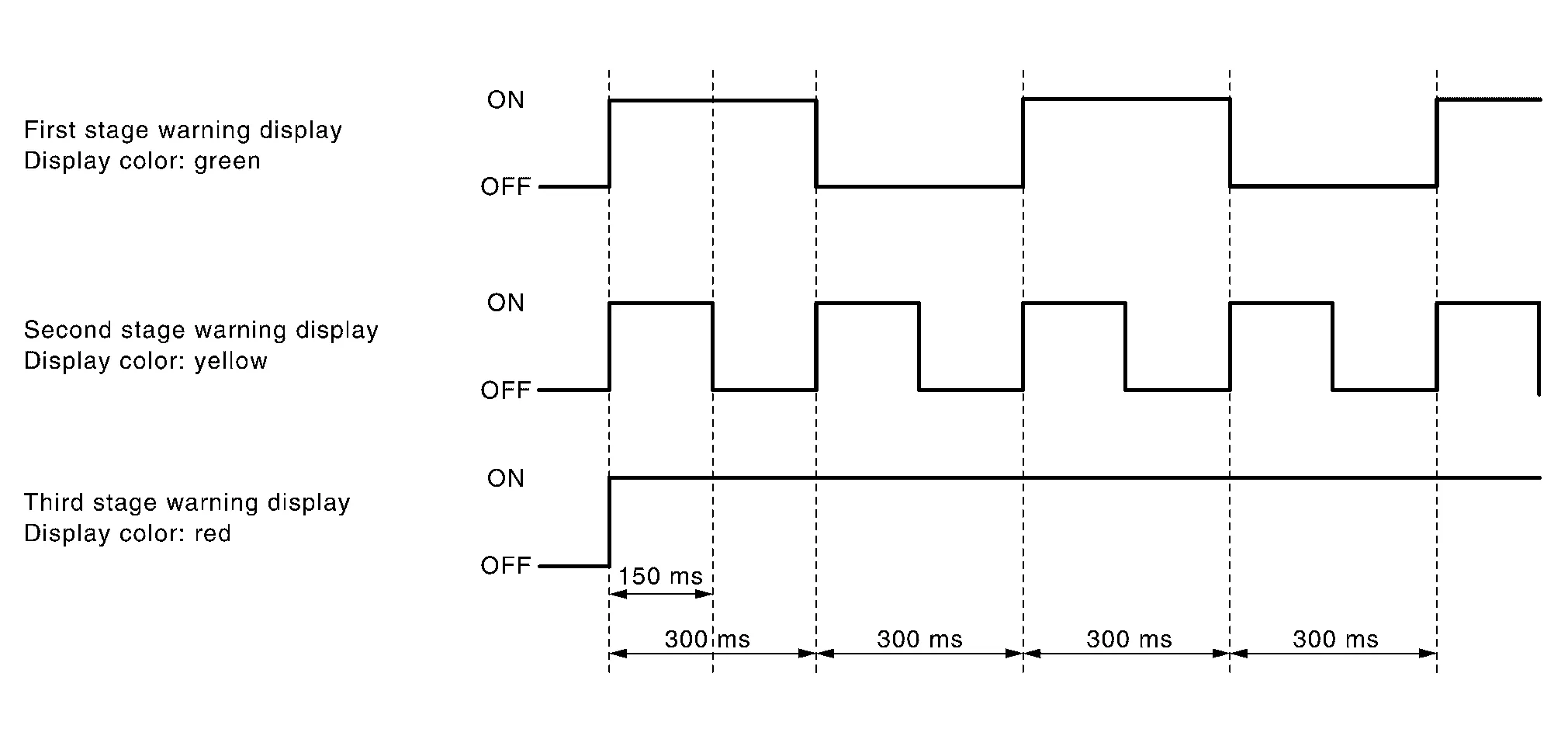
Sonar Buzzer Frequency
-
The sonar buzzer cycle changes between 4 levels (for center) and 3 levels (for corner) according to the detection distance.
-
The nearest sensor from the detected obstacle determines the sonar buzzer cycle if multiple sensors detect an obstacle simultaneously.
 NOTE:
NOTE:
The sonar buzzer of the corner sensor sounds as follows:
-
As for the first, second and third stages, the sonar buzzer sound for 3 seconds at maximum.
-
As for the fourth stage, the sonar buzzer does not stop even after a lapse of 3 seconds.
-
Sonar buzzer stops when the Nissan Murano vehicle moves away from an obstacle and the warning level decreases.
 Component Parts. Sonar System
Component Parts Location
No. Component Function
1.
Rear sonar sensor RH inner
Refer to Sonar Sensor.
2.
Rear sonar sensor RH outer
3...
 Diagnosis System (sonar Control Unit)
CONSULT Function
CAUTION:
After disconnecting the CONSULT vehicle interface (VI) from the data link connector, the ignition must be cycled OFF → ON (for at least 5 seconds) → OFF...
Other information:
Nissan Murano (Z52) 2015-2024 Service Manual: Power Outlet :: Precaution. Precautions
Precaution for Supplemental Restraint System (SRS) "AIR BAG" and "SEAT BELT PRE-TENSIONER" The Supplemental Restraint System such as “AIR BAG” and “SEAT BELT PRE-TENSIONER”, used along with a front seat belt, helps to reduce the risk or severity of injury to the driver and front passenger for certain types of collisions...
Nissan Murano (Z52) 2015-2024 Service Manual: Precaution. Precautions
Precaution for Supplemental Restraint System (SRS) "AIR BAG" and "SEAT BELT PRE-TENSIONER" The Supplemental Restraint System such as “AIR BAG” and “SEAT BELT PRE-TENSIONER”, used along with a front seat belt, helps to reduce the risk or severity of injury to the driver and front passenger for certain types of collisions...
Categories
- Manuals Home
- Nissan Murano Owners Manual
- Nissan Murano Service Manual
- All-Wheel Drive (AWD) (if so equipped)
- Checking engine oil level
- High Beam Assist (if so equipped)
- New on site
- Most important about car
Unfastening the seat belts. Checking seat belt operation
Unfastening the seat belts

To unfasten the seat belt, press the button
on the buckle  . The seat belt
automatically
retracts.
. The seat belt
automatically
retracts.
