
Nissan Murano: System / Select Control
SYSTEM DIAGRAM
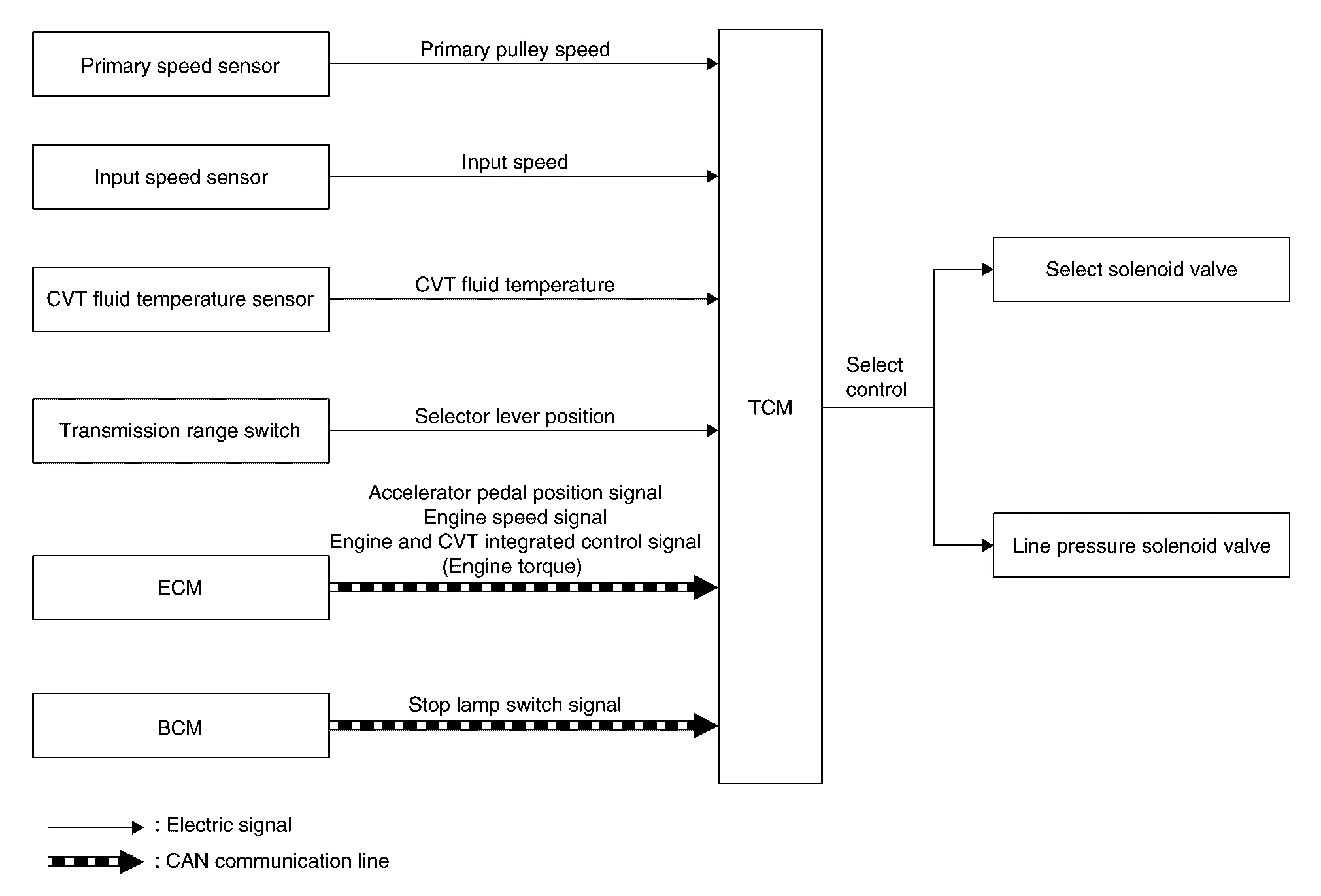
DESCRIPTION
Based on accelerator pedal angle, engine speed, primary pulley speed, and the input speed, the optimum operating pressure is set to reduce impact of a selector lever operation while shifting from “N” (“P”) to “D” (“R”) position.
 Shift Control
System Description
SYSTEM DIAGRAMDESCRIPTIONTo select the gear ratio that can give the driving force to meet driver's intent or vehicle situation, the Nissan Murano vehicle driving condition such as vehicle speed or accelerator pedal position is detected and the most appropriate gear ratio is selected and the shifting method before reaching the speed is determined...
 Lock-Up Control
System Description
SYSTEM DIAGRAMDESCRIPTION
Controls for improvement of the transmission efficiency by engaging the torque converter clutch in the torque converter and eliminating slip of the converter...
Other information:
Nissan Murano (Z52) 2015-2024 Service Manual: P0719 Brake Pedal Switch B
DTC Description DTC DETECTION LOGIC DTC CONSULT screen terms (Trouble diagnosis content) DTC detection condition P0719 Brake pedal switch B (Brake Switch "B" Circuit Low) Diagnosis condition When a deceleration G of -0.13 G or more occurs after the Nissan Murano vehicle speed exceeds 30 km/h (19 MPH)...
Nissan Murano (Z52) 2015-2024 Owners Manual: How to enable/disable the LDW system
Perform the following steps to enable or disable the LDW system. Using “Settings” in the vehicle information display: Press the button until “Settings” displays in the vehicle information display and then press the OK button. Use the button to select “Driver Assistance...
Categories
- Manuals Home
- Nissan Murano Owners Manual
- Nissan Murano Service Manual
- Settings
- How to enable/disable the LDW system
- Turning the AEB system on/off
- New on site
- Most important about car
Driver and passenger supplemental knee air bag

Driver’s side
The knee air bag is located in the knee bolster, on the driver’s and passenger’s side. All of the information, cautions and warnings in this manual apply and must be followed. The knee air bag is designed to inflate in higher severity frontal collisions, although it may inflate if the forces in another type of collision are similar to those of a higher severity frontal impact. It may not inflate in certain collisions.

Passenger’s side

Copyright © 2026 www.nimurano.com