
Nissan Murano: Windshield wiper blades / Replacing
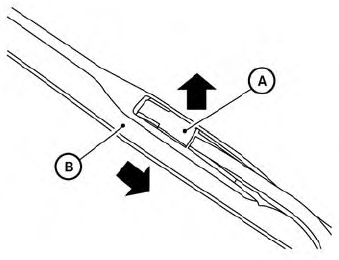
Replace the wiper blades if they are worn. To replace the windshield wiper blades, follow the procedure below:
- Lift the wiper arm away from the windshield.
- Lift the release tab
 .
. - Move the wiper blade
 down
and remove.
down
and remove. - Insert the new wiper blade onto the wiper arm.
- Push the release tabdownuntil it clicks.
- Push wiper on to windshield.
CAUTION
- After wiper blade replacement, return the wiper arm to its original position; otherwise it may be damaged when the hood is opened.
- Make sure the wiper blades contact the glass; otherwise the arms may be damaged from wind pressure.
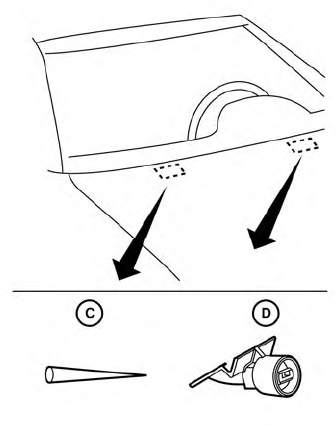
If you wax the surface of the hood, be careful
not to let wax get into the washer nozzle
 . This may cause clogging or
improper
windshield-washer operation. If wax gets
into the nozzle, remove it with a needle or
small pin
. This may cause clogging or
improper
windshield-washer operation. If wax gets
into the nozzle, remove it with a needle or
small pin  .
.
Rear window wiper blade
It is recommended that you visit a NISSAN dealer if checking or replacement is required.
 Cleaning
If your windshield is not clear after using
the windshield-washer or if a wiper blade
chatters when running, wax or other material
may be on the blade or windshield...
 Brakes
If the brakes do not operate properly, have
the brakes checked. It is recommended
that you visit a NISSAN dealer for this service.
Self-adjusting brakes
Your vehicle is equipped with self-adjusting
brakes...
Other information:
Nissan Murano (Z52) 2015-2024 Service Manual: C1a12 Laser Beam Off Center
DTC Description DTC DETECTION LOGIC DTC No. CONSULT screen terms DTC detection condition C1A12–78 LASER BEAM OFFCNTR Diagnosis condition When Ignition switch is ON. Signal (terminal) — Threshold Radar of distance sensor (ICC sensor) is off the aiming point...
Nissan Murano (Z52) 2015-2024 Service Manual: Performance Test
Inspection INSPECTION PROCEDURE Connect recovery/recycling/recharging equipment (for HFO-1234yf) or manifold gauge. Start the engine, and set to the following conditions. Test condition Surrounding condition Indoors or in the shade (in a well-ventilated place) Nissan Murano Vehicle condition Door Closed Door glass Full open Hood Open Engine speed Idle speed A/C condition Temperature control switch or dial Full cold A/C switch ON Air outlet VENT (ventilation) Intake door position Recirculation Fan (blower) speed Maximum speed set Maintain test condition until A/C system becomes stable (approximately 10 minutes)...
Categories
- Manuals Home
- Nissan Murano Owners Manual
- Nissan Murano Service Manual
- Warning lights
- How to enable/disable the LDW system
- Tire rotation
- New on site
- Most important about car
LATCH (Lower Anchors and Tethers for CHildren) system

LATCH system lower anchor locations - bench seat
Your vehicle is equipped with special anchor points that are used with LATCH system compatible child restraints. This system may also be referred to as the ISOFIX or ISOFIX compatible system. With this system, you do not have to use a vehicle seat belt to secure the child restraint unless the combined weight of the child and child restraint exceeds 65 lbs. (29.5 kg). If the combined weight of the child and child restraint is greater than 65 lbs. (29.5 kg), use the vehicle’s seat belt (not the lower anchors) to install the child restraint. Be sure to follow the child restraint manufacturer’s instructions for installation.
