
Nissan Murano: Heater & Air Conditioning System :: Removal and Installation / Refrigerant Pressure Sensor
REMOVAL
Discharge the refrigerant. Refer to Recycle Refrigerant.
Remove the front bumper fascia assembly. Refer to Removal and Installation.
Remove horn assembly. Refer to Removal and Installation.
Remove the air guide (RH). Refer to Exploded View.
Disconnect the harness connector from the refrigerant pressure sensor.
Remove refrigerant pressure sensor (1).
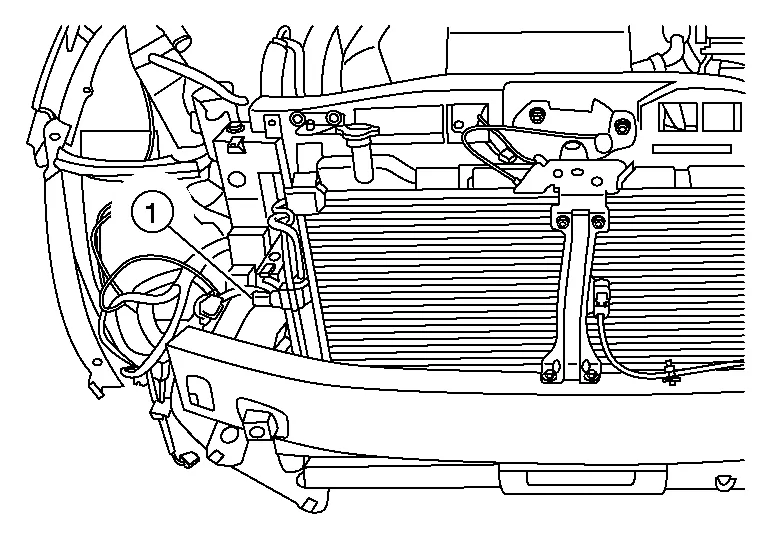
CAUTION:
Cap or wrap the opening of the refrigerant pressure sensor with suitable material such as vinyl tape to avoid the entry of air.
INSTALLATION
Installation is in the reverse order of removal.
CAUTION:
-
Do not reuse the O-ring.
-
Apply A/C oil to the O-ring of the refrigerant pressure sensor for installation.
-
After charging the refrigerant, check for leaks. Refer to Leak Test.
 Liquid Tank
R..
 Heating and Cooling Unit Assembly
Exploded View
1.
Heating and cooling unit assembly
2.
Steering member
3.
Steering member brace (LH)
4.
Steering member brace (RH)
A.
Steering member caps
Pawl
Front
1...
Other information:
Nissan Murano (Z52) 2015-2024 Service Manual: Brake System :: Symptom Diagnosis. Noise, Vibration and Harshness (nvh) Troubleshooting
..
Nissan Murano (Z52) 2015-2024 Service Manual: B1310 Tcu Temperature Error
DTC Description DTC DETECTION LOGIC DTC No. CONSULT screen terms (Trouble diagnosis content) DTC detection condition B1310 TCU TEMPERATURE ERROR (TCU temperature error) Diagnosis condition When ignition switch is ON. Signal (terminal) — Threshold TCU internal temperature is high Diagnosis delay time 1 second or more POSSIBLE CAUSE TCU internal temperature is high TCU FAIL-SAFETelematics system function stops DTC Confirmation Procedure PERFORM DTC CONFIRMATION PROCEDURE CONSULT Ignition switch ON...
Categories
- Manuals Home
- Nissan Murano Owners Manual
- Nissan Murano Service Manual
- Rear bench seat adjustment
- Intelligent Forward Collision Warning (I-FCW)
- Jacking up vehicle and removing the damaged tire
- New on site
- Most important about car
