
Nissan Murano: Transmission & Driveline / Rear Axle :: Unit Disassembly and Assembly. Rear Drive Shaft
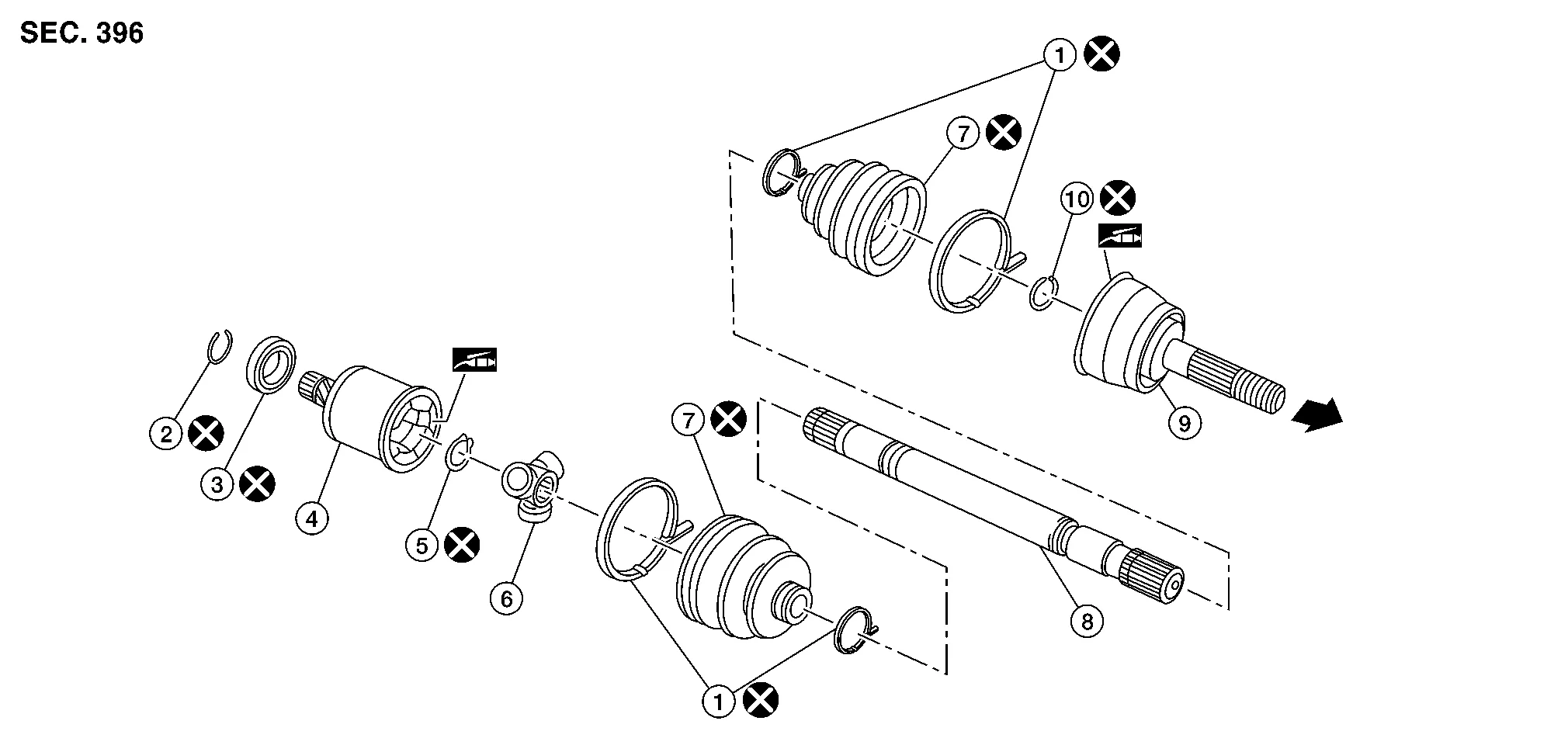
| 1. | Boot band | 2. | Circular clip | 3. | Dust shield |
| 4. | Housing | 5. | Snap ring | 6. | Spider assembly |
| 7. | Boot | 8. | Shaft | 9. | Joint sub-assembly |
| 10. | Circular clip |  |
Wheel side |
DISASSEMBLY
Wheel Side
Secure rear drive shaft in a vise.
CAUTION:
When securing rear drive shaft in a vise, always use aluminum or copper plates between vise and rear drive shaft.
Remove and discard boot bands and slide boot back.
Install suitable tool (A) 30 mm (1.18 in) or more into the threaded part of joint sub-assembly, and pull joint sub-assembly from shaft using suitable tool (B).

CAUTION:
-
Align suitable tool and shaft then remove joint sub-assembly by pulling directly.
-
If joint sub-assembly cannot be removed after five or more unsuccessful attempts, replace entire rear drive shaft.
Remove and discard circular clip from shaft.
Remove and discard boot from shaft.
While rotating ball cage, clean old grease off joint sub-assembly.
Final Drive Side
Secure rear drive shaft in a vise.
CAUTION:
When securing rear drive shaft in a vise, always use copper or aluminum plates between vise and rear drive shaft.
Remove and discard boot bands and slide boot back.
Put matching marks on housing and shaft before separating housing from shaft.
CAUTION:
Use paint or an equivalent for matching marks. Do not scratch surface.
Put matching marks (A) on spider assembly and shaft.

CAUTION:
Use paint or an equivalent for matching marks. Do not scratch surface.
Remove and discard snap ring (1) using a suitable tool.
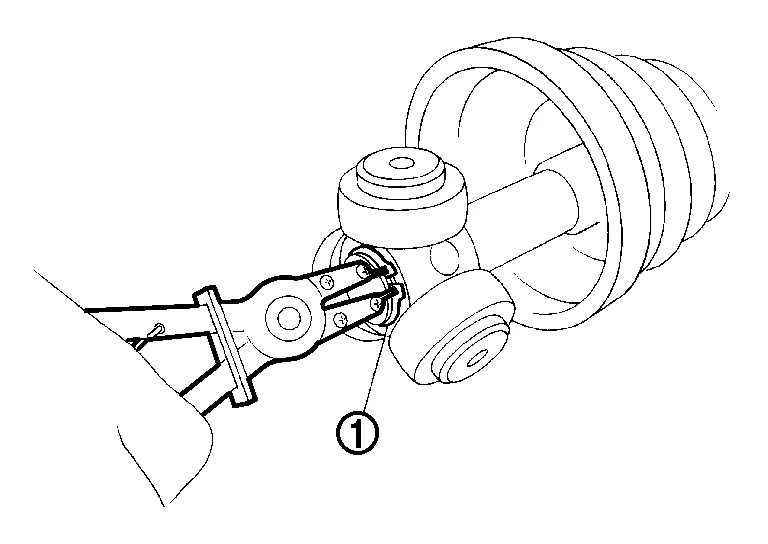
Remove spider assembly from shaft.
Remove and discard boot from shaft.
Remove and discard circular clip from housing.
Remove and discard dust shield from housing.
Clean old grease off housing and shaft.
INSPECTION AFTER DISASSEMBLY
Shaft
-
Replace entire rear drive shaft if there is any bending, cracking, or other damage.
Joint Sub-assembly
-
Make sure there is no rough rotation or unusual axial looseness.
-
Make sure there is no foreign material inside joint sub-assembly.
-
Check joint sub-assembly for compression scars, cracks or fractures.
-
If there are any irregular conditions of joint sub-assembly components, replace entire rear drive shaft.
Housing and Spider Assembly
-
If roller surface of spider assembly has scratches or wear, replace entire rear drive shaft.
ASSEMBLY
Wheel Side
Insert Genuine NISSAN Grease into joint sub-assembly (1) until grease begins to ooze from ball groove and serration hole.
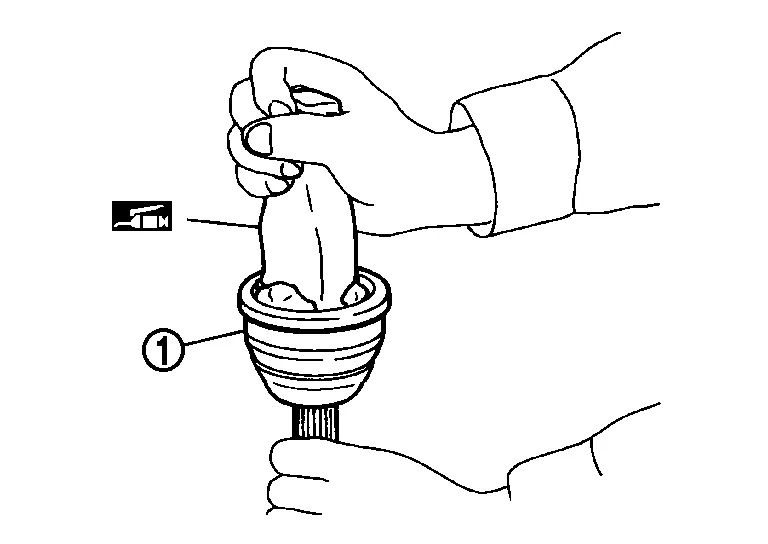
CAUTION:
After inserting grease, use a paper shop cloth to wipe off old grease that has oozed out.
 NOTE:
NOTE:
Always check with the Parts Department for the latest parts information.
Install new boot and new small boot band to shaft.

CAUTION:
-
Cover drive shaft serration with protective tape (A) to prevent damage to boot during installation.
-
Do not reuse boot or boot bands.
Remove protective tape wrapped around the drive shaft serration.
Attach new circular clip to shaft. Circular clip must fit securely into shaft groove. Attach nut to joint sub-assembly. Use a suitable tool to press-fit.
CAUTION:
Do not reuse circular clip.
Install joint sub-assembly to shaft using suitable tool.

WARNING:
Ensure that the circular clip is properly engaged, otherwise the joint sub-assembly could pull away from the shaft during Nissan Murano vehicle operation resulting in loss of drive force and possible rear drive shaft damage, which may cause a crash and serious injury or damage the rear drive shaft.
Pull the joint sub-assembly in the axial direction away from the shaft. Confirm that the joint sub-assembly cannot be pulled out.
Insert remaining balance of the specified amount of Genuine NISSAN Grease listed below into housing from large diameter side of boot.
| Grease quantity | : Refer to Drive Shaft. |
NOTE:
Always check with the Parts Department for the latest parts information.
Install boot securely into grooves (indicated by “*” marks) as shown.
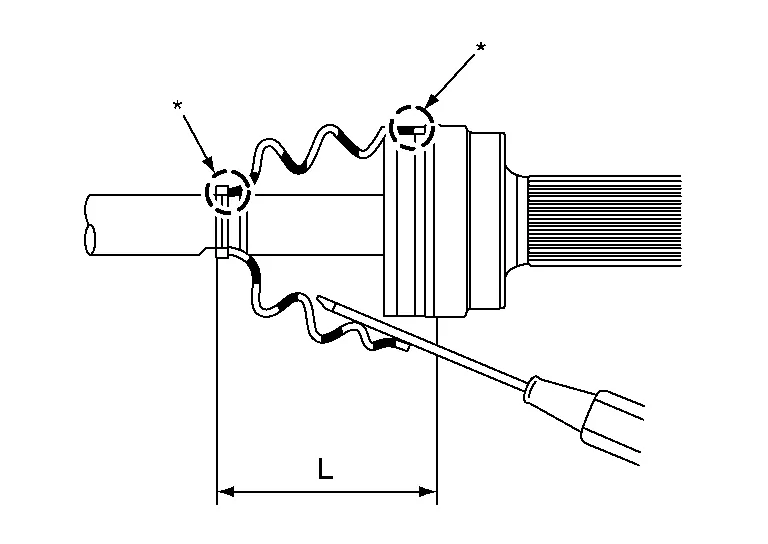
CAUTION:
If there is grease on the boot mounting surfaces (indicated by “*” marks) on shaft or joint sub-assembly, boot may come off. Remove all grease from boot mounting surfaces.
-
To prevent deformation of boot, adjust boot installation length (L) to specified value indicated below. Insert a suitable tool into large end of boot. Bleed air from boot to prevent boot deformation.
Boot installation length (L) : Refer to Drive Shaft. CAUTION:
-
Boot may be damaged if installation length exceeds or is less than standard value.
-
Be careful that suitable tool does not contact inside surface of boot.
-
Install new boot bands securely.
CAUTION:
Do not reuse boot band.
Put boot band in groove on drive shaft boot. Then fit pawls () into holes for temporary installation.
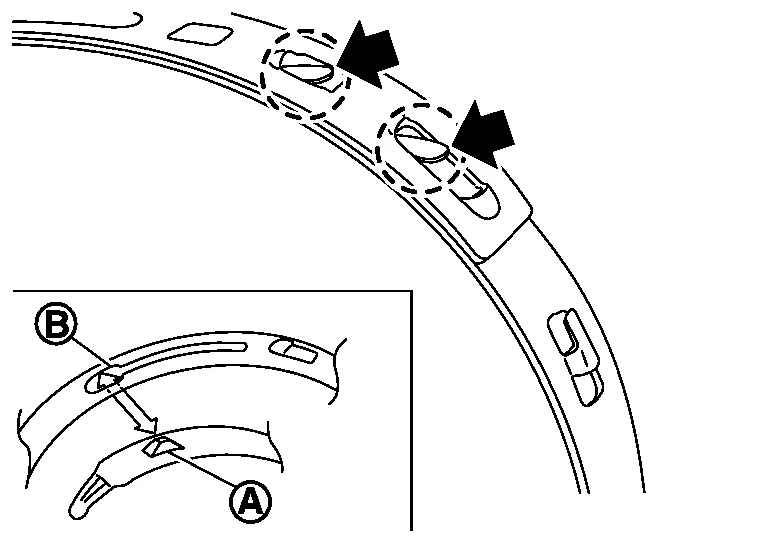
NOTE:
For large diameter side, fit projection (A) and guide slit (B) at first.
Pinch projection on band with suitable pliers to tighten band.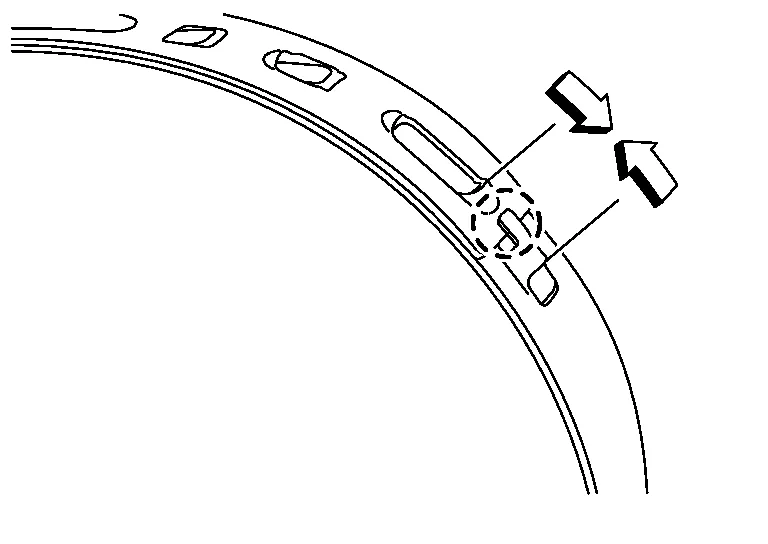
After installing joint sub-assembly and shaft, make sure that they are in the correct position when rotating boot. If boot position is not correct, remove old boot bands, then reposition boot and secure with new boot bands.
CAUTION:
Do not reuse boot bands.
Final Drive Side
Install new boot and new small boot band to shaft.
CAUTION:
-
Cover drive shaft serration with protective tape (A) to prevent damage to boot during installation.
-
Do not reuse boot or boot bands.
Remove protective tape wrapped around the drive shaft serration.
Align matching marks (A) on spider assembly (1) with matching mark on shaft (2). Install spider assembly to shaft with chamfer (B) facing shaft.
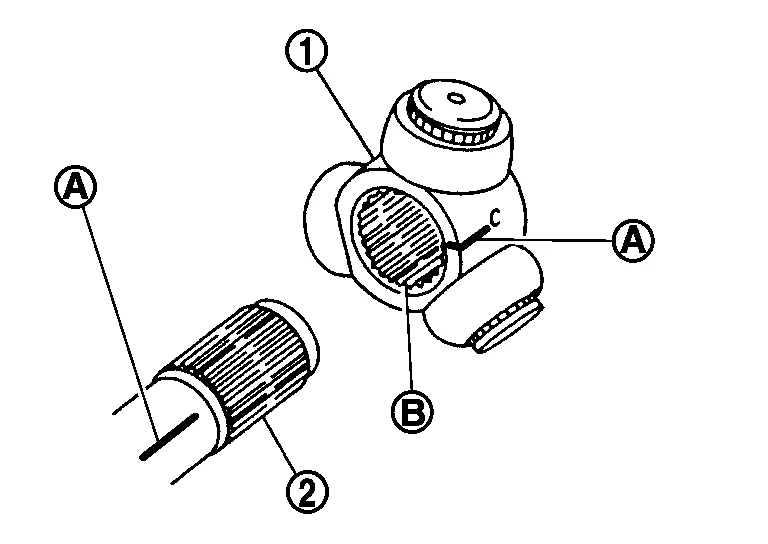
Install new snap ring (1) onto shaft using suitable tool.
CAUTION:
Do not reuse snap ring.
Pack housing with the specified amount of new Genuine NISSAN Grease.
| Grease amount | : Refer to Drive Shaft. |
NOTE:
Always check with the Parts Department for the latest parts information.
Align matching marks made during disassembly and install housing onto spider assembly.
After installation, pull shaft to check engagement between housing and snap ring.
Install boot securely into grooves (indicated by “*” marks) as shown.
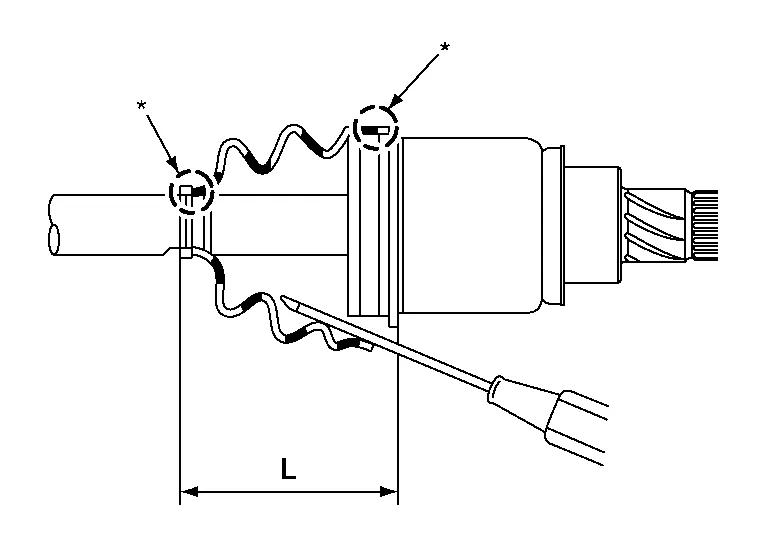
CAUTION:
If there is grease on boot mounting surfaces (indicated by “*” marks) on shaft or housing, boot may come off. Clean all grease from the boot mounting surfaces.
Make sure boot installation length (L) is length specified below. Insert a suitable tool into large end of boot. Bleed air from boot to prevent boot deformation.
| Boot installation length (L) | : Refer to Drive Shaft. |
CAUTION:
-
Boot may break if boot installation length exceeds or is less than standard value.
-
Be careful that suitable tool does not contact inside surface of the boot.
Install new boot bands securely.
CAUTION:
Do not reuse boot band.
Put boot band in groove on drive shaft boot. Then fit pawls () into holes for temporary installation.
NOTE:
For the large diameter side, fit projection (A) and guide slit (B) at first.
Pinch projection on band with suitable pliers to tighten band.
After installing housing and shaft, make sure that they are in the correct position when rotating boot. If boot position is not correct, remove old boot bands, then reposition boot and secure with new boot bands.
CAUTION:
Do not reuse boot bands.
Install a new dust shield.
CAUTION:
Do not reuse dust shield.
Install a new circular clip.
CAUTION:
Do not reuse circular clip.
 Rear Drive Shaft
Exploded View
1.
Rear drive shaft
2.
Wheel hub lock nut
3.
Cotter pin
Removal and Installation
REMOVALRemove wheel hub and bearing. Refer to Removal and Installation...
 Rear Axle :: Service Data and Specifications (sds). Service Data and Specifications (sds)
Wheel Bearing
Item Standard
Axial end play
0.05 mm (0.002 in) or less
Drive Shaft
Application
Standard
Joint type
Wheel side
Final drive side
Grease quantity
30 - 50 g (1...
Other information:
Nissan Murano (Z52) 2015-2024 Service Manual: Vehicle Jerks During
Diagnosis Procedure The vehicle jerks when VDC function, TCS function, ABS function, EBD function, brake assist function or hill start assist function operates.CHECK SYMPTOM Check that the vehicle jerks when VDC function, TCS function, ABS function, EBD function, brake assist function or hill start assist function operates...
Nissan Murano (Z52) 2015-2024 Service Manual: P1225 Tp Sensor
DTC Description DTC DETECTION LOGIC DTC CONSULT screen terms (Trouble diagnosis content) DTC detection condition P1225 CTP LEARNING-B1 (Closed throttle position learning performance) Diagnosis condition Ignition switch ON Signal (terminal) Electric throttle control actuator signal Threshold Closed throttle position learning value is excessively low Diagnosis delay time — POSSIBLE CAUSE Electric throttle control actuator (TP sensor 1 and 2) FAIL-SAFENot applicable DTC Confirmation Procedure PRECONDITIONING If DTC Confirmation Procedure has been previously conducted, always perform the following before conducting the next test...
Categories
- Manuals Home
- Nissan Murano Owners Manual
- Nissan Murano Service Manual
- High Beam Assist (if so equipped)
- Memory storage function (key-link)
- Warning lights
- New on site
- Most important about car
LATCH (Lower Anchors and Tethers for CHildren) system

LATCH system lower anchor locations - bench seat
Your vehicle is equipped with special anchor points that are used with LATCH system compatible child restraints. This system may also be referred to as the ISOFIX or ISOFIX compatible system. With this system, you do not have to use a vehicle seat belt to secure the child restraint unless the combined weight of the child and child restraint exceeds 65 lbs. (29.5 kg). If the combined weight of the child and child restraint is greater than 65 lbs. (29.5 kg), use the vehicle’s seat belt (not the lower anchors) to install the child restraint. Be sure to follow the child restraint manufacturer’s instructions for installation.
