
Nissan Murano: Rear Automatic Braking (RAB) (if so equipped) / RAB system operation
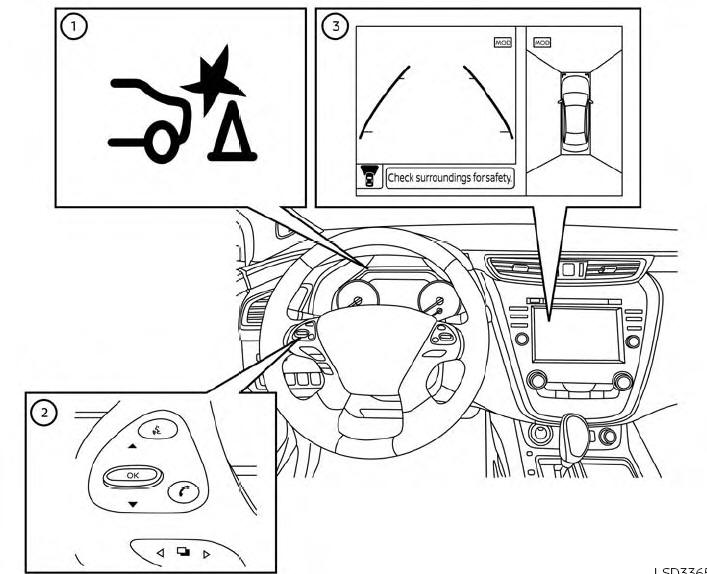
 RAB system warning light and
RAB system
warning indicator
RAB system warning light and
RAB system
warning indicator
 Steering-wheel-mounted controls (left
side)
Steering-wheel-mounted controls (left
side)
 Center display (if so equipped)
When the shift lever is in the R (Reverse) position and the vehicle speed is less than approximately 9 mph (15 km/h), the RAB system operates.
If a risk of a collision with an obstacle is detected when your vehicle is backing up, the RAB system warning indicator will flash in the vehicle information display, a red frame will appear in the center display (for vehicles with the Intelligent Around View Monitor system), and the system will chime three times. The system will then automatically apply the brakes. After the automatic brake application, the driver must depress the brake pedal to maintain brake pressure.
NOTE:
- The brake lights of the vehicle come on when braking is performed by the RAB system.
- Whenthe brakes operate,a noisemay be heard. This is not a malfunction.
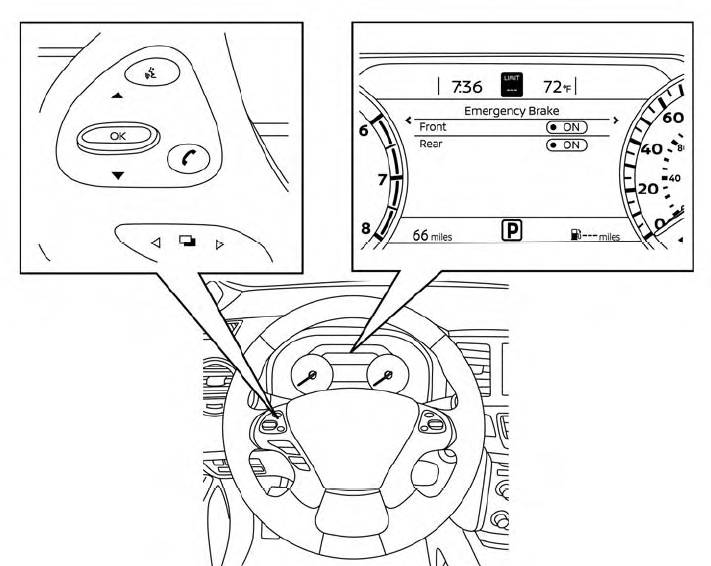
 Rear Automatic Braking (RAB) (if so equipped)
WARNING
Failure to follow the warnings and instructions
for proper use of the RAB
system could result in serious injury or
death.
The RAB system is a supplemental aid
to the driver...
 Turning the RAB system on/off
Perform the following steps to turn the RAB
system on or off.
Press the button until
“Settings”
displays in the vehicle information display
and then press the OK button...
Other information:
Nissan Murano (Z52) 2015-2024 Owners Manual: Heated steering wheel switch (if so equipped)
The heated steering wheel system is designed to operate only when the surface temperature of the steering wheel is below 68°F (20°C). Push the heated steering wheel switch to warm the steering wheel after the ignition switch is placed in the ON position...
Nissan Murano (Z52) 2015-2024 Service Manual: Fuel Injector
Component Function Check INSPECTION START Turn ignition switch to START. Are any cylinders ignited? YES>> GO TO 2. NO>> Proceed to Diagnosis Procedure. CHECK FUEL INJECTOR FUNCTION With CONSULT Start engine. Perform “POWER BALANCE” in “ACTIVE TEST” mode with CONSULT...
Categories
- Manuals Home
- Nissan Murano Owners Manual
- Nissan Murano Service Manual
- GAS STATION INFORMATION
- Tire rotation
- Rear bench seat adjustment
- New on site
- Most important about car
Vehicle security system

Your vehicle has two types of security systems:
Vehicle security system NISSAN Vehicle Immobilizer SystemThe vehicle security system provides visual and audible alarm signals if someone opens the doors, liftgate or the hood when the system is armed. It is not, however, a motion detection type system that activates when a vehicle is moved or when a vibration occurs.
