
Nissan Murano: System / Power Consumption Control System
SYSTEM DIAGRAM
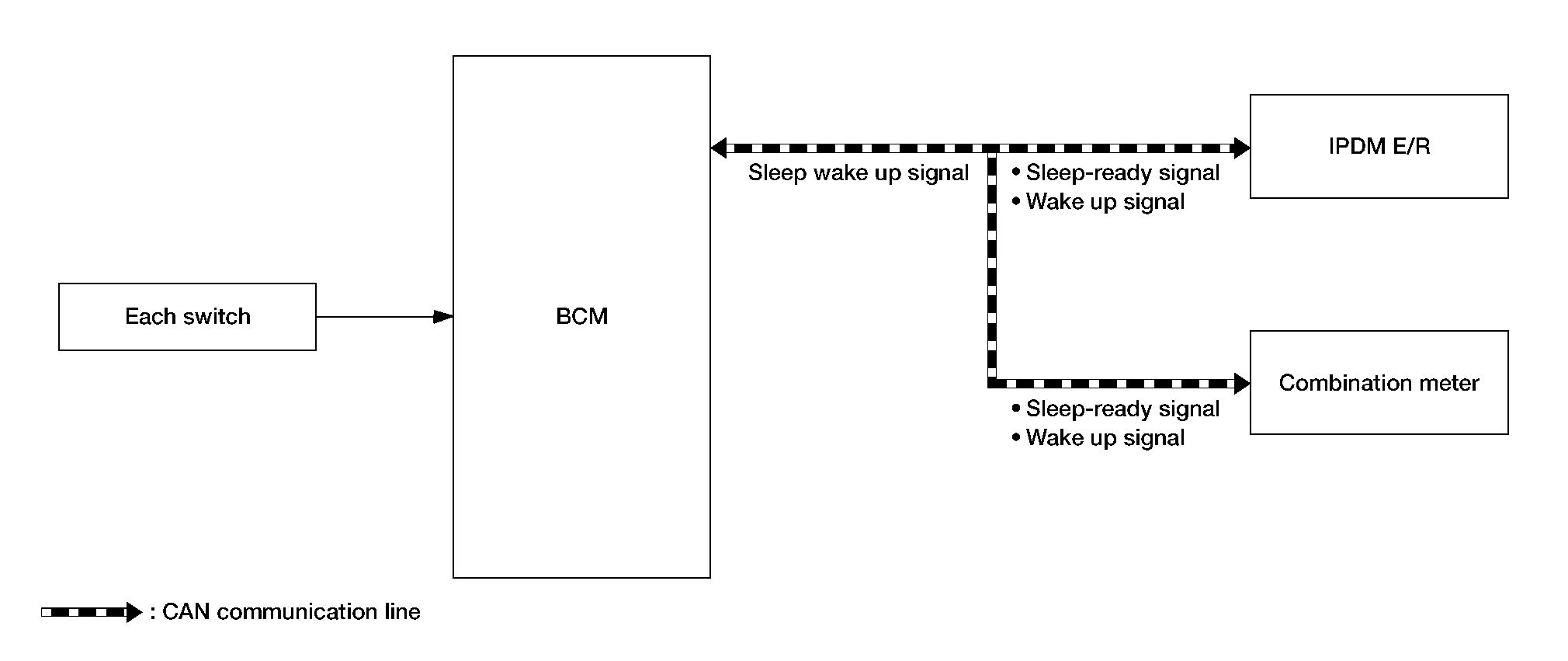
INPUT SIGNAL AND OUTPUT SIGNAL
Major signal transmission between each unit via communication lines is shown in the following table:
| Component parts | Signal description |
|---|---|
| IPDM E/R |
|
| Combination meter | |
| BCM |
|
OUTLINE
-
BCM incorporates a power saving control function that reduces the power consumption according to the Nissan Murano vehicle status.
-
BCM switches the status (control mode) by itself with the power saving control function. It performs the sleep request to each unit (IPDM E/R and combination meter) that operates with ignition switch OFF.
Normal mode (wake-up)
-
CAN communication is normally performed with other units
-
Each control with BCM is operating properly
CAN communication sleep mode (CAN sleep)
-
CAN transmission is stopped
-
Control with BCM only is operating
Low power consumption mode (BCM sleep)
-
Low power consumption control is active
-
CAN transmission is stopped
-
LOW POWER CONSUMPTION CONTROL WITH BCM
BCM reduces the power consumption with the following operation in the low power consumption mode:
-
The reading interval of each switch changes from a 10 ms interval to a 60 ms interval.
Sleep mode activation
-
BCM receives the sleep-ready signal (ready) from IPDM E/R and combination meter via CAN communication.
-
BCM transmits the sleep wake up signal (sleep) to each unit when all of the CAN sleep conditions are fulfilled.
-
Each unit stops the transmission of CAN communication with the sleep wakeup signal. BCM is in CAN communication sleep mode.
-
BCM is in the low power consumption mode and performs the low power consumption control when all of the BCM sleep conditions are fulfilled with CAN sleep condition.
| CAN sleep condition | BCM sleep condition |
|---|---|
|
|
Wake-up operation
-
BCM transmits the sleep wake up signal (wake up) to each unit when any of the CAN wake-up conditions are fulfilled. It changes from the low power consumption mode or the CAN communication sleep mode to the normal mode.
-
Each unit starts the transmission of CAN communication with the sleep wake up signal. In addition, the combination meter transmits the wake up signal to BCM via CAN communication to report the CAN communication start.
| BCM wake-up condition | CAN wake-up condition |
|---|---|
|
|
 Signal Buffer System
System Description
SYSTEM DIAGRAMOUTLINEBCM has the signal transmission function that outputs/transmits each input/received signal to each unit.Signal transmission function list Signal name Input Output Description
Push-button ignition switch signal
Push-button ignition switch
BCM
Transmits the push-button ignition switch signal to the BCM...
 Shipping Mode Control System
System Description
SYSTEM DIAGRAMSignal transmission function list Signal name Input Output Description
Shipping mode status signal
BCM
Combination meter (CAN)
Transmits shipping mode status signal to combination meter when condition is established...
Other information:
Nissan Murano (Z52) 2015-2024 Owners Manual: Front-door pockets. Console side pockets (if so equipped)
F..
Nissan Murano (Z52) 2015-2024 Service Manual: Brake Fluid Level and Leaks
Inspection BRAKE FLUID LEVEL Make sure that the brake fluid level in the reservoir sub tank is between the MAX and MIN lines. Visually check around the reservoir sub tank and reservoir tank for brake fluid leakage. If the brake fluid level is excessively low, check the brake system for leakage...
Categories
- Manuals Home
- Nissan Murano Owners Manual
- Nissan Murano Service Manual
- Power Steering Fluid (PSF)
- Indicator lights
- Fuel recommendation
- New on site
- Most important about car
Vehicle security system

Your vehicle has two types of security systems:
Vehicle security system NISSAN Vehicle Immobilizer SystemThe vehicle security system provides visual and audible alarm signals if someone opens the doors, liftgate or the hood when the system is armed. It is not, however, a motion detection type system that activates when a vehicle is moved or when a vibration occurs.
