
Nissan Murano: Parking Brake System :: Removal and Installation / Parking Brake Control
Nissan Murano (Z52) 2015-2024 Service Manual / Brakes / Parking Brake System :: Removal and Installation / Parking Brake Control
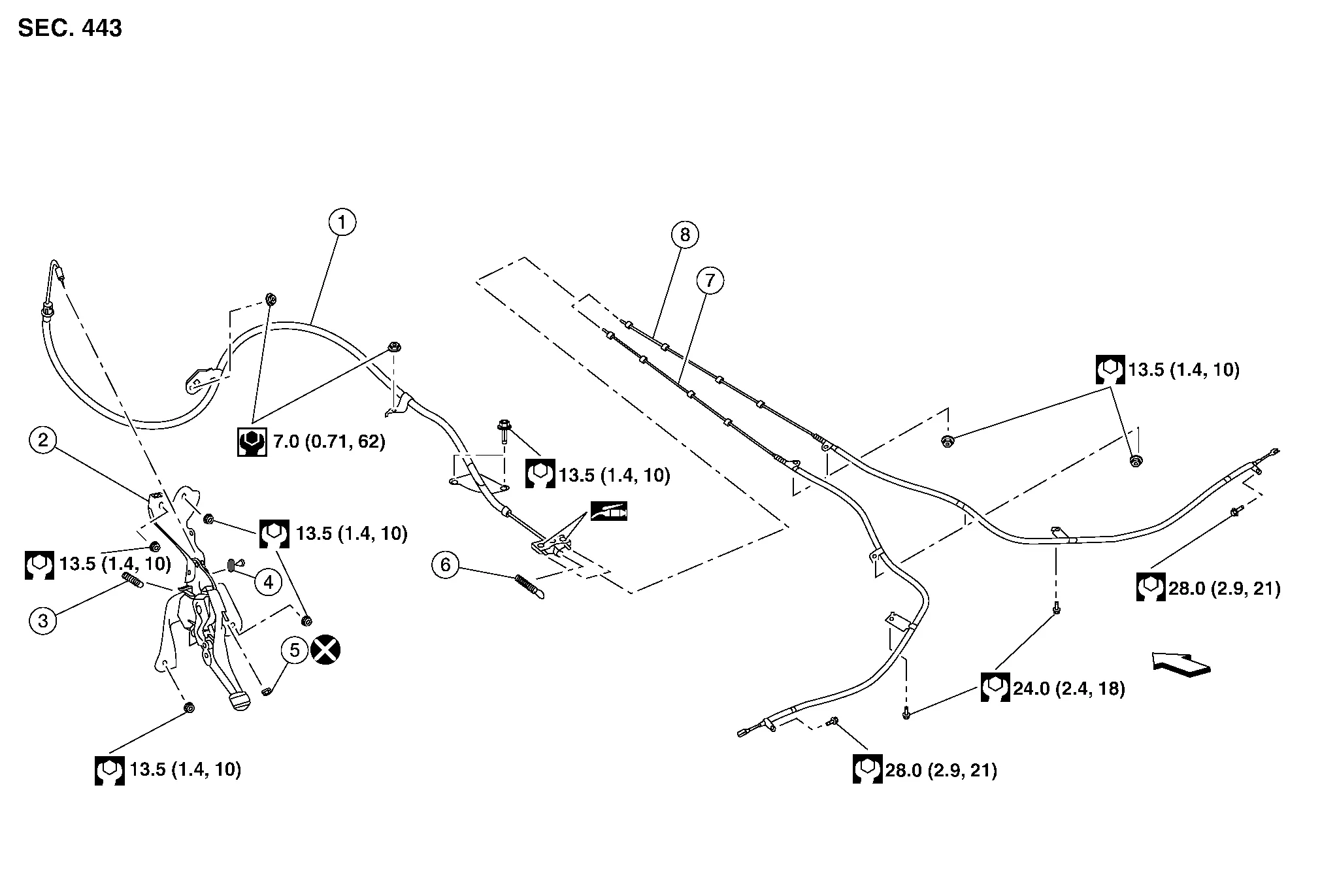
| 1. | Front cable | 2. | Parking brake pedal assembly | 3. | Parking brake pedal return spring |
| 4. | Parking brake switch | 5. | Adjusting nut | 6. | Return spring |
| 7. | Rear cable (LH) | 8. | Rear cable (RH) |  |
Front |
WARNING:
-
Always work from the side of air bag module. Do not work in front of it.
-
Do not use air tools or electric tools for servicing.
REMOVAL
Remove lower instrument panel LH. Refer to Removal and Installation.
Place fuse box aside.
Disconnect harness connector from parking brake switch.
Remove parking brake pedal assembly nuts and place parking brake pedal assembly aside.
Remove adjusting nut from parking brake pedal.
Separate front cable from parking brake pedal.
Remove parking brake pedal assembly.
Remove parking brake switch if necessary.
INSTALLATION
Installation is in the reverse order of removal.
CAUTION:
Do not reuse the adjusting nut.
Adjust parking brake with new adjusting nut. Refer to Inspection and Adjustment.

 Parking Brake Front Cable
Removal and Installation
REMOVALRemove parking brake control. Refer to Removal and Installation.
NOTE:
It is not necessary to remove parking brake switch...
Other information:
Nissan Murano (Z52) 2015-2024 Service Manual: Trouble Diagnosis
Component Description Component Description Main line CAN communication line between splices Branch line CAN communication line between splice and a control unit Splice A point connecting a branch line with a main line Termination circuit Circuit connected across the CAN communication system...
Nissan Murano (Z52) 2015-2024 Service Manual: Structure and Operation
Sectional View Transfer cover Transfer case Ring gear bearing (transfer case side) Ring gear shaft Pinion bearing Drive pinion Companion flange Ring gear Ring gear bearing (transfer cover side) Operation Description POWER TRANSFER DIAGRAMELECTRIC CONTROLLED COUPLING The AWD control unit supplies command current to electric controlled coupling (AWD solenoid)...
Categories
- Manuals Home
- Nissan Murano Owners Manual
- Nissan Murano Service Manual
- Settings
- Passenger compartment
- Checking engine oil level
- New on site
- Most important about car

Copyright © 2026 www.nimurano.com