
Nissan Murano: Removal and Installation / Icc Steering Switch
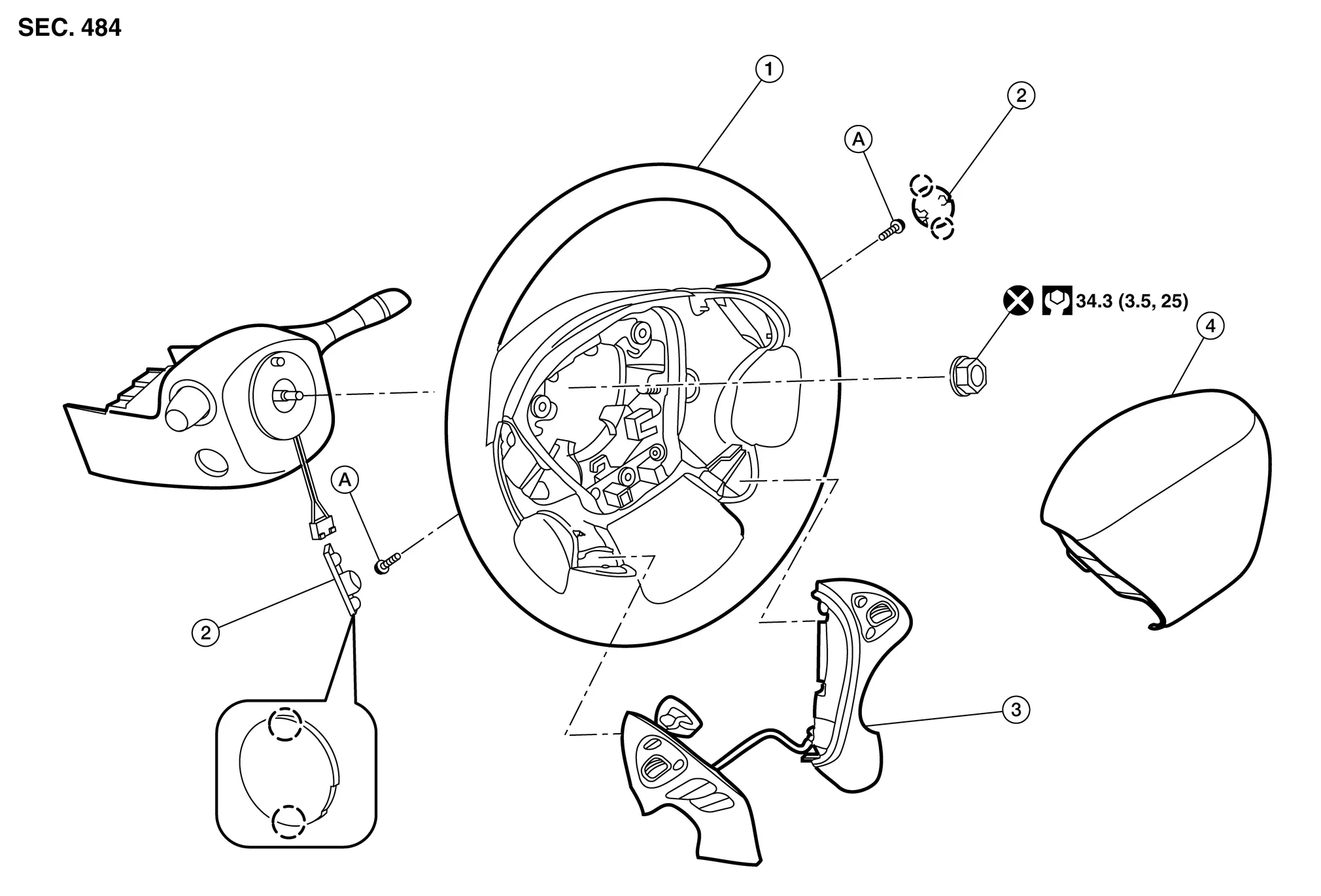
| 1. | Steering wheel | 2. | Cover | 3. | Steering switches |
| 4. | Driver air bag module | A. | Refer to Exploded View. |  |
Pawl |
REMOVAL
 NOTE:
NOTE:
The ICC steering and audio switches are serviced as an assembly.
Remove steering wheel. Refer to Removal and Installation.
Release pawls ( ) and remove steering wheel rear finisher (1) from steering wheel (2).

Remove ICC steering and audio switch assembly screws ().

Remove ICC steering and audio switch assembly (1) from steering wheel (2).
INSTALLATION
Installation is in the reverse order of removal.
CAUTION:
Always perform the ICC system action test to check that the ICC system operates normally after replacing the distance sensor or repairing any ICC system malfunction. Refer to Description.
 Distance Sensor
Exploded View
1.
Front bumper reinforcement
2.
Distance sensor
3.
Distance sensor bracket
A.
Refer to Installation.
B.
Refer to Installation ...

Other information:
Nissan Murano (Z52) 2015-2024 Service Manual: Diagnosis System (sonar Control Unit)
CONSULT Function CAUTION: After disconnecting the CONSULT vehicle interface (VI) from the data link connector, the ignition must be cycled OFF → ON (for at least 5 seconds) → OFF. If this step is not performed, the BCM may not go to ”sleep mode”, potentially causing a discharged battery and no-start condition...
Nissan Murano (Z52) 2015-2024 Service Manual: Ecu Diagnosis Information. Av Control Unit
Values on the Diagnosis Tool NOTE: The following table includes information (items) inapplicable to this Nissan Murano vehicle. For information (items) applicable to this vehicle, refer to CONSULT display items. Monitor Item Condition Value/Status Sunload sensor — Off — On Parking brake Parking brake not applied...
Categories
- Manuals Home
- Nissan Murano Owners Manual
- Nissan Murano Service Manual
- Warning lights
- Vehicle Dynamic Control (VDC) OFF switch
- Passenger compartment
- New on site
- Most important about car

Copyright © 2026 www.nimurano.com