
Nissan Murano: Transmission & Driveline / Front Axle :: Periodic Maintenance
Nissan Murano (Z52) 2015-2024 Service Manual / Transmission & Driveline / Front Axle :: Periodic Maintenance
 Front Axle :: Symptom Diagnosis. Noise, Vibration and Harshness (nvh) Troubleshooting
NVH Troubleshooting Chart
Use chart below to find the cause of the symptom. If necessary, repair or replace these parts. Reference — Inspection — Exploded View — Inspection NVH Troubleshooting Chart Inspection NVH Troubleshooting Chart NVH Troubleshooting Chart Inspection NVH Troubleshooting Chart NVH Troubleshooting Chart
Possible cause and SUSPECTED PARTS Excessive joint angle Joint sliding resistance Imbalance Improper installation, looseness Parts interference Wheel bearing damage FRONT SUSPENSION FRONT AXLE TIRE WHEEL DRIVE SHAFT BRAKE STEERING
Symptom
DRIVE SHAFT
Noise
×
×
-
-
-
×
×
×
×
×
-
×
×
Shake
×
-
×
-
-
×
×
×
×
×
-
×
×
FRONT AXLE
Noise
-
-
-
×
×
×
×
×
×
×
×
×
Shake
-
-
-
×
×
×
×
×
×
×
×
×
Vibration
-
-
-
×
×
×
×
-
×
-
×
-
×
Shimmy
-
-
-
×
×
-
×
-
×
×
-
×
×
Shudder
-
-
-
×
-
×
-
×
×
-
×
×
Poor quality ride or handling
-
-
-
×
×
-
×
-
×
×
-
-
-
Inspect Front Axle for cracks or damage...
 Front Wheel Hub
On-vehicle Service
Check axle and suspension parts for excessive play, wear or damage.
Move the wheel as shown to check for excessive play.
Inspection
Move the wheel hub and bearing in an axial direction by hand to verify that looseness of wheel hub and bearing exists...
Other information:
Nissan Murano (Z52) 2015-2024 Service Manual: System
System Description SYSTEM DIAGRAMINPUT/OUTPUT SIGNAL CHART Item Input signal to main power window and door lock/unlock switch Main power window and door lock/unlock switch function Actuator Encoder Encoder pulse signal Power window control Front power window motor Main power window and door lock/unlock switch Front power window motor LH UP/DOWN signal Power window and door lock/unlock switch RH Front power window motor RH UP/DOWN signal BCM RAP signal Rear power window switch Rear power window motor UP/DOWN signal Rear power window motor POWER WINDOW OPERATION Power window system is activated by the power window switches when ignition switch ON position or during the retained power operation after ignition switch OFF...
Nissan Murano (Z52) 2015-2024 Service Manual: Hood Switch
Component Function Check CHECK FUNCTION CONSULT Select “HOOD SW” and “HOOD SW 2” in “Data Monitor” mode of “IPDM E/R”. Check “HOOD SW” and “HOOD SW 2” indication under the following condition: Monitor item Condition Indication HOOD SW Hood Open OFF Close ON HOOD SW 2 Open ON Close OFF Is the indication normal? YES>> Hood switch is OK...
Categories
- Manuals Home
- Nissan Murano Owners Manual
- Nissan Murano Service Manual
- How to enable/disable the LDW system
- Indicator lights
- Shift lock release
- New on site
- Most important about car
Fuel gauge
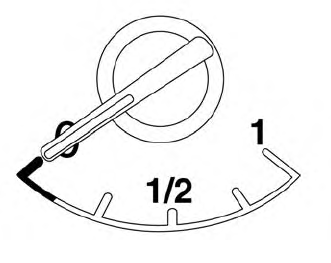
The gauge indicates the approximate fuel level in the tank.
The gauge may move slightly during braking, turning, acceleration, or going up or down hills.
The gauge needle returns to 0 (Empty) after the ignition switch is placed in the OFF position.

Copyright © 2026 www.nimurano.com