
Nissan Murano: Rear Disc Brake / Disc Brake Rotor
INSPECTION
Appearance
Check surface of disc brake rotor for uneven wear, cracks or damage. Replace if any abnormal conditions exist.
Runout
Check the wheel bearing axial end play before the inspection. Refer to Inspection.
Secure the disc brake rotor to the wheel hub and bearing assembly with wheel nuts at two wheel nut locations.
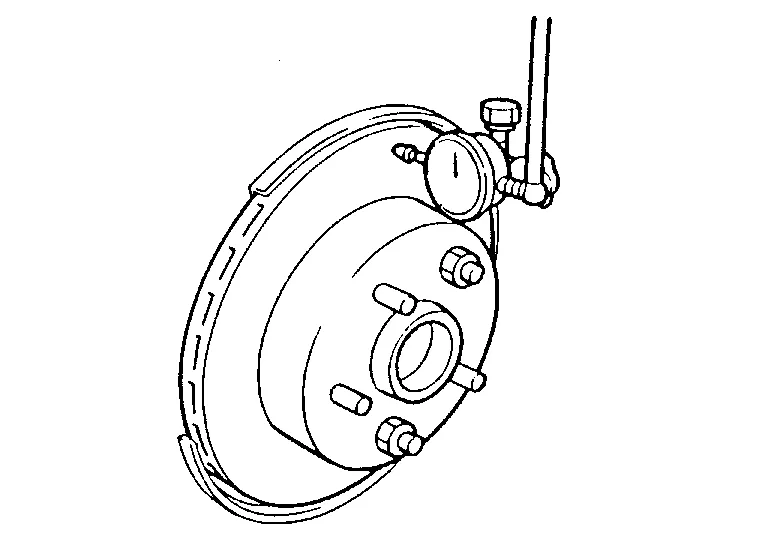
Inspect the runout with a dial gauge to measured at 10 mm (0.39 in) inside the disc edge.
| Runout (with it attached to the Nissan Murano vehicle) | : Refer to Rear Disc Brake. |
Find the installation position with a minimum runout by shifting the disc brake rotor-to-wheel hub and bearing assembly installation position by one hole at a time if the runout exceeds the limit value.
Refinish the disc brake rotor if the runout is outside the limit even after performing the above operation. When refinishing, use Tool.
| Tool number | : 38-PFM92 ( — ) |
CAUTION:
-
Check in advance that the thickness of the disc brake rotor is wear thickness + 0.3 mm (0.012 in) or more.
-
If the thickness is less than wear thickness + 0.3 mm (0.012 in), replace the disc brake rotor. Refer to Removal and Installation.
| Wear thickness | : Refer to Rear Disc Brake. |
Thickness
Check the thickness of the disc brake rotor using a micrometer. Replace the disc brake rotor if the thickness is below wear limit.

| Wear thickness | : Refer to Rear Disc Brake. |
ADJUSTMENT
CAUTION:
-
Burnish contact surfaces between brake pads and disc rotor according to the following procedure after refinishing the disc rotor, replacing brake pads or if a soft pedal occurs at very low mileage.
-
Be careful of Nissan Murano vehicle speed. Brakes do not operate firmly/securely until pads and disc rotor are securely seated.
-
Only perform this procedure under safe road and traffic conditions. Use extreme caution.
Drive the vehicle on straight, flat road.
Depress the brake pedal until the vehicle stops.
Release the brake pedal for a few minutes to allow the brake components to cool.
Repeat steps 1 to 3 until pad and disc rotor are securely seated.
 Brake Pad
Inspection and Adjustment
INSPECTIONCheck brake pad wear thickness from an inspection hole (A) on cylinder body. Check using a scale if necessary. Wear thickness
: Refer to Rear Disc Brake...

Other information:
Nissan Murano (Z52) 2015-2024 Service Manual: Component Parts. Can Gateway System
..
Nissan Murano (Z52) 2015-2024 Service Manual: Both Side Front Fog Lamps Are Not Turned on
Diagnosis Procedure Both side front fog lamps are not turned ON in any condition.COMBINATION SWITCH INSPECTION Check combination switch. Refer to Symptom Table. Is the inspection result normal? YES>> GO TO 2. NO>> Repair or replace the malfunctioning part...
Categories
- Manuals Home
- Nissan Murano Owners Manual
- Nissan Murano Service Manual
- Power Steering Fluid (PSF)
- GAS STATION INFORMATION
- Warning lights
- New on site
- Most important about car
